Copyright © 2022, Leatt
®
Corporation
5
GB
Neck Brace adjustment
b.
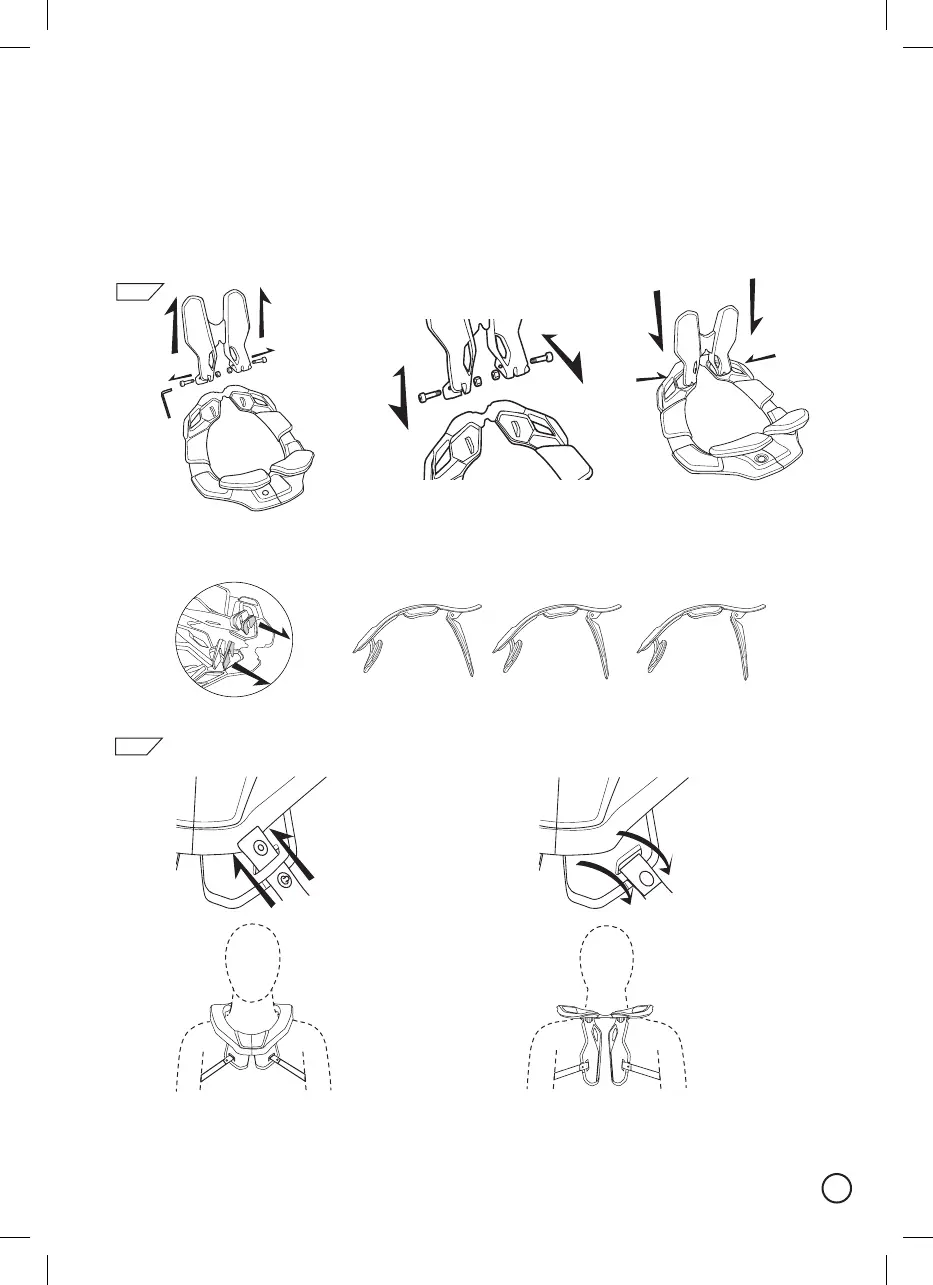
Thethoracichas2positions.Thiswillallowfortwodierentsizeadjustments.Iftheneckbracefeelstoo
loose,removethethoracicboltswiththeallenkeysupplied(6a).Oncetheboltsareremoved,pullthe
thoracicothebraceandre-attachitinthesmallersetting(6b).
6
If you feel the brace “climbing” your back, adjust the rear thoracic by swopping out the rear thoracic angle
wedges.Thereare2wedgesthatareeasilyinterchangeabletoallowangleadjustmentfordierentbody
types(6c).
a.
Optional Brace Strap
Back
Front
The brace strap is easily attached through opening the ends of the straps, looping them through the strap
openingsandthenclosingthemagain(7a&b).Pleasemakesureyouhavethestrapssecureonthefront
andbackofthebrace(7c).
7
a.
c.
b.
0
5
10
c.



 To Next Page