- 14 -
• shielded, better if also stranded
• With a section of not less than 0.5 mm
2
PROGRAMMING
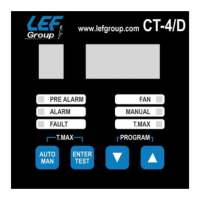
Push and hold the buttons UP/DOWN for programming menù.
On the display appears finally the letter F which allows to fasten the state of the
monitor system:
• 0: three probes without control of the cooling fans.
• 1: four probes with control of the cooling fans.
• 2: four probes without control of the cooling fans.
• 3: three probes with control of the cooling fans.
• 4: ADVANCED PROGRAMMING MENU.
Default configurations: P=140, A=160, L=90, H=100, F=0.
Modify it pressing buttons UP/DOWN and confirm by ENTER.
In case of choice F=4 jump to menu: ADVANCED PROGRAMMING MENU, in
other case continue here.
On the display appears the letter P (Pre-alarm) and the set temperature from the
last programming.
The pre-alarm temperature is set through UP/DOWN buttons.
After setting the pre-alarm temperature push ENTER.
The letter A (Alarm) appears together with the set temperature of the last
programming. If the new pre-alarm temperature is higher than old alarm, the device
proposes a new pre-alarm temperature more 1 degree.
Modify it pressing buttons UP/DOWN and confirm by ENTER.
In case of choice F=0 or F=2 the programming procedure is finished, in other case
continue here.
Now on the display appears the letter L for the choice of the lowest temperature
under which the fan switches off.
Modify it pressing buttons UP/DOWN and confirm by ENTER.
The letter H appears to choose the maximum temperature over which the fan
switches on.
Modify it pressing buttons UP/DOWN and confirm by ENTER.
Soon out of programming procedure the device executes a LAMP TEST.
System is prearranged in automatic way and visualises so the maximum measured


 To Next Page
 Loading...