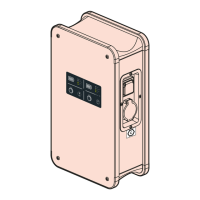
The Legrand Green'Up charging station is an Electric Vehicle Supply Equipment (ESVE) designed for charging electric vehicles using the OCPP 1.6J protocol. This user guide provides instructions for configuring and using the charging station in OCPP mode.
Function Description:
The Green'Up charging station facilitates the charging of electric vehicles. When configured in OCPP mode, it communicates with an OCPP 1.6J server via a web socket connection, allowing for remote management and control of charging sessions. The station can operate as a single or double charging point, with OCPP mode being applied to both sides in a double station setup. The communication kit (cat.no 0 590 56) is essential for establishing the connection and configuration. An optional RFID kit (cat.no 0 590 59) can be integrated for user authentication via RFID tags.
Important Technical Specifications:
The charging station supports OCPP 1.6J protocol. Key configurable parameters include:
- OCPP Data:
- URL: The login address for the OCPP server.
- UID: The identifier used by the terminal when connecting to the OCPP server.
- OfflineBehavior: Defines the station's behavior when offline (e.g., NoControl).
- MeterValueSampleInterval: Interval (in seconds) at which meter values are sampled and sent to the server (default 10000 seconds).
- ConnectionTimeOut: Timeout for connection attempts (default 60 seconds).
- HeartBeatInterval: Interval (in seconds) for sending heartbeat messages to the server (default 10000 seconds).
- Network Configuration (RJ45 and WiFi):
- IP address, Subnet mask, Gateway IP address.
- DHCP enable/disable.
- DNS1 and DNS2 addresses.
- For WiFi: Network's SSID and WEP key.
- Badge Reader Settings: Allows configuration for offline operation (all IDs, only locally stored IDs, or no IDs).
- Access to Web Pages: Enables changing access ID and password for security.
- Charging Point Configuration (Individual Parameters):
- Maximum current at the charging point.
- Cable usage management (detachable or attached cable simulation).
- OCPP Action.
- Core Profile Parameters (OCPP 1.6):
- AllowOfflineTxForUnknownId: Optional, default False.
- AuthorizationCacheEnabled: Optional, default False.
- AuthorizeRemoteTxRequests: Required, default True.
- BlinkRepeat: Optional, default 60 (no action on Legrand station).
- ClockAlignedDataInterval: Required, default 0 (no action on Legrand station).
- ConnectionTimeOut: Required, default 60 (60 seconds by default).
- GetConfigurationMaxKeys: Required, N.A., default 255.
- HeartbeatInterval: Required, default 60 (between 10 and 86400 seconds).
- LightIntensity: Optional, Rejected, default 100 (no action on Legrand station).
- LocalAuthorizeOffline: Required, default False.
- LocalPreAuthorize: Required, default False.
- MaxEnergyOnInvalidId: Optional, Rejected, default 0.
- MeterValuesAlignedData: Required, check "supportedMeterValuesAlignedData".
- MeterValuesAlignedDataMaxLength: Required, Rejected, default 50.
- MeterValuesSampledData: Required, check "supportedMeterValuesSampledData".
- MeterValuesSampledDataMaxLength: Optional, Rejected, default 50.
- MeterValueSampleInterval: Required, default 30 (10 seconds).
- MinimumStatusDuration: Optional, default 0.
- NumberOfConnectors: Required, N.A., default 0 (depends on product reference).
- ResetRetries: Required, default 1.
- ConnectorPhaseRotation: Required, Not supported, Unknown (no action on Legrand station).
- ConnectorPhaseRotationMaxLength: Optional, N.A., default 1 (no action on Legrand station).
- StopTransactionOnEVSideDisconnect: Required, default True (no action on Legrand station).
- StopTransactionOnInvalidId: Required, default False.
- StopTxnAlignedData: Required, check "supportedStopTxnAlignedData".
- StopTxnAlignedDataMaxLength: Optional, N.A., default 10.
- StopTxnSampledData: Required, check "supportedStopTxnSampledData".
- StopTxnSampledDataMaxLength: Optional, N.A., default 10.
- SupportedFeatureProfiles: Required, N.A., includes Core, FirmwareManagement, LocalAuthListManagement, RemoteTrigger, Reservation, SmartCharging.
- SupportedFeatureProfilesMaxLength: Optional, N.A., default 6.
- TransactionMessageAttempts: Required, default 3.
- TransactionMessageRetryInterval: Required, default 10.
- UnlockConnectorOnEVSideDisconnect: Required, default True (no action on Legrand station, always true).
- WebSocketPingInterval: Required, default 300 (no action on Legrand station).
- SupportedFileTransferProtocols: Required, includes FTP, SFTP, FTPS, HTTP, HTTPS.
- Local Auth List Management Profile:
- LocalAuthListEnabled: Required, default False.
- LocalAuthListMaxLength: Required, N.A., default 500.
- SendLocalListMaxLength: Required, N.A., default 500.
- Reservation Profile:
- ReserveConnectorZeroSupported: Optional, N.A., default True.
- Smart Charging Profile:
- ChargeProfileMaxStackLevel: Required, N.A., default 100.
- ChargingScheduleAllowedChargingRateUnit: Required, N.A., default Current, Power.
- ChargingScheduleMaxPeriods: Required, N.A., default 100.
- ConnectorSwitch3to1PhaseSupported: Optional, N.A., default False.
- MaxChargingProfilesInstalled: Required, N.A., default 100.
- Legrand Profile:
- chargingStationMaxLimit: N.A., default 64.
- confBasicTime: N.A., default 10.
- confAuthorizeTime: N.A., default 20.
- confBottNotificationTime: N.A., default 30.
- defaultIdTag1: N.A., default LEGRAND001.
- defaultIdTag2: N.A., default LEGRAND002.
- MaxCurrentInstallationRight/Left: N.A. (maximum limit of the installation).
- MaxCurrentCableRight/Left: N.A. (maximum limit of the charging cable used).
- MeterType: N.A., default Internal ("Internal" or "external").
- networkEthernetAddress/Netmask/Gateway: N.A.
- networkWiFiAddress/Netmask/Gateway: N.A.
- OCPPPlugAndCharge: N.A., default False.
- serverReconnectionTime: N.A., default 30.
- UID: N.A., default Null.
- URL: N.A., default Null.
Usage Features:
- Installation: Install the communication and optional RFID kits according to the provided instructions (LE09802AA\XX).
- Initial Connection: Connect a laptop to the communication kit. Access the charging station's web pages by logging into the Communication Kit (default IP: 192.168.1.200) using the default ID and password (admin/admin).
- Charging Mode Selection: Navigate to the "Charging Mode" page and select "OCPP" mode. This automatically applies OCPP mode to all charging points of the station.
- Configuration File Management:
- Download: Download the current OCPP configuration file (
OCPPConf.xml) from the charging station.
- Modification: Edit the downloaded XML file to adjust parameters such as server URI, station UID, network settings (RJ45 and WiFi), badge reader behavior, and web page access credentials. Ensure strict adherence to XML formatting rules.
- Upload: Upload the modified
OCPPConf.xml file back to the communication kit.
- Verification: Review the "OCPP data" section on the web page to confirm that the new configuration data has been correctly applied.
- OCPP Service Activation: Once the configuration is verified, click "Connect to the OCPP server" to initiate the OCPP service on the charging station.
- Status Monitoring: Monitor the activation and connection status to the OCPP server in the "OCPP Status" section.
Maintenance Features:
- Firmware Updates: The latest update package, including OCPP functionalities, is available on the Legrand e-catalogue (www.legrand.fr). Regular updates ensure optimal performance and security.
- Network Settings: The charging station's network settings can be directly modified via the OCPP configuration file or through the "Networks" page on the communication kit's web interface. Exercise caution when changing network settings as they take effect immediately.
- Troubleshooting: The "OCPP status" section provides information on the connection situation with the OCPP server, aiding in troubleshooting connectivity issues.
- Security: It is strongly recommended to change the default access ID and password for the web pages to enhance security.
- Logging: The system provides various notifications and status updates, such as "BootNotification", "StatusNotification", "StopTransaction", and "MeterValues", which can be used for monitoring and diagnostics.

 Need help?
 General

 To Next Page