76
Thermostat with display
Installer manual
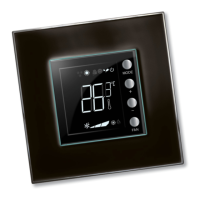
2.2 Front view
1 - Heating function.
2 - Cooling function.
3 - Manual mode icon.
4 - Comfort mode icon.
5 - Eco mode Icon.
6 - Antifreeze / Thermal protection / OFF mode.
7 - MODE key: a short pressure changes the mode of operation of the device; an extended
pressure (unless used as MyHOME probe) changes the function. For the Hotel mode of
operation only it is possible to change the function using the Mode key (performing the
configuration using the MyHOME_Suite software).
8 -
+ key: increase the set value.
9 -
– key: decrease the set value.
10 - FAN key: set the fan-coil speed on 3 levels + automatic.
11 - Heating On indicator.
12 - Cooling On indicator.
13 - Fan-coil speed indicator, 3 levels.
14 - Fan-coil in automatic mode indicator.
15 - Measured (thermometer symbol On) / set (thermometer symbol Off) temperature indicator.
16 - Unit of measure: °C or °F.
MODE
+
–
FAN
10
7
8
9
1 2 3 4 5 6
11121314
15
16
2 Description


 To Next Page
 Loading...