EasyManua.ls Logo

LEGRAND radiant WWP20CCV2 - User Manual

LEGRAND radiant WWP20CCV2
12 pages
Print Icon
To Next Page IconTo Next Page
Loading...
Smart Plug-In Dimmer, Wi-Fi
before you start
Review this guide in its entirety. Consult an electrician with any questions or if
you are unsure of your abilities.
Caution: To reduce the risk of injury and/or overheating and damage to
other equipment:
For dry, indoor use only.
Connect the Smart Plug-In Dimmer to a 120 VAC, 60 Hz power
source ONLY.
This Smart Plug-In Dimmer is intended for lamps with dimmable
bulbs ONLY.
To reduce the risk of electrical shock, this equipment has a grounding
type plug that has a third (grounding) pin. If the plug does not fi t in
outlet, contact a qualifi ed electrician to install the proper outlet.
Visit www.legrand.us/radiant/smart-lighting/support for support.
installation & setup
1 | plug in the smart plug-in dimmer
Insert the lamp or device to be controlled into the outlet on the Smart
Plug-In Dimmer.
The Smart Dimmer up/down buttons can be reversed for use in outlets with the
ground plug up:
Hold the bottom button while plugging in your dimmer. The dimmer
automatically adjusts the orientation.
2 | test the smart plug-in dimmer
a
With the lamp or device on, press the top button on the Smart Plug-In
Dimmer to turn your device on.
b
Hold the bottom button to decrease the light level.
c
Hold the top button to increase the light level.
d
Press the bottom button to turn your device off.
TROUBLESHOOTING TIP:
If the device is not responding to the dimmer, confi rm that the outlet is
powered and that the device is functional.
getting to know your plug-in
Item Name Description
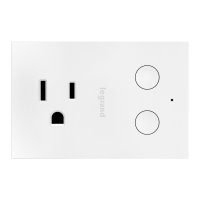
1 Top Button
Press to turn the light on or double-tap to
raise the dimming percentage to 100%.
Press and hold any button to quickly change
the dimming percentage by 20% per second.
2 Bottom Button
Press to turn the device off.
3 LED Locator Light
Indicates the current state of the device. Refer
to “LED Locator Light Explanations” for detail.
4 Outlet
Plug your dimmable device into the socket.
specifi cations
Load Rating
Incandescent/halogen 300 W
CFL/LED 100 W
Legrand reserves the right to change specifi cations without notice.
NOTE: The dimmer ships in forward phase mode to accommodate most load
types. For loads that require reverse phase dimming, such as ELV loads, adjust
the phase using the app.
SCAN TO WATCH THE
INSTALLATION VIDEO
3 | set up your system
a
Download and launch the Smart Lights, Wi-Fi app by Legrand. The app is
available on the App Store or on Google Play.
b
Connect your Smart Plug-In Dimmer to your home network by following the
step by step instructions in the app.
c
Use the app to control your Smart Plug-In Dimmer.
Google Play and the Google Play logo are trademarks of Google LLC.
App Store is a service mark of Apple Inc., registered in the U.S. and other countries.
SCAN TO WATCH HOW
TO SET UP THE APP
SCAN TO DOWNLOAD
RESET TO FACTORY DEFAULT
You can delete the device from the
app to reset or while device is off
press and hold dim button for 10
seconds then release.
NOTE: When it is turned on, the Smart
Dimmer recalls the most recent
dimming level.
1
2
3
4
LED LOCATOR LIGHT EXPLANATIONS
LED
Color
State of Light Explanation
Blinking
Amber
Factory default; ready to connect to your network.
Solid White Device is connected to your network.
Question and Answer IconNeed help?

Do you have a question about the LEGRAND radiant WWP20CCV2 and is the answer not in the manual?

Summary

Before You Start

Safety Precautions and Usage Guidelines

Essential safety information for indoor use, power source, and bulb compatibility to prevent injury or damage.

Installation and Setup Guide

Plugging In and Orientation

Instructions on how to connect the dimmer and adjust its orientation for different outlet types.

Testing Dimmer Functions

Steps to verify the dimmer's on/off and dimming functionality using the device buttons.

App Setup and Network Connection

Guide to download the Legrand app and connect the Smart Plug-In Dimmer to your home Wi-Fi network.

Device Overview and Operation

Component Identification

Details on the top button, bottom button, LED locator light, and outlet functions of the dimmer.

LED Status and Reset Procedure

Explanation of LED indicator states and the method to reset the device to factory defaults.

Technical Specifications and Compliance

Load Ratings and Phase Mode

Specifies compatible load types (Incandescent/halogen, CFL/LED) and dimming phase mode settings.

Regulatory Information

Details on FCC, IC compliance, RF exposure limits, and operational conditions for safe use.

Support and Warranty

Product Warranty Details

Information on product warranty coverage, claim procedures, and access to additional details.

Customer Support Contact

Provides phone, email, and online chat options for customer assistance and inquiries.

Overview

This document describes the Legrand Radiant Smart Plug-In Dimmer, Wi-Fi, a device designed to control dimmable lamps and devices.

Function Description:

The Smart Plug-In Dimmer allows users to control the on/off state and dimming level of connected lamps with dimmable bulbs. It operates on a 120 VAC, 60 Hz power source and is intended for dry, indoor use only. The device features Wi-Fi connectivity, enabling control through the Legrand Smart Lights, Wi-Fi app, available on both the App Store and Google Play. The app facilitates connecting the dimmer to a home network and provides comprehensive control over the device.

Important Technical Specifications:

  • Power Source: 120 VAC, 60 Hz
  • Load Type Compatibility:
    • Incandescent/Halogen: 300 W
    • CFL/LED: 100 W
  • Dimming Mode: Ships in forward phase mode; reverse phase dimming (for ELV loads) can be adjusted via the app.
  • Connectivity: Wi-Fi
  • Regulatory Compliance:
    • FCC ID: A3LCWAM210S (Complies with Part 15 of FCC rules for Class B digital devices, ensuring reasonable protection against harmful interference in residential installations. Operation is subject to two conditions: no harmful interference caused, and acceptance of any interference received.)
    • IC ID: 649E-CWAM210S (Complies with Industry Canada license-exempt RSS standards. Operation is subject to two conditions: no interference caused, and acceptance of any interference.)
    • RF Exposure Statement: Meets SAR evaluation limits given in RSS-102 Issue 5 requirements at a minimum separation distance of 15 mm to the human body.
  • Certifications: Wi-Fi CERTIFIED, cULus LISTED, RoHS, OCF.

Usage Features:

The Smart Plug-In Dimmer offers both physical and app-based control.
Physical Controls:

  • Top Button:
    • Press: Turns the light on.
    • Double-tap: Raises the dimming percentage to 100%.
    • Press and hold (any button): Quickly changes the dimming percentage by 20% per second.
  • Bottom Button:
    • Hold: Decreases the light level.
    • Press: Turns the device off.
    • Press and hold (any button): Quickly changes the dimming percentage by 20% per second.
  • Orientation Adjustment: The up/down buttons can be reversed for use in outlets with the ground plug up. To adjust, hold the bottom button while plugging in the dimmer, and it will automatically adjust its orientation.
  • LED Locator Light: Indicates the current state of the device:
    • Blinking Amber: Factory default; ready to connect to your network.
    • Solid White: Device is connected to your network.

App-Based Controls (Legrand Smart Lights, Wi-Fi app):

  • Download and Launch: Available on the App Store and Google Play.
  • Network Connection: Connect the Smart Plug-In Dimmer to your home network by following the step-by-step instructions in the app.
  • Remote Control: Use the app to control the Smart Plug-In Dimmer from anywhere.
  • Phase Adjustment: For loads requiring reverse phase dimming (e.g., ELV loads), the dimming phase can be adjusted using the app.

Installation and Setup:

  1. Plug in the Smart Plug-In Dimmer: Insert the lamp or device to be controlled into the outlet on the Smart Plug-In Dimmer.
  2. Test the Smart Plug-In Dimmer:
    • With the lamp or device on, press the top button to turn it on.
    • Hold the bottom button to decrease the light level.
    • Hold the top button to increase the light level.
    • Press the bottom button to turn the device off.
  3. Set Up Your System:
    • Download and launch the Legrand Smart Lights, Wi-Fi app.
    • Connect the dimmer to your home network via the app.
    • Use the app to control the dimmer.

Maintenance Features:

  • Reset to Factory Default:
    • Delete the device from the app.
    • Alternatively, while the device is off, press and hold the dim button for 10 seconds, then release.
  • Memory Function: When turned on, the Smart Dimmer recalls the most recent dimming level.

Safety Precautions:

  • For dry, indoor use only.
  • Connect to a 120 VAC, 60 Hz power source ONLY.
  • Intended for lamps with dimmable bulbs ONLY.
  • Equipped with a grounding-type plug (third grounding pin) to reduce the risk of electrical shock. If the plug does not fit, contact a qualified electrician to install the proper outlet.
  • Any changes or modifications to the device not expressly approved by the manufacturer will void the warranty and the user's authority to operate the equipment.

Warranty and Support:

  • Warranty: Warranted under normal use against defects in workmanship and materials for as long as you own it. For manufacturing defects during normal use, return for replacement at the store of purchase or contact technical support at 1-877-833-3303. A dated sales receipt is required for all replacement requests. Additional warranty details are available on the device's product page at http://www.legrand.us.
  • Technical Support:
    • Phone: 1-877-833-3303 (8:00 a.m. to 8:00 p.m. EST, Monday-Friday)
    • Email: smartlighting@legrand.us
    • Chat: https://www.legrand.us/radiant/smart-lighting.aspx (Click on the chat icon)
    • Online Support: www.legrand.us/radiant/smart-lighting/support

LEGRAND radiant WWP20CCV2 Specifications

General IconGeneral
BrandLEGRAND
Modelradiant WWP20CCV2
CategoryDimmer
LanguageEnglish

Related product manuals