84
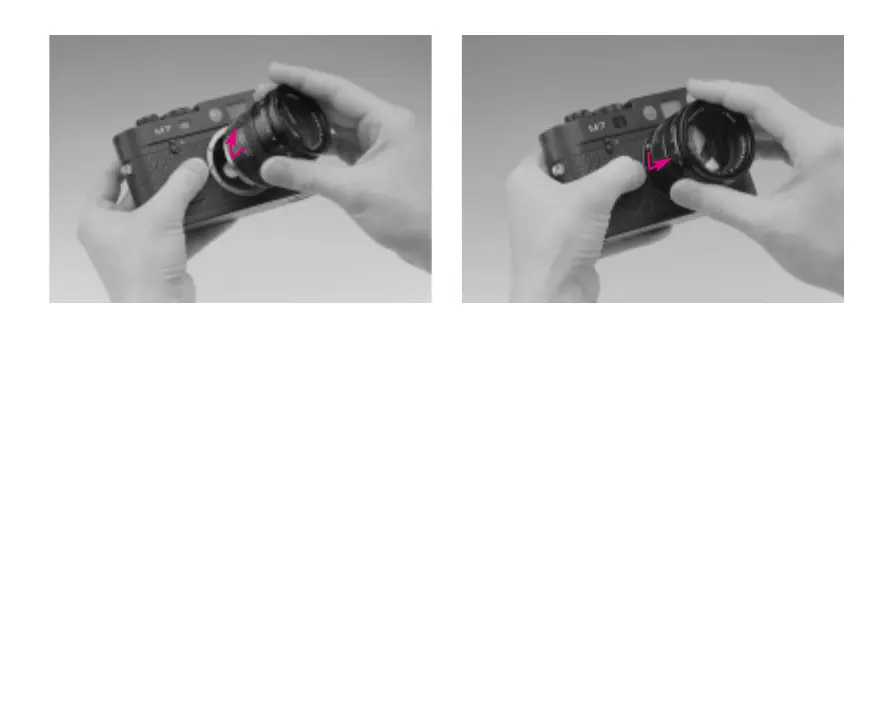
Attaching a lens
01. Hold the lens by the fixed ring (17),
02. align the red lens alignment button (5) with
the lens release button (3) on the camera
body,
03. attach the lens in this position, ensuring that
it is perpendicular to the front of the camera,
and
04. turn the lens slightly to the right to lock it
audibly and perceptibly into place.
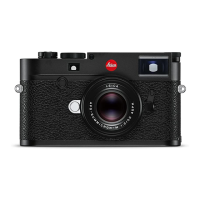
Removing a lens
01. Hold the lens by the fixed ring (17),
02. depress the lens release button (3) on the
camera,
03. turn the lens to the left until the lens align-
ment button (5) lines up with the lens release
button, and
04. remove the lens, keeping it perpendicular to
the camera body.
Note: When the camera is loaded with film,
change the lens in the shade of your body, as
direct sunlight may otherwise penetrate the
shutter.


 To Next Page