49
Touche de fonction (2)
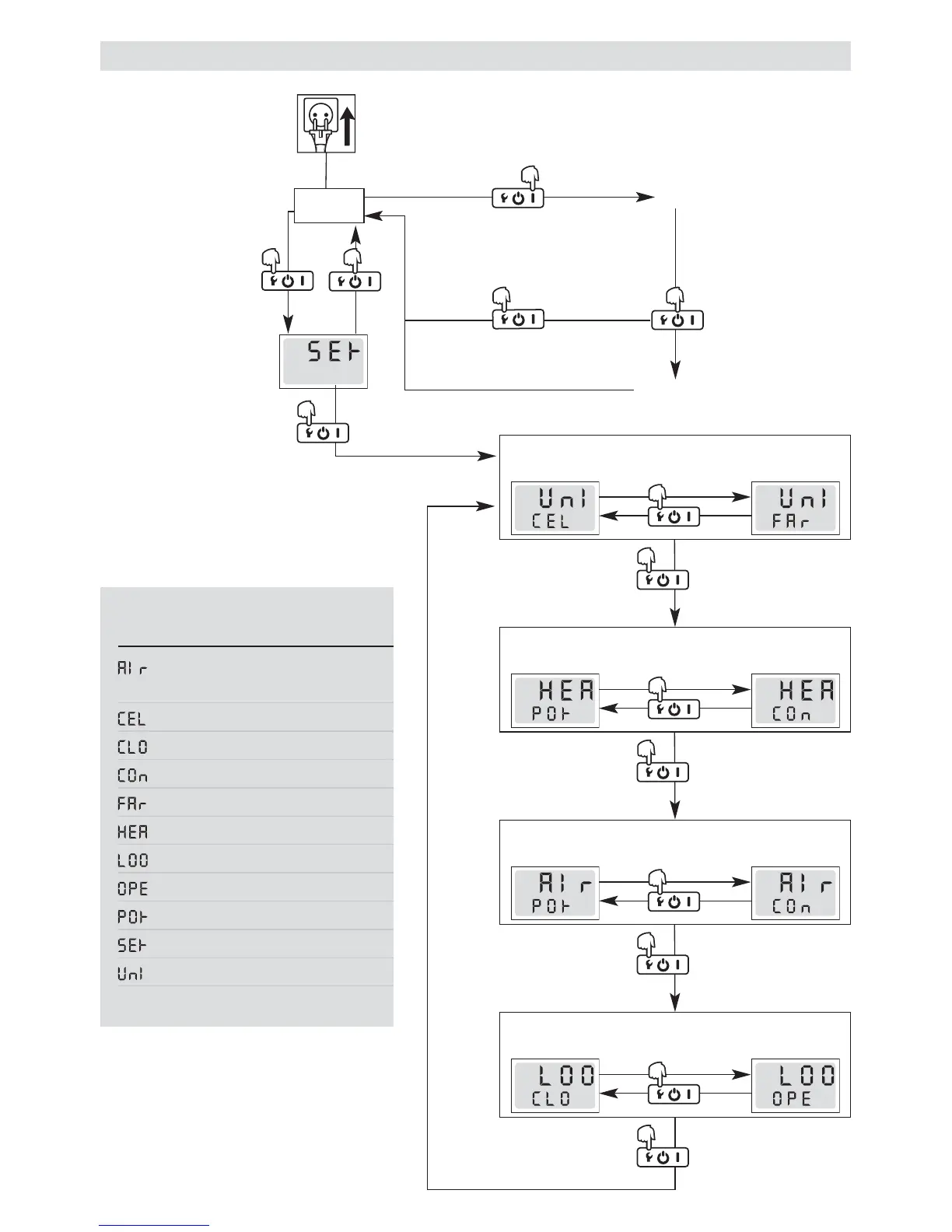
Appuyez pendant
3 secondes
Menu Setup
Raccordez le câble d’ali-
mentation secteur (1) au
secteur électrique
Stand by
Commutateur principal (2)
MARCHE
Chauffage
Cool Down
3 minutes
Touche de fonction (2)
Appuyez pendant 3 secondes
Configuration et utilisation de HOTWIND SYSTEM
Touche de fonction (2)
1 appui court sur la touche
Touche de fonction (2)
Appuyez pendant 3 secondes
Touche de fonction (2)
1 appui court sur la touche
°C
°F
Touche de fonction (2)
Appuyez pendant 3 secondes
Touche de fonction (2)
1 appui court sur la touche
Touche de fonction (2)
Appuyez pendant 3 secondes
Touche de fonction (2)
1 appui court sur la touche
Touche de fonction (2)
Appuyez pendant 3 secondes
Touche de fonction (2)
1 appui court sur la touche
°C
L é g e n d e
Affichage Description
(Air) Consigne
quantité d’air
(°C) Celsius
(Closed Loop) Régulé
(Connector) Interface
(°F) Fahrenheit
(Heater) Consigne chauffage
(Loop) Régulation
(Open Loop) Piloté
(Pot) Potentiomètre
(Setup) Configuration
(Unit) Unité
Si dans la touche de fonction (2) n’est pas
maintenue enfoncée pendant 10secondes
dans le menu Setup, l’appareil passe
automatiquement en mode Stand by.



 To Next Page