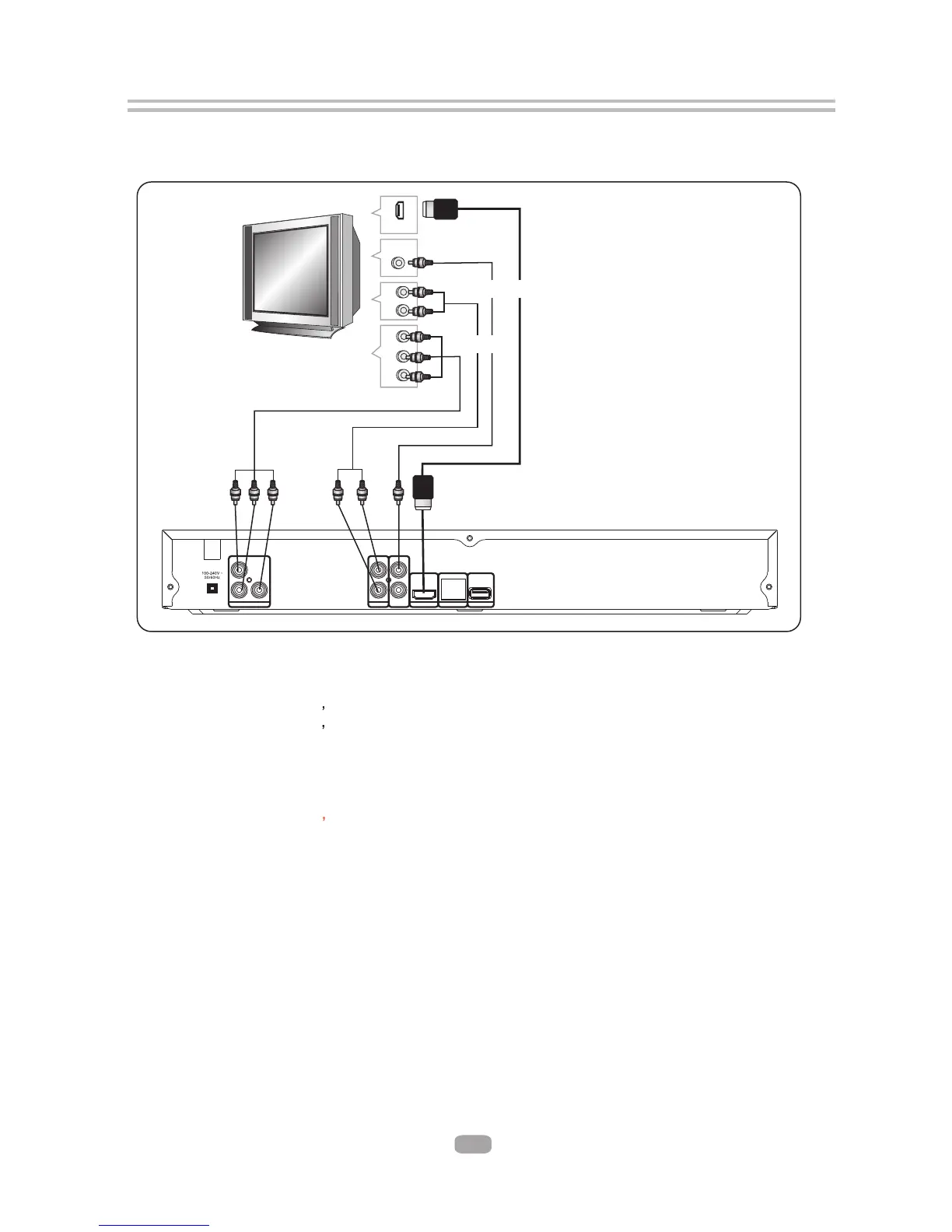
2.3 TV Set Connections
5
AUDIO IN
HDMI IN
VIDEO IN
VIDEO
R
L
Y
U
V
HDMI
YPbPr IN
COMPONENT IN
AUDIO IN
2.3.1 CONNECT BD PLAYER TO TV SET BY AV CABLE
Connect the BD player s FL and FR jack to the audio input jack on the TV.
Connect the BD player s video out jack to the video input jack of TV.
2.3.2 CONNECT THE BD PLAYER TO TV SET USING THE Y/Pb/Pr JACKS
Use the COMPONENT Cable(not supplied) to connect BD player to your TV.
Connect the BD player s Audio output L and R jack to the audio input jack on the TV.
2.3.3CONNECT THE BD PLAYER TO TV SET USING THE HDMI OUTPUT
Use the HDMI cable (not supplied) to connect BD player to your TV.
Notes: The player supports video resolution up to 1080p 60Hz on HDMI output.
AUDIO OUT
L
R
COAXIAL
VIDEO OUT
HDMI OUT(1080P)
LAN USB
Y
Pr
Pb
COMPONENT



 To Next Page