4.4. Text Entry
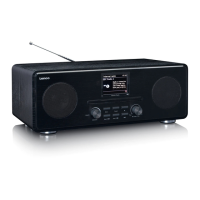
To enter search requests or passwords, etc. The data entry screen presents all available characters
and command functions in a continuous loop. Rotate the knob control to scroll back and forth
through the loop as required. Press OK to select the currently highlighted character. If you make a
mistake select the BKSP (backspace) option to remove the last character. When you have finished
the words, select OK to enter the search words or password. Select CANCEL to quit the entry screen.
Note: A short cut is available to reduce the amount of scrolling when selecting commands and
characters. Press the Info key to jump to the BKSP (Backspace) command option, from anywhere in
the character loop. To enter a string of characters, select each character in turn. As each character is
selected, the key is built up and displayed in the field at the top of the display. The three options –
Backspace, OK and Cancel are included in the selection loop. These can be accessed just using the
knob control, press the Info key, to jump to the BKSP (backspace) option.


 To Next Page