EasyManua.ls Logo

LENCO DIR-261 - Page 7

LENCO DIR-261
261 pages
Print Icon
To Next Page IconTo Next Page
To Previous Page IconTo Previous Page
Loading...
7
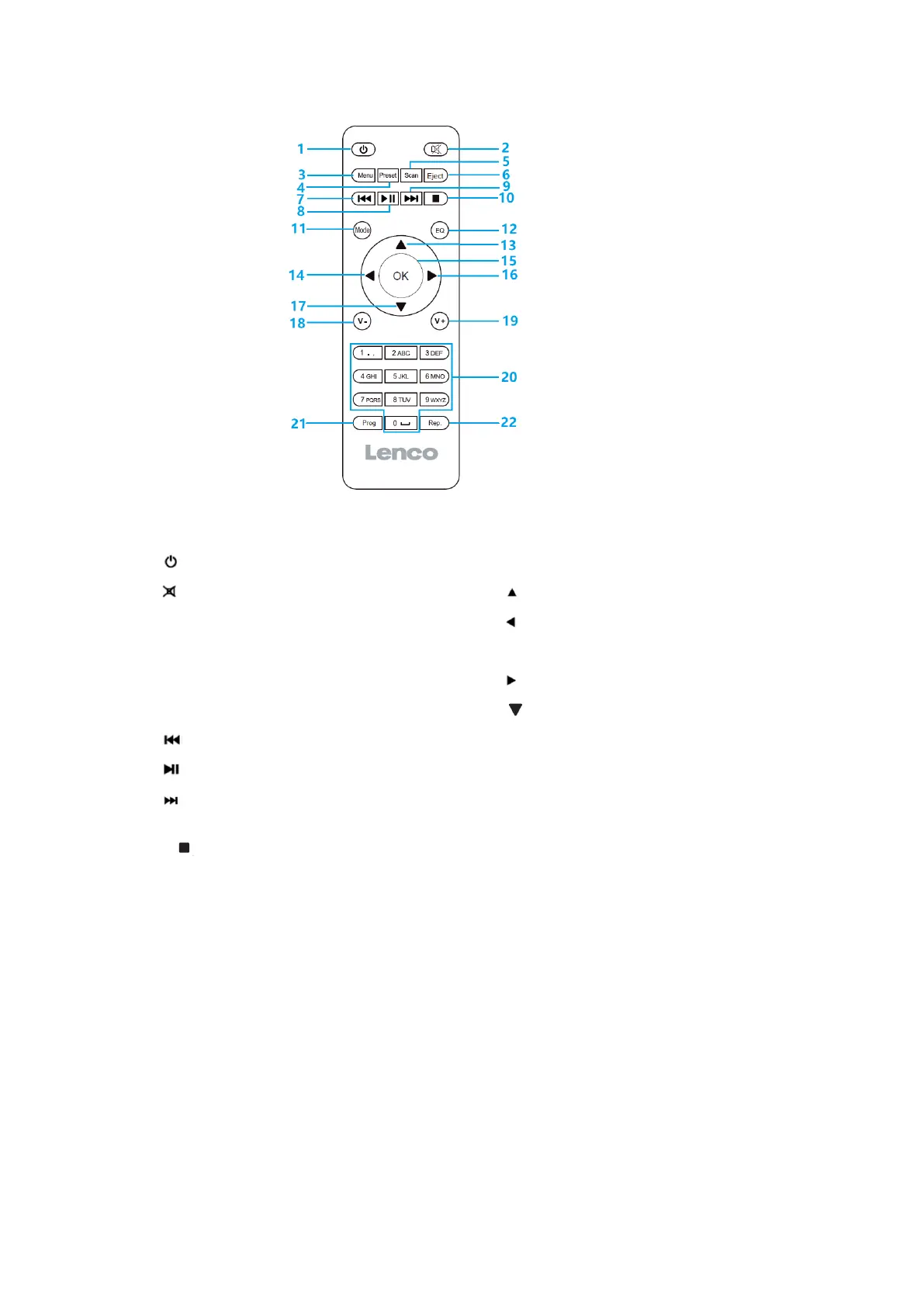
1. Standby button
12. Equalizer settings
2. Switch speaker ON/OFF
13. Up cursor button
3. Menu-Main menu and Info
14. Left cursor button
4. Preset-saved stations, Favorites, etc
15. OK Confirm selection
5. Scan-DAB/FM scan
16. Right Cursor button
6. Eject button
17. Down cursor button
7. Go back one track
18. V- Decrease volume
8. Play/Pause
19. V+ Increase volume
9. Go forward one track
20. 0.....9 Call up favorites/Memory; input
letters and numbers
10. Stop play button
21. Prog for CD
11. Mode button
22. Rep. for CD
Battery installation for remote control:
1. Push on the ‘open’ marking of the battery cover and slide it downwards
2. Install two (2) x AAA size batteries into the battery compartment (check the correct
polarity)
3. slide the battery cover back

Related product manuals