6
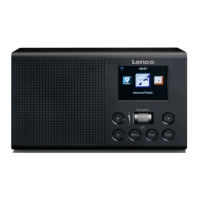
1. Rotary Navigate/Select control
•
Rotate to scroll and highlight options on screen
•
Press to Select an option
•
When the alarm sounds, press to Snooze for 5 minutes
•
In Bluetooth mode: Press to disconnect the current device and search for new
devices.
2. Power
•
Short press to Power on/off (Standby)
3. Mode
•
Short press to change the mode (Internet radio/Bluetooth/UPnP)
4. Menu
•
Short press to display the Menu options (Local radio/Internet radio/Media
Centre/Information Centre/Bluetooth/Configuration)
•
Long press to connect to your router using WPS.
5. Skip back/Scroll left on screen
6. Skip forward/Scroll right on screen
7. Preset (Internet radio)
•
Short press: Radio preset recall
•
Long press: Radio preset store
8. Radio preset 1 (Favourite)
•
In Internet radio mode: Long press to store a preset (favourite)
•
In Internet radio mode: Short press to recall a preset (favourite)
9. Radio preset 2 (Favourite)
•
In Internet radio mode: Long press to store a preset (favourite)
•
In Internet radio mode: Short press to recall a preset (favourite)
10. Radio preset 3 (Favourite)
•
In Internet radio mode: Long press to store a preset (favourite)
•
In Internet radio mode: Short press to recall a preset (favourite)
•
In Bluetooth mode: Short press to Play/Pause
11. Radio preset 4 (Favourite)
•
In Internet radio mode: Long press to store a preset (favourite)
•
In Internet radio mode: Short press to recall a preset (favourite)
12. Rotary Volume control
•
Clockwise to increase the volume
•
Anti-clockwise to decrease the volume
13. Speaker
14. Colour display
15. Power socket
16. Headphone socket



 To Next Page