2
WARNING
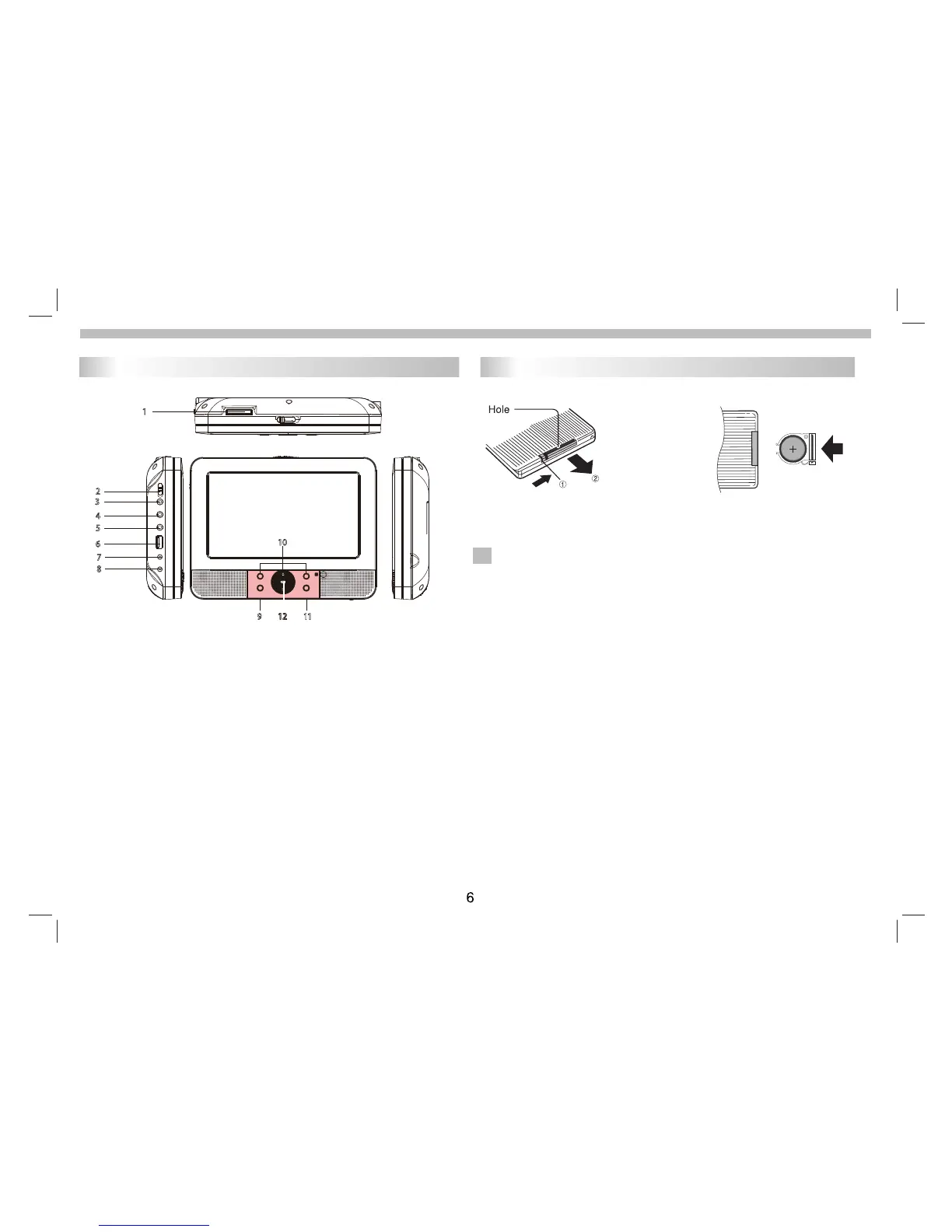
Identification of Controls
Main Unit
Inser
t the battery
Re
move battery during storage or when you are not using the DVD
Do not ingest the battery, Chemical Burn Hazard
(The remote control supplied with) This product contains a
coin/button cell battery. If the coin/button cell battery is swallowed,
it can cause severe internal burns in just 2 hours and can lead to
death.Keep new and used batteries away from children.
If the battery compartment does not close securely, stop using the
product and keep it away from children.
If you think batteries might have been swallowed or placed inside any part
of the body, seek immediate medical attention.
To prevent possible hearing damage, do not listen at high volume levels
for long periods.
player for a long time.
2.Insert battery.
N
NOTES:
1.Open the battery door.
When using the remote control for the first time do not forget to
remove the plastic card.
1.
SD/
MMC
2
. POWER ON/OFF
3. HEADPHONE OUT JACKS
4. VIDEO/AUDIO OUT
5.
6.USB
8. DC IN 9-12V
9. ENTER
10. UP/DOWN/LEFT/RIGHT
11. SOURCE
VIDEO/AUDIO IN
7. DC OUT
1
2
3
4
5
6
7
8
9
10
11
12
1 . Baery Charging Indicator
Illuminate
s green flashing when the baery is charging.
Illuminates green when the baery is fully charged.
Illuminates red when the unit is switched on.



 To Next Page