E5
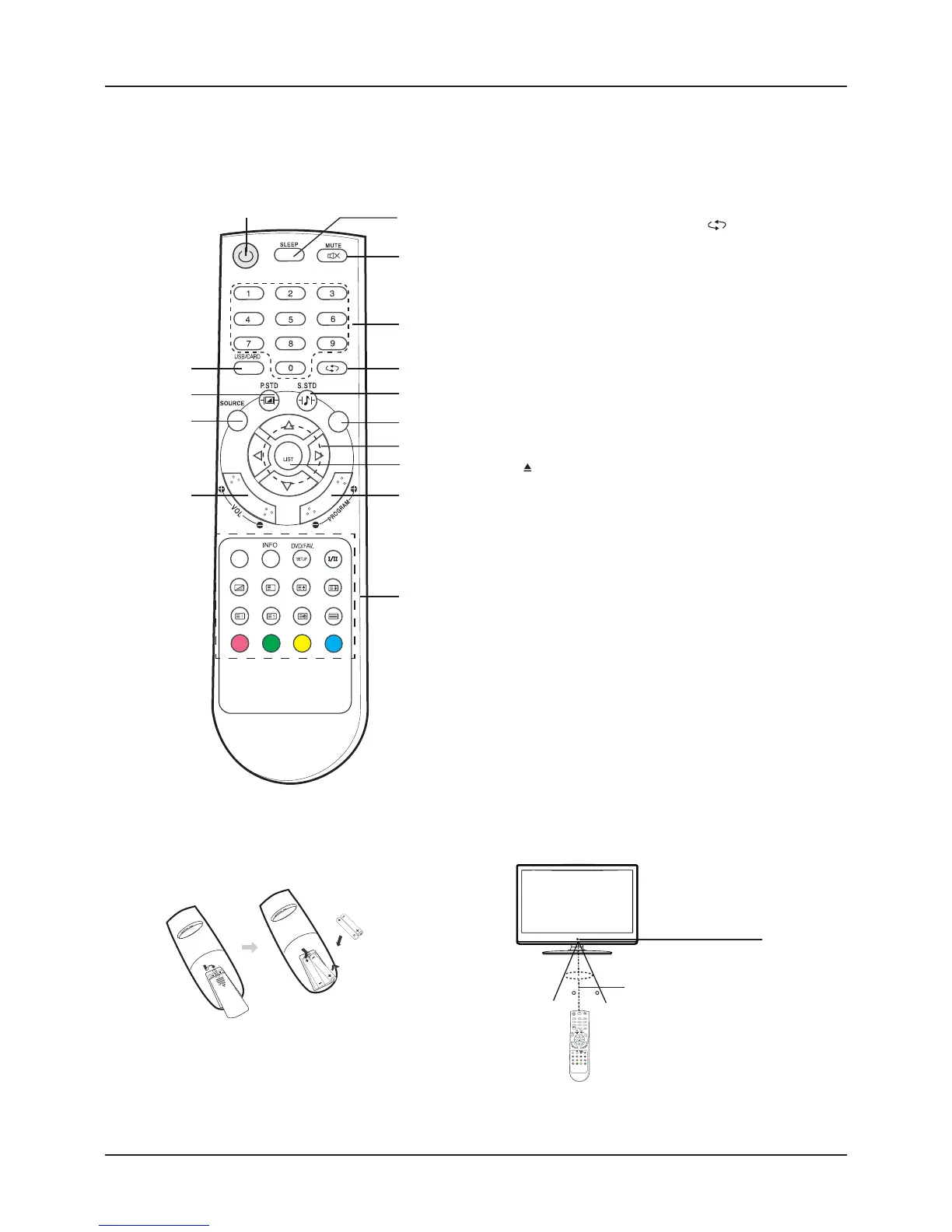
REMOTE CONTROL
Note:
Bright Sunlight or lighting may cause erratic remote operation.
Always remove batteries if the remote control is not to be used for more than a month. Batteries left in it may cause damage.
The buttons on the remote control perform similar function to similarly marked buttons on the main unit.
•
•
•
Two “LR03/AAA” batteries
Inserting Batteries
Control Range
30 30
Within approx. 8 metres
Remote
sensor
Control buttons
1. Power/Standby button (
z
)
2. Sleep function button (SLEEP)
3. Mute button (MUTE)
4. Number buttons (0, 1~9)
5. Title/Previous channel button (TITLE
)
6. Sound mode button (S.STD)
7. Menu button (MENU)
8. Navigation keys (
o
,
a
,
p
,
b
)
9. Confi rm/Channel list button (OK LIST)
10. Channel select buttons (- PROGRAM +)
11. Volume control buttons (- VOLUME +)
12. Source select button (SOURCE)
13. Picture mode buttons (P.STD)
14. USB/CARD / ASPECT:
USB /Card function select button
Display mode selection
*. Special buttons:
EXIT / : DVD Eject / Menu exit button
INFO: Information display button
DVD/FAV SETUP: DVD setup menu / Favourite List button
AUDIO I/II: Audio language / NICAM mode select button
l
: DVD play/pause / Teletext mix button
n
: DVD stop / Teletext cancel button
DISC MENU: Disc menu display/ Teletext size/zoom button
SUBTITLE: DVD subtitle / Teletext hold button
EPG/GOTO: Electronic program guide/ Go to
/ Teletext index display button
ZOOM: DVD zoom in/out / Teletext reveal button
REPEAT: DVD repeat playback button / Teletext subpage button
A-B: DVD A-B repeat button / Teletext On/Off button
f
: Red / Preview button
e
: Cyan / Next button
d
: Yellow / Forward button
c
: Blue / Next button
2
X
AUDIO
l
n
DISC MENU
SUBTITLE
EPG/GOTO ZOOM
REPEAT
A-B
f
e
d
c
OK
EXIT/q
ASPECT
MENU
TITLE
1
3
4
5
6
7
8
9
10
11
12
13
*
14
X
AUDIO
l
n
DISC MENU
SUBTITLE
EPG/GOTO ZOOM
REPEAT
A-B
f
e
d
c
OK
EXIT/q
ASPECT
MENU
TITLE



 To Next Page