14
Exit (Quit) - closes all windows and exits Audacity, prompting you to save any unsaved changes
first.
Edit Menu
Undo - This will undo the last editing operation you performed to your project. Audacity supports
full unlimited undo - meaning you can undo every editing operation back to when you opened the
window.
Redo - This will redo any editing operations that were just undone. After you perform a new
editing operation, you can no longer redo the operations that were undone.
Cut - Removes the selected audio data and places it on the clipboard. Only one "thing" can be on
the clipboard at a time, but it may contain multiple tracks.
Copy - Copies the selected audio data to the clipboard without removing it from the project.
Paste - Inserts whatever is on the clipboard at the position of the selection or cursor in the project,
replacing whatever audio data is currently selected, if any.
Trim - Removes everything to the left and right of the selection.
Delete - Removes the audio data that is currently selected without copying it to the clipboard.
Silence - Erases the audio data currently selected, replacing it with silence instead of removing it.
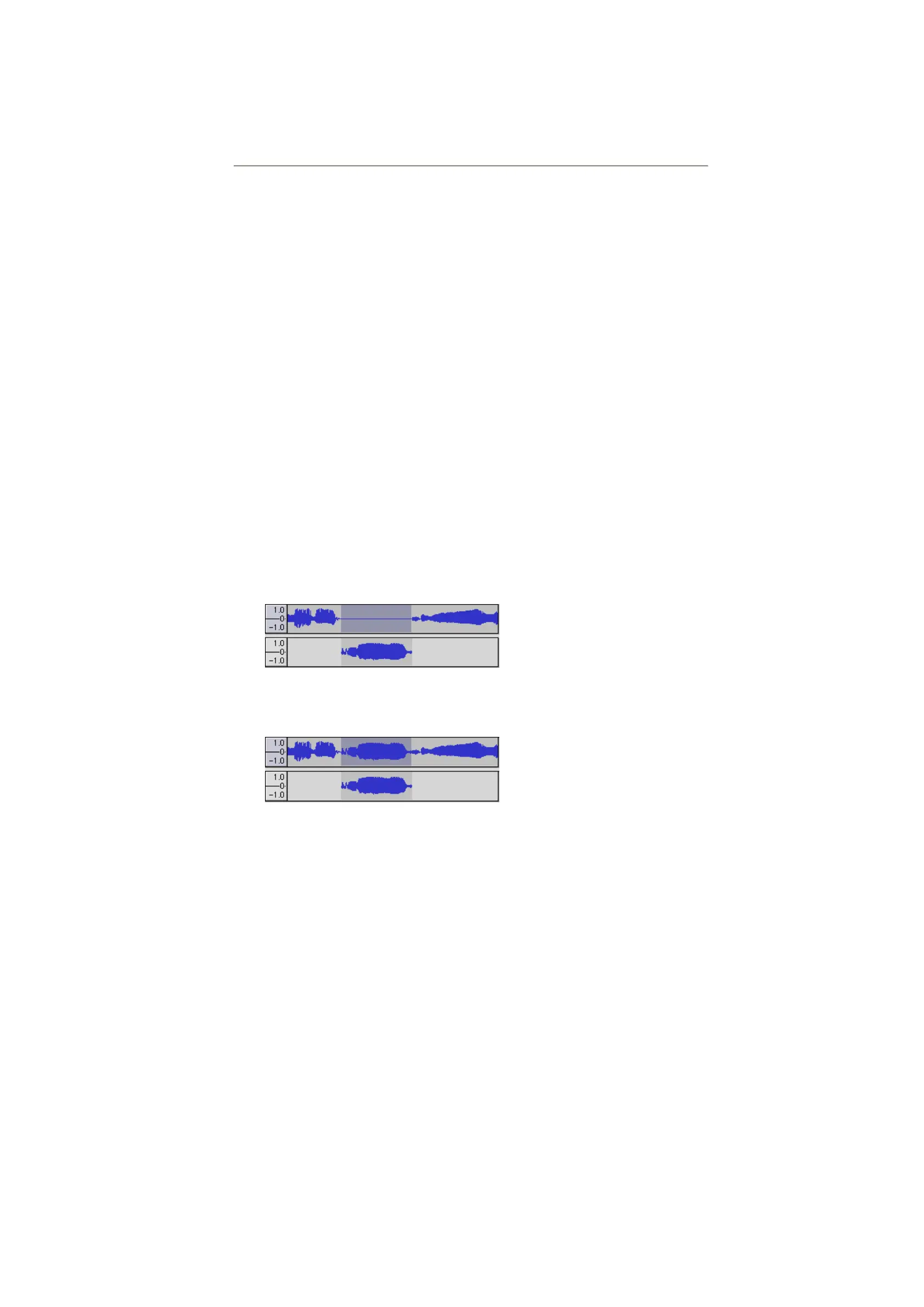
Split - Moves the selected region into its own track or tracks, replacing the affected portion of the
original track with silence. See the figure below:
Duplicate - Makes a copy of all or part of a track or set of tracks into new tracks. See the figure
below:
Select ... > All - Selects all of the audio in all of the tracks in the project.


 To Next Page