FRONT PANEL
6
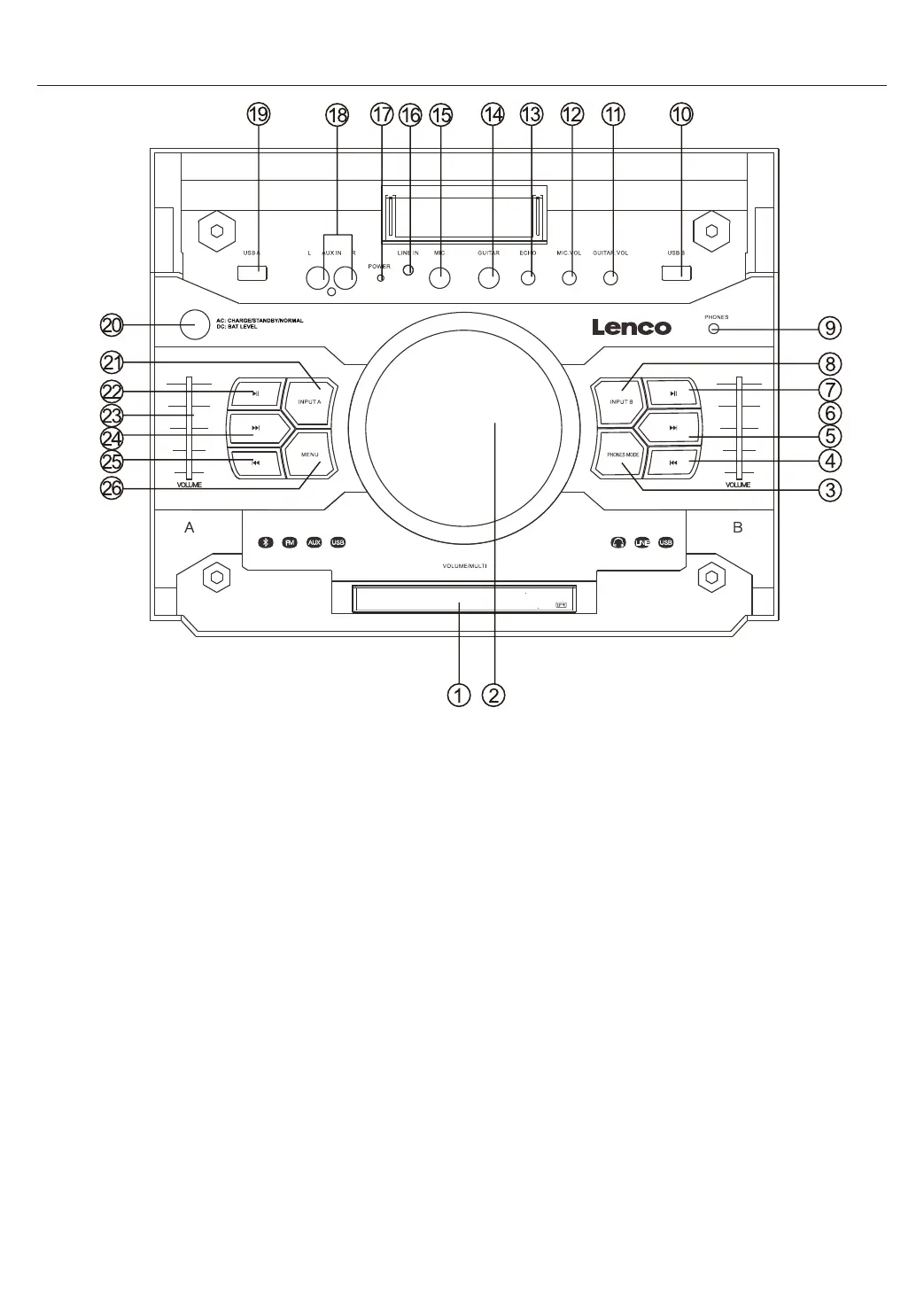
1. LED DISPLAY
Display System parameter informaon, the le side of the display shows the INPUT A status, the right
side of the display shows the INPUT B status
2. VOLUME/MULTI/DJ EFFECT
Rotate the knob to adjust the main volume, phones volume, treble, bass. Short press this key to
choose different music effect SCRATCH, REVERB, BEAT BOX, YEAH, BRING IT, GEYA, COME ON Long
press plays DRUMS effect.
3. PHONES MODE
Press this key to c
hoose different EARPHONES mode, INPUT A, INPUT B, INPUT AB
4. INPUT B PREV
Press this key to choose previous music with USB B
5. INPUT B NEXT
Press this key to choose next music with USB B
6. INPUT B VOLUME
This is used to adjust the volume with INPUT B
7. INPUT B PLAY/PAUSE
Press this key to choose play/pause music with INPUT B
When playing usb, long press this key to change playme count down or count up.
8. INPUT B MODE
Press this key t
o choose different INPUT B mode, LINE, USB B
9. EARPHONES INPUT JACK
10. USB B input jack


 To Next Page
 Loading...