www.lenovo.com
连接多功能一体机的电源。
Connect the power supply.
抬起扫描仪部分。
Lift the scanner unit.
装入纸张并调节进纸导轨到适当的位置。
Load paper and adjust the paper guide.
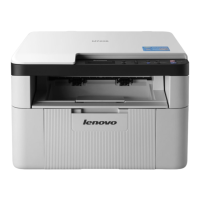
多功能一体机
多功能一体机多功能一体机
多功能一体机 M710 快速安装指南
快速安装指南快速安装指南
快速安装指南
打开纸张支架并拉开出纸托盘。
Lift the paper support, and extend the paper exit tray.
打开您的计算机。
Turn your computer on.
2
3
1
安全信息
安全信息安全信息
安全信息
• 请只使用随同此产品提供的电源,或者使用经过厂家认证的
电源作为替代。
• 电源线要连接在距离此产品尽量近的电源插座上,以便于使
用。
• 如果需要服务或维修,除参考操作说明书以外,也可以向专
业的服务人员请教。
当心
当心当心
当心:
::
:请不要在雷雨天气时使用传真功能。请不要在雷雨天气
时安装此产品,或者进行任何的电线 / 电缆连接 ( 电源线,电
话线等 )。
Safety information
• Use only the power supply provided with this product or the
manufacturer’s authorized replacement power supply.
• Connect the power supply cord to an electrical outlet that is
near the product and easily accessible.
• Refer service or repairs, other than those described in the
user documentation, to a professional service person.
CAUTION: Do not use the fax feature during a lightning storm.
Do not set up this product or make any electrical or cabling
connections, such as the power supply cord or telephone,
during a lightning storm.
请确认电源指示灯亮着。
Make sure the power light is on.

 Need help?

 To Next Page
 General