Home
Lenovo
Tablet
TAB 2 A7
Page 5 (Preparing the Device)
Lenovo TAB 2 A7 - Preparing the Device
35 pages
Manual
Save Page as PDF
To Next Page
To Next Page
To Previous Page
To Previous Page
Loading...
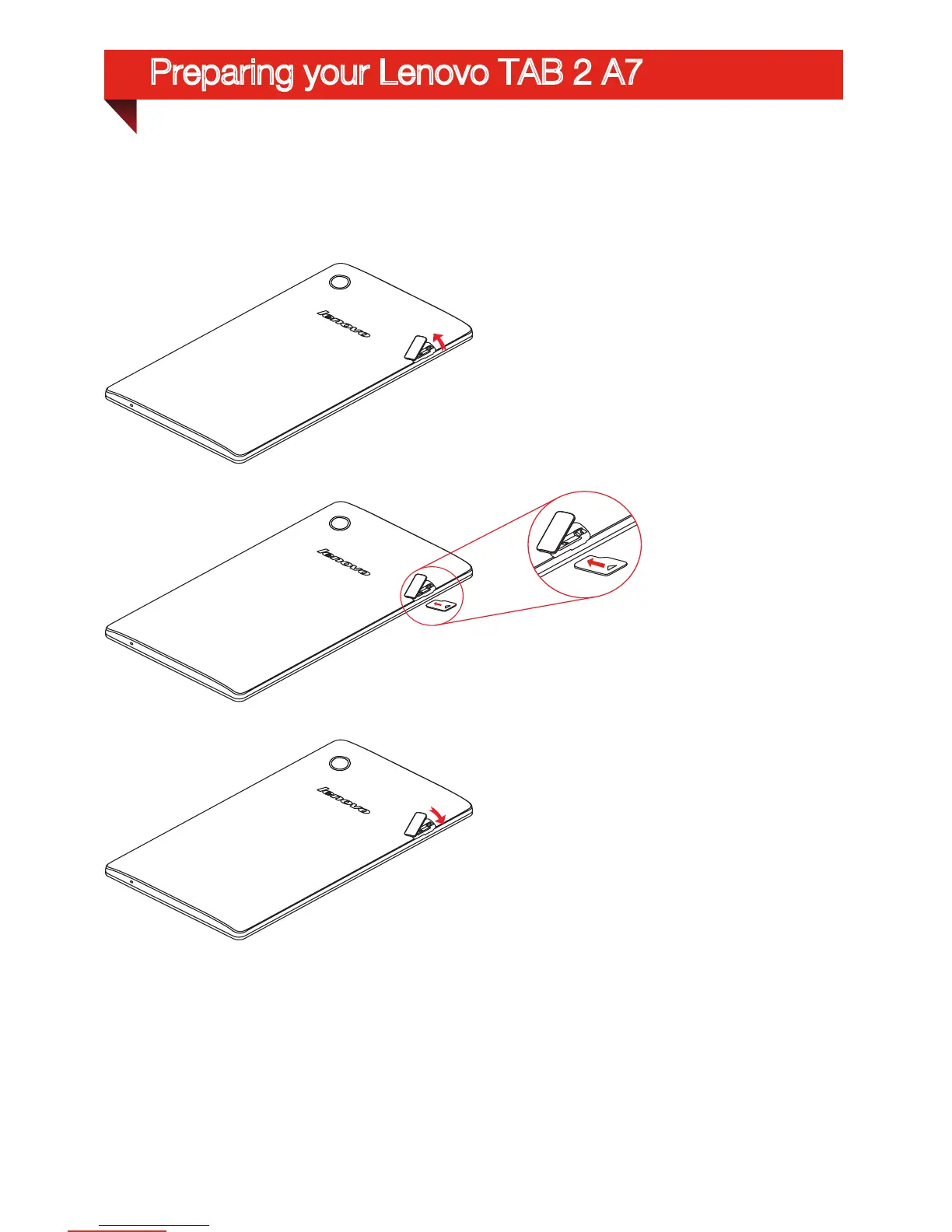
Install the MicroSD car
d as shown.
Step 1.
Open the card-slot door
.
Step 2.
Insert the card into the r
espective
slots, push the cards until they ar
e
engaged in place.
Step 3.
Close the card-slot door
.
Preparing your Lenovo TAB 2 A7
4
6
Related product manuals
Lenovo TAB 2 A8-50
34 pages
Lenovo TAB 2 A7-30
24 pages
Lenovo TAB 2 A7-10F
42 pages
Lenovo TAB 2 A10-70
41 pages
Lenovo TAB 2 A8-50F
69 pages
Lenovo TAB 2 A10-30
27 pages
Lenovo TAB 2 A7-20F
33 pages
Lenovo TAB 2 A7-30F
26 pages
Lenovo TAB 2 A10-70L
14 pages
Lenovo TAB 2 A10-70F
15 pages
Lenovo TAB 2 A7-30DC
26 pages
Lenovo TAB 2 A7-30 series
14 pages




 To Next Page