Chapter 1. Meet your computer
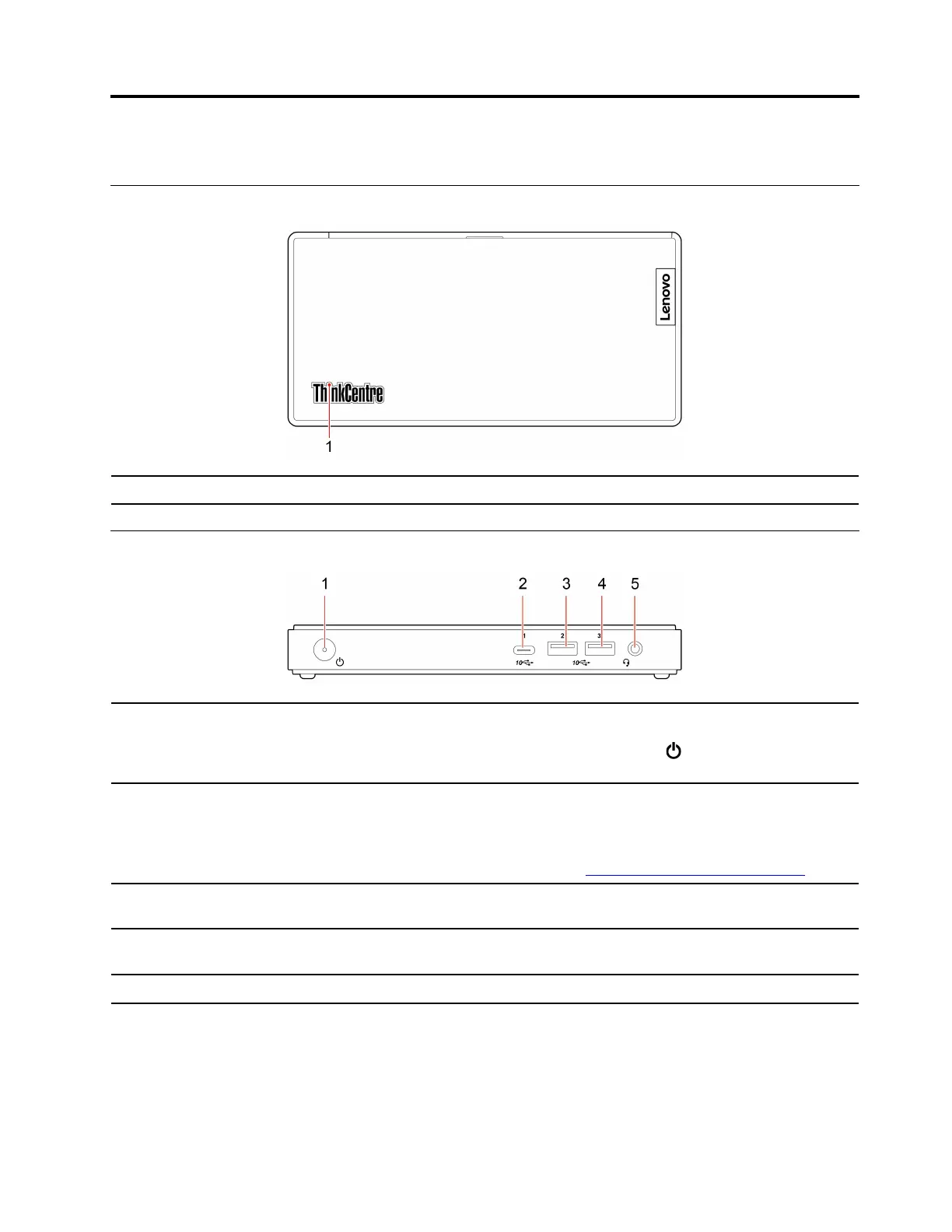
Top
1. ThinkCentre
®
LED
This indicator is on when the computer is on.
Front
1. Power button
Press to turn on the computer.
To turn off the computer, open the Start menu, click
Power, and then select
Shut down.
2. USB-C
™
connector (USB 3.1
Gen 2)
• Output voltage and current of 5 V and 0.9 A.
• Transfer data at USB 3.1 speed, up to 10 Gbps.
• Connect to USB-C accessories to help expand your computer functionality. To
purchase USB-C accessories, go to
https://www.lenovo.com/accessories.
3. USB 3.1 connector Gen 2
Connect USB-compatible devices, such as a USB keyboard, USB mouse, USB
storage device, or USB printer.
4. USB 3.1 connector Gen 2
Connect USB-compatible devices, such as a USB keyboard, USB mouse, USB
storage device, or USB printer.
5. Headset connector
Connect a headset or headphones to your computer.
© Copyright Lenovo 2019, 2021 1



 To Next Page
 Loading...









