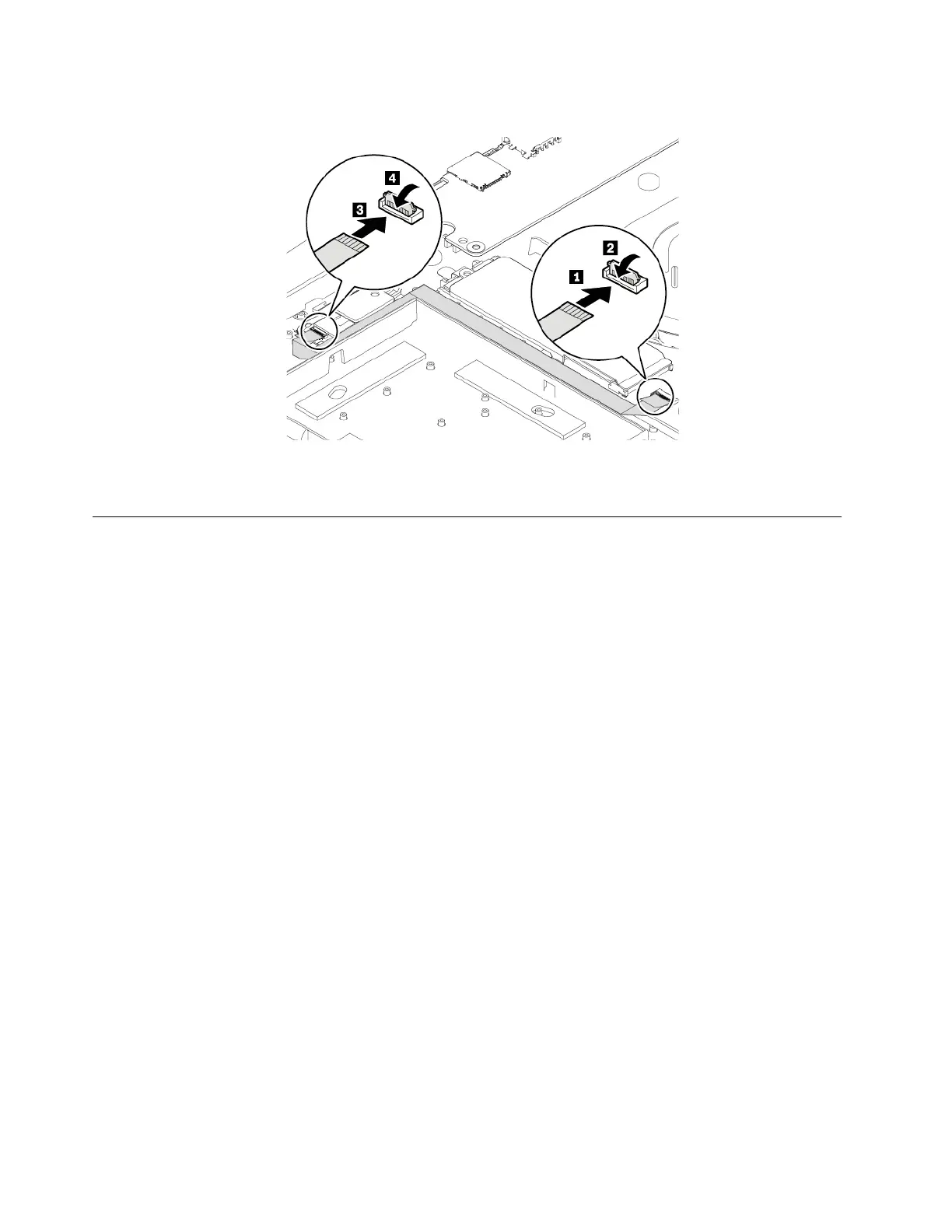
11. Connect the cable and attach the connectors.
12. Reinstall the base cover assembly.
13. Turn the computer over. Connect the ac power adapter and all cables to the computer.
Replacing the M.2 solid-state drive
Before you start, read “Important safety information” on page iii and print the following instructions.
Attention: The M.2 solid-state drive is sensitive. Inappropriate handling might cause damage and
permanent loss of data.
When handling the M.2 solid-state drive, observe the following guidelines:
• Replace the M.2 solid-state drive only for upgrade or repair. The M.2 solid-state drive is not designed for
frequent changes or replacement.
• Before replacing the M.2 solid-state drive, make a backup copy of all the data that you want to keep.
• Do not apply pressure to the M.2 solid-state drive.
• Do not touch the contact edge of the M.2 solid-state drive. Otherwise the M.2 solid-state drive might get
damaged.
• Do not make the M.2 solid-state drive subject to physical shocks or vibration. Put the M.2 solid-state drive
on a soft material, such as cloth, to absorb physical shocks.
Replacing the long M.2 solid-state drive
To replace the long M.2 solid-state drive, do the following:
1. If you are going to replace an Intel Optane memory, disable the Intel Optane memory by doing the
following:
a. Restart the computer. When the logo screen is displayed, press F1.
Note: If a supervisor password has been set, enter the correct password when prompted. You also
can press Enter to skip the password prompt and enter the BIOS menu. However, you cannot
change the system configurations that are protected by the supervisor password.
b. Select Config ➙ Storage ➙ Intel (R) Rapid Storage Technology ➙ Intel Optane ➙ Disable.
c. Select to preserve user data and select Yes to confirm your operation.
94
E580 User Guide














 To Next Page