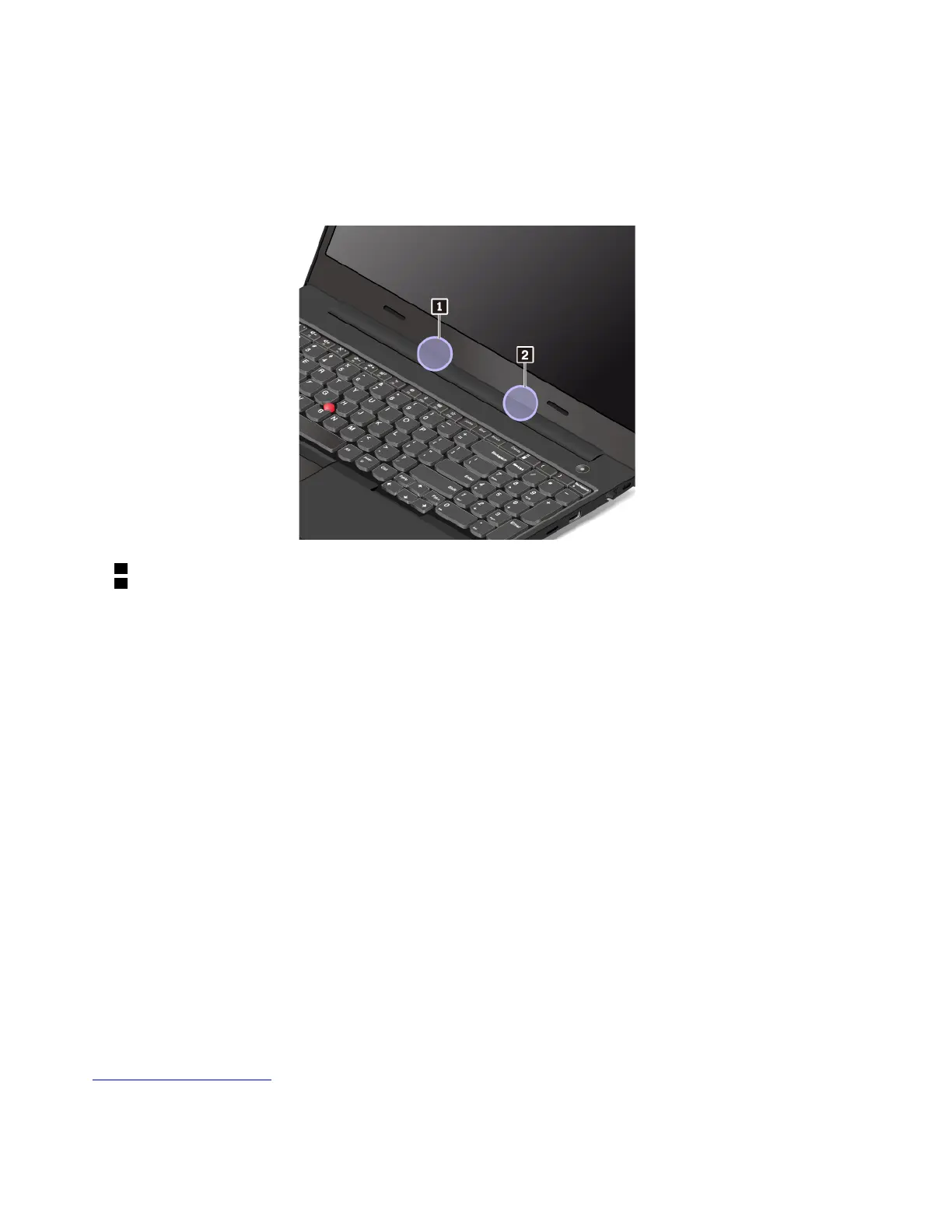
Locating the UltraConnect wireless antennas
ThinkPad notebook computers feature an integrated UltraConnect™ wireless antenna system built into the
display for optimal reception, enabling wireless communication wherever you are.
The following illustration shows the antennas locations of your computer:
1 Wireless-LAN antenna (auxiliary)
2 Wireless-LAN antenna (main)
Wireless-radio compliance information
Computer models equipped with wireless communications comply with the radio frequency and safety
standards of any country or region in which it has been approved for wireless use.
Brazil wireless-radio compliance information
Este equipamento não tem direito à proteção contra interferência prejudicial e não pode causar interferência
em sistemas devidamente autorizados.
This equipment is not protected against harmful interference and may not cause interference with duly
authorized systems.
Mexico wireless-radio compliance information
Advertencia: En Mexico la operación de este equipo estásujeta a las siguientes dos condiciones: (1) es
posible que este equipo o dispositivo no cause interferencia perjudicial y (2) este equipo o dispositivo debe
aceptar cualquier interferencia, incluyendo la que pueda causar su operación no deseada.
Locating wireless regulatory notices
For more information about the wireless regulatory notices, refer to the Regulatory Notice shipped with your
computer.
If your computer is shipped without the Regulatory Notice, you can find it on the Web site at:
https://support.lenovo.com
106 E580 User Guide














 To Next Page