Select SSID:
Root - Client - XXXX: The password of the WiFi Repeater will
be the same as your XXXX router.
Repeater AP – WiFi-Repeater1: Select this option to set up the password
for your WiFi repeater
Factory Default and Settings Backup , Restore
You can backup all Setting of this router to a file, so you can make several copied of
router configuration for security reason.
To backup or restore router setting, please follow the following instructions:
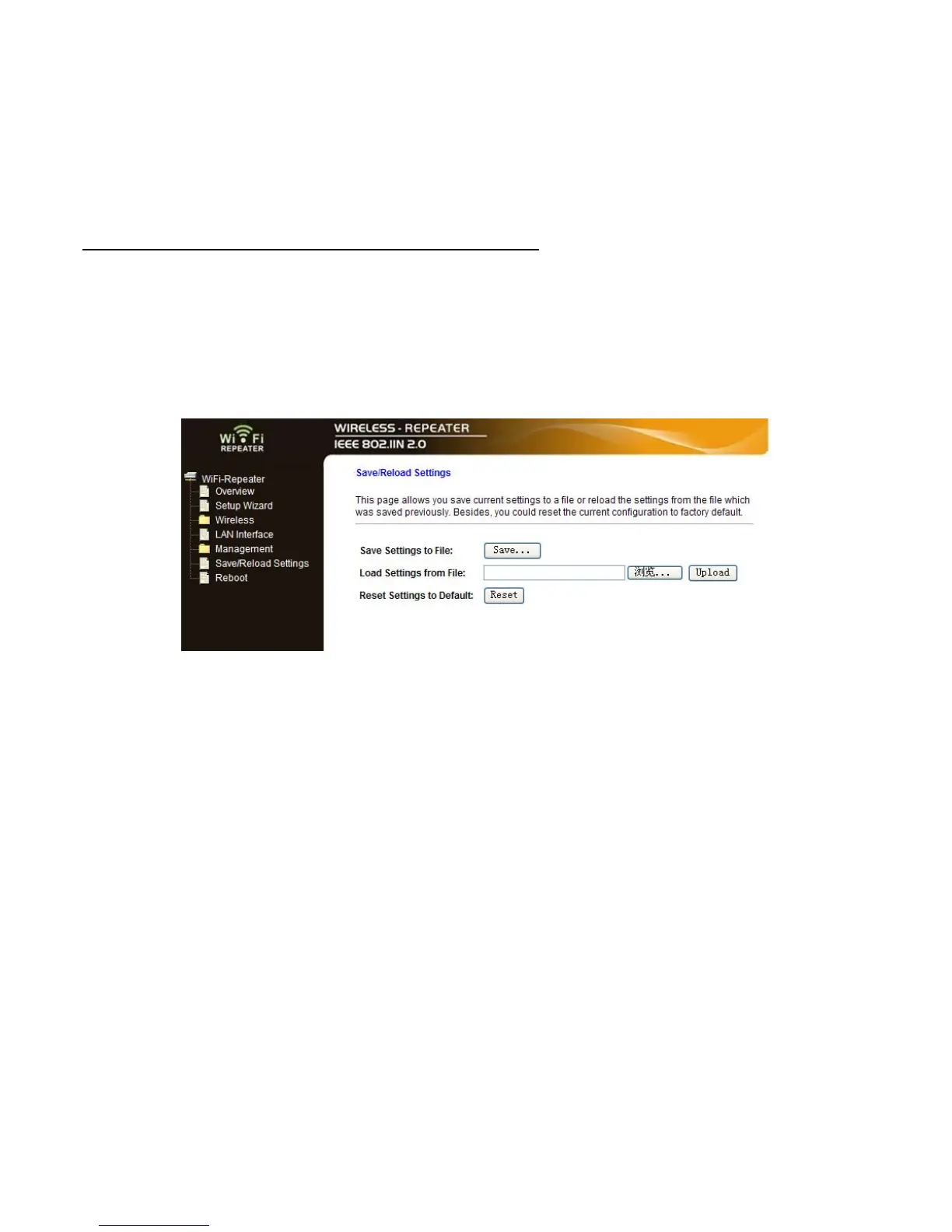
Please click ‘Save/Reload setting’ located at the web management interface, then the
following message will be displayed on your web browser:
Save Settings
Press ‘Save…’ button, and you’ll be prompted to download the
configuration as a file, you can please save it as another
filename for different versions, and keep it in a safe place.
Load Settings Press ‘Browse…’ to pick a previously-saved configuration file
from your computer, and then click ‘Upload…’ to transfer the
configuration file to router. After the configuration is uploaded,
the router’s configuration will be replaced by the file you just
uploaded.
Reset Settings Click this ‘Reset‘ button to remove all settings you made, and
restore the configuration of this router back to factory default
settings


 To Next Page
 Loading...