- 4 -
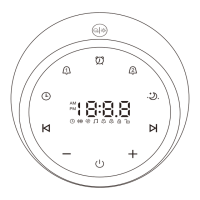
Volume Control
●
Tap the " " button once to increase the volume by one
level. Tap and hold the " " button to increase the
volume continuously.
● Tap the " " button once to decrease the volume by
one level. Tap and hold the " " button to decrease the
volume continuously.
Auto-Off Timer Set
Tap the " " button to set the timer for 15/30/60/90/120mins
or turn it off. You can also tap and hold the " " button to
turn off the timer directly.
Night Light
Tap the metal speaker grill to turn on/off the night light.
Colorful Ambient Light
Tap the " " button to choose an ambient light (6 colors:
red, yellow, blue, pink, aqua, and purple, and a
color-changing mode). When the ambient light is on, you
can tap the metal speaker grill to turn it off.
Note:
Turn off the timer if you wish to listen to the sounds
continuously.



 To Next Page