EasyManua.ls Logo

Lewis 17 - Page 16

Default Icon
78 pages
Print Icon
To Next Page IconTo Next Page
To Previous Page IconTo Previous Page
Loading...
14
42.
To
remove
bobbin
case,
we
recommend
that
the
presser
foot
be
removed
first
as
per
instructions
in
Paragraphs
38
and
39.
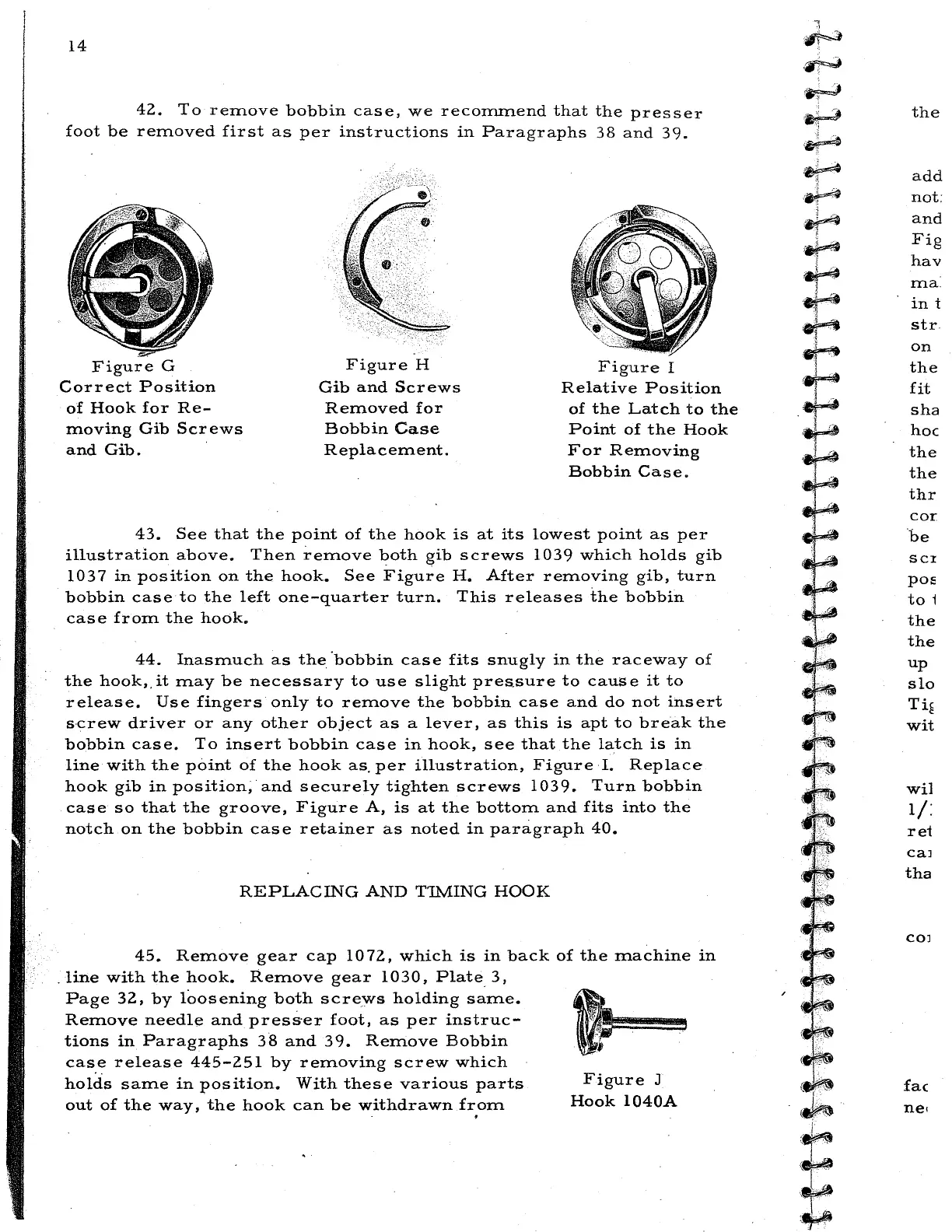
Figure
G
Correct
Position
of
Hook
for
Re-
moving
Gib
Screws
and
Gib.
Figure
H
Gib
and
Screws
Removed
for
Bobbin
Case
Replacement.
Figure
I
Relative
Position
of
the
Latch
to
the
Point
of
the
Hook
For
Removing
Bobbin
Case.
43.
See
that
the
point
of
the
hook
is
at
its
lowest
point
as
per
illustration
above.
Then
remove
both
gib
screws
1039
which
holds
gib
1037
in
position
on
the
hook.
See
Figure
H.
After
removing
gib,
turn
bobbin
case
to
the
left
one-quarter
turn.
This
releases
the
bobbin
case
from
the
hook.
44.
Inasmuch
as
the
·bobbin
case
fits
snugly
in
the
raceway
of
the
hook,.it
may
be
necessary
to
use
slight
pressure
to
cause
it
to
release.
Use
fingers
only
to
remove
the
bobbin
case
and
do
not
insert
screw
driver
or
any
other
object
as
a
lever,
as
this
is
apt
to
break
the
bobbin
case.
To
insert
bobbin
case
in
hook,
see
that
the
latch
is
in
line
with
the
point
of
the
hook
as.
per
illustration,
Figure
I.
Replace
hook
gib
in
position,·
and
securely
tighten
screws
1039.
Turn
bobbin
case
so
that
the
groove,
Figure
A,
is
at
the
bottom
and
fits
into
the
notch
on
the
bobbin
case
retainer
as
noted
in
paragraph
40.
REPLACING
AND
T1MING
HOOK
45.
Remove
gear
cap
1072,
which
is
in
back
of
the
machine
in
.
line
with
the
hook.
Remove
gear
1030,
Plate
3,
Page
32,
by
loosening
both
screws
holding
same.
Remove
needle
and
press·er
foot,
as
per
instruc-
tions
in
Paragraphs
38
and
39.
Remove
Bobbin
cas_e
release
445-251
by
removing
screw
which
holds
same
in
position.
With
these
various
parts
out
of
the
way,
the
hook
can
be
withdrawn
fr.om
Figure
J
Hook
l040A
l
··~
·~
~
-~
.~
~
;~
i
~
..
~
·vr··~
-~
Wl
.,.,
i
w}?t
I ,
t~
l .
:r:
.
.,
.
~
~
...
l
..
~
t~
~-:'<
~
..
..
.
.
.
~
'']~·
~
ll'l·.;.""
the
add
not:
and
Fig
hav
m a .
in
t
str
on
the
fit
sha
hoc
the
the
thr
cor
be
SCI
pos
to
1
the
the
up
slo
Ti~
wit
wil
lj:
rei
caJ
tha
COJ
fac

Related product manuals