EasyManua.ls Logo

LFE 2000 Series - Page 26

LFE 2000 Series
155 pages
Print Icon
To Next Page IconTo Next Page
To Previous Page IconTo Previous Page
Loading...
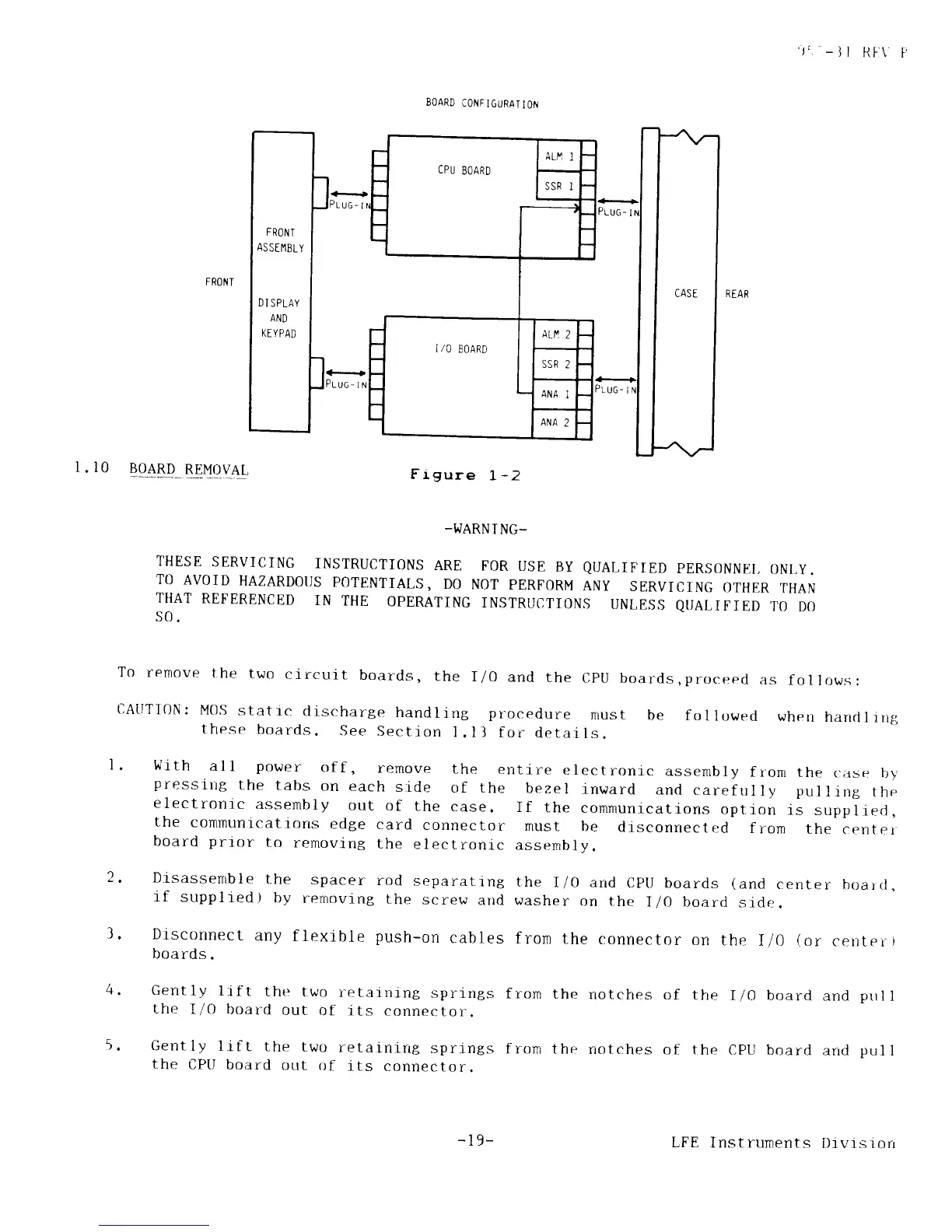
CPU
EOARD
FR0t/
T
AS
STIlBLY
D
I SPLAY
AND
KE YPAD
','
-
] I
RI.\
P
FRONT
I.l0
BOARD
REMOVAL
BOARD
CONFIGURAIION
Frgure
1,
-2
-I.JARN
I NG-
THESE
SERVICING
INSTRUCTIONS
ARE
TO
AVOID
HAZARDOT]S
POTENTIALS,
DO
THAT
REFERENCED
IN
THE
OPERATING
s0.
FOR
USE
BY
QUALIFIED
PERSONNEI,
ONLY.
NOT
PERFORM
ANY
SERVICING
OTHER
THAN
INSTRUCTIONS
UNLES,S
QI]ALIFIED
TO
DO
To
remove
t,he
two
circuil-
boards,
the
I/0
and
the
CptJ
boards,proceed
as
follows:
cAtlrI0N:
MOS
statrc
discharge
handling pr-ocedure
must
be
these
boards.
See
Section
l.ll
for
details.
fol
lowed
when
handl
ing
'
Wrth
al
l
power
of
f
,
remove
the
entire
electronic
assernbly
f ron
the
c:;rse
by
pressirtg
the
tabs
on
each
side
of the
bezel
inward
ancl
carefulIy pulling
the
electronic
assembly
out
of
the
case.
If
the
communicatlons
option
is
suppliecl,
the
communications
edge
card
connector
must be
disconnectr:cl
from
the
cenrer
board
prtor
to
removing
the
electronlc
assembly.
.
Drsassenrble
the
spacer
rod
separattng
the
I/0 and
CptJ boards
(and
center
boarcl
.
lf
supplred)
by
rernoving
the
screw
and washer
on
the
I/O board
sidr:.
l.
Disconnect
any
flexible
push-on
cables
from
the
connector
on
the
I/0
(or
cenrer
r
boards.
Gently
lrft
the
two
retaining
springs
the
I/0
board
out
of its
connector.
Gently
lift the
two
retainrrrg
springs
the
CPtl
board
out
of
its
connector.
from
the
rrotches
of
the
I/0 board
and
prrl
I
fron
the
notches
of the
CPU board
arrd
pul
I
-
l9-
LFE
Instruments
Dtvlsrorr