EasyManua.ls Logo

LFE 2000 Series - Page 74

LFE 2000 Series
155 pages
Print Icon
To Next Page IconTo Next Page
To Previous Page IconTo Previous Page
Loading...
958-l
I
REV.
7,2.4
SOLID
STATE
RELAY
OUTPUT
1
AltD
OUTPUT
2
TEST
ON/OFF
AND PROPORTIONING
0UTPUTS
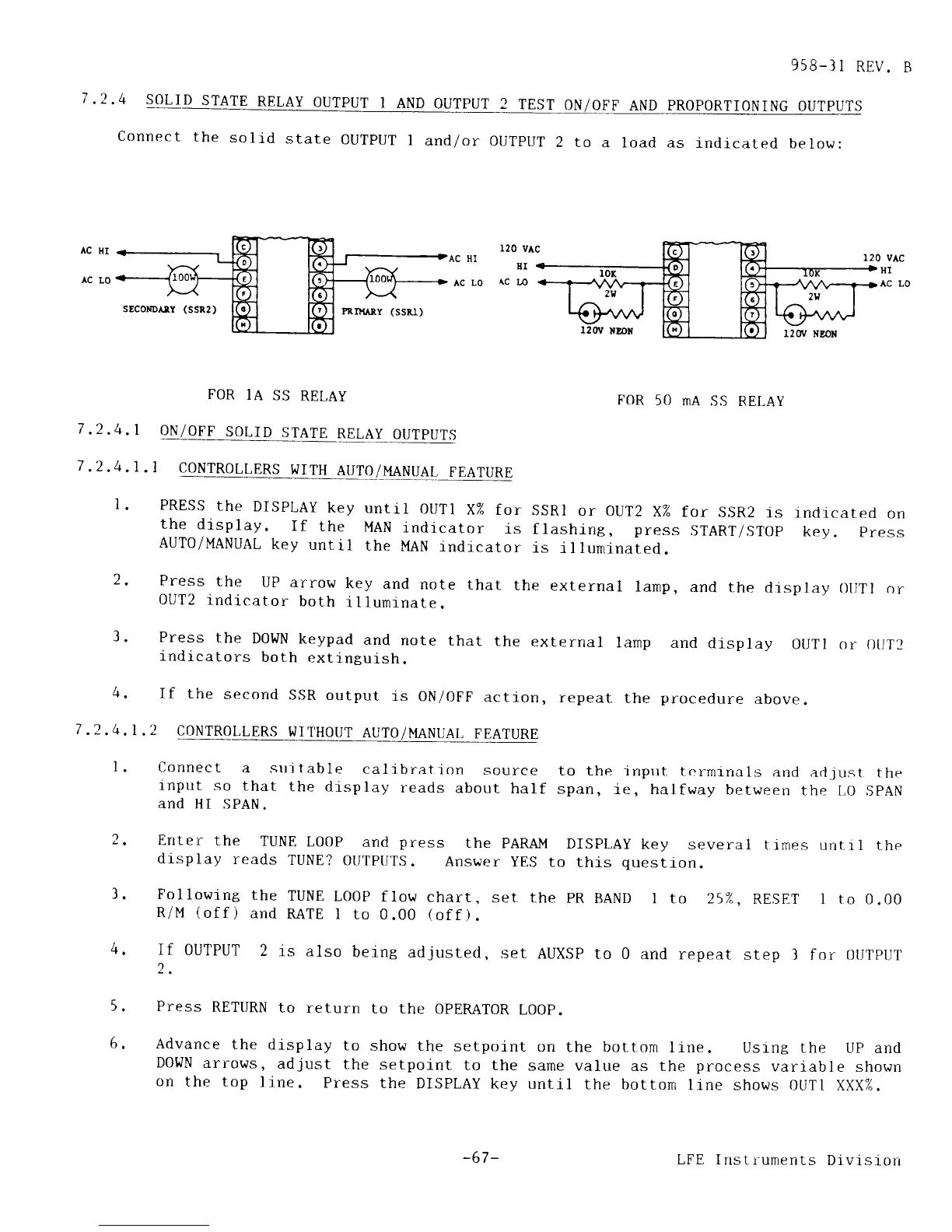
Connect
the
solid
state
0UTPUT
I
and/or
OUTPUT
2 to
a load as
rndicated
below:
AC
HI
AC
L0
vAc
EI
1201r
NDoX
1201/ xEoN
FOR
IA
SS
RELAY
FOR
50 mA
SS
RELAY
ON/OFF
SOLID
STATE
RELAY
OUTPUTS
CONTROLLERS
WITH
AUT0/I'{ANUAL
FEATURE
PRESS
the
DISPLAY
key
until
oUTl
X%
for
SSRI
or
0UT2
X%
for
SSR2
rs
rndrcated
on
the
display.
If
the
MAN
indicator
is
flashing, press
START/ST9p
key.
press
AUTO/MANUAL
key
untl1
the
MAN
indicator
is
illuminated.
Press
the
UP
arrow
key
and
note that
the
external
larnp,
and
the
display ollTl
or
OUT2
indicator
both
illuminate.
Press
the
DoWN
keypad
and
note
that
the
external
lamp
and
drsplay
OUTI
or 0tJT2
indicators
both
extinguish.
If
the
second
ssR
output
is
ON/OFF
action,
repeat
the
procedure
above
.2
CONTROLLERS
WITHOUT
AUTO/MANUAT,
FEATURE
Connect
a stti table
calibration
source
to the
input. t-r-.,rrnirrals
and
ad.1
trst the
lnput
so
that
the display
reads
about
half
span,
1€, halfway
between
the LO
SpAN
and
HI SPAN.
r20
AC
HI
Ac
Lo
Ac
7
,2.4.1
7
.2.4.1
.1
l.
)
?
2.4,
I
1
4.
Enter
the
TUNE
LOOP
and
press
the
pARA-lr{
DISpLAy
key
display
reads
TUNE?
OUTPUTS.
Answer
yES
to
this
quesr
Following
the
TUNE
LOOP
flow
chart.
set the
pR
BAND 1
several
ttmes unt.r
I the
ion.
to 257,,
RESET 1
to 0.00
6.
R/M
(off)
and
RATE
I to 0.00
(off).
If
OUTPUT
2
is also
being
adjusted,
set
AUXSP
to 0
and
repeat step
3 for SUTpUT
2.
Press
RETURN
to return
to
the OPEMTOR
LOOP.
Advance
the
display
to
show
the setpoint
on
the bottom
line.
Usrng the
Up ancl
D0['JN
arrows,
adjust
the
setpoint
to the
same value
as the
process
variab]e
shown
on
the top
line.
Press
the
DISPLAY
key until
the bottom
line shows OUT1
XXX%.
-67 -
LFE
Instruments
Dlvisrorr