23
ENGLISH
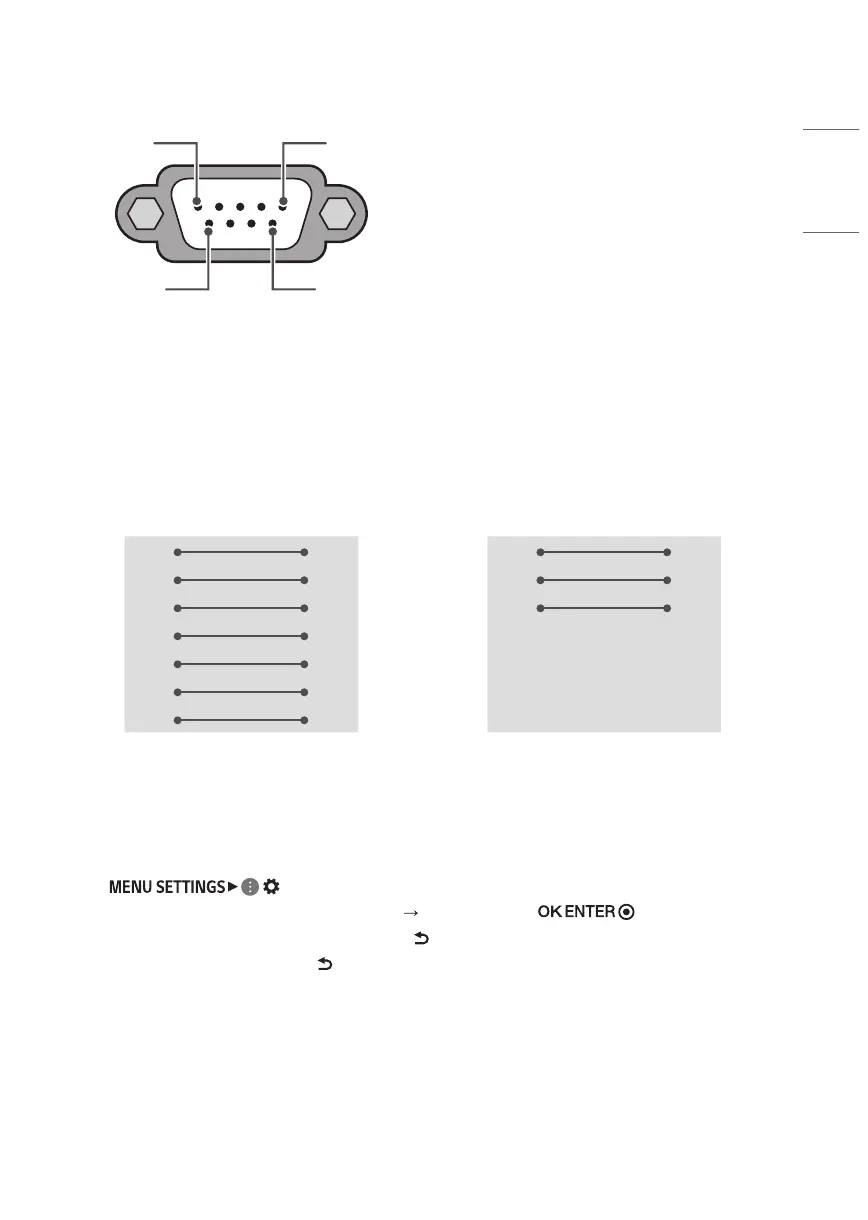
Connector type: D-Sub 9-pin male
1
6
5
9
RS-232C
(Serial port)
RS-232C configurations
7-Wire Configurations
(Standard RS-232C cable)
3-Wire Configurations
(Not standard)
PC TV
RXD 2 3 TXD
TXD 3 2 RXD
GND 5 5 GND
DTR 4 6 DTR
DSR 6 4 DSR
RTS 7 8 RTS
CTS 8 7 CTS
D-Sub 9 D-Sub 9
PC TV
RXD 2 3 TXD
TXD 3 2 RXD
GND 5 5 GND
DTR 4 6 DTR
DSR 6 4 DSR
RTS 7 8 RTS
CTS 8 7 CTS
D-Sub 9 D-Sub 9
Set ID
For Set ID number, see “Real data mapping (Hexadecimal: Decimal)”.
1 Press ( ) to access the main menus.
2 Press the Navigation buttons to scroll to (* [General] [Set ID]) and press button.
3 Scroll left or right to select a set ID number and select (Back). The adjustment range is 1-99.
4 When you are finished, press and hold (Back).


 To Next Page