- 10 -
LGE Internal Use OnlyCopyright © 2010 LG Electronics. Inc. All right reserved.
Only for training and service purposes
4.5. Check SW Version
(1) Method
1) Push In-star key on Adjust remote control.
2) SW Version check
Check “Main : Vx.xx” - LD310
5. SET assembly adjustment method
5.1. Input Area-Option
(1) Profile : Must be changed the Area option value because
being different of each Country’s Language and
signal Condition.
(2) Equipment : adjustment remote control.
(3) Adjustment method
- The input methods are same as other chassis.(Use IN-
START Key on the Adjust Remote control.)
Refer to Job Expression of each main chassis ass’y
(EBTxxxxxxxx) for Option value.
5.2. Adjustment of White Balance
- Purpose : Adjust the color temperature to reduce the
deviation of the module color temperature.
- Principle : To adjust the white balance without the saturation,
Fix the one of R/G/B gain to 192 (default data)
and decrease the others.
- Adjustment mode : Three modes - Cool / Medium / Warm
(Medium data is automatically calibrated by the Cool data)
- Required Equipment
1) Remote control for adjustment
2) Color Analyzer : CA100+ or CA-210 or same product -
LCD TV(ch : 9)
(should be used in the calibrated ch by CS-1000)
3) Auto W/B adjustment instrument(only for auto adjustment)
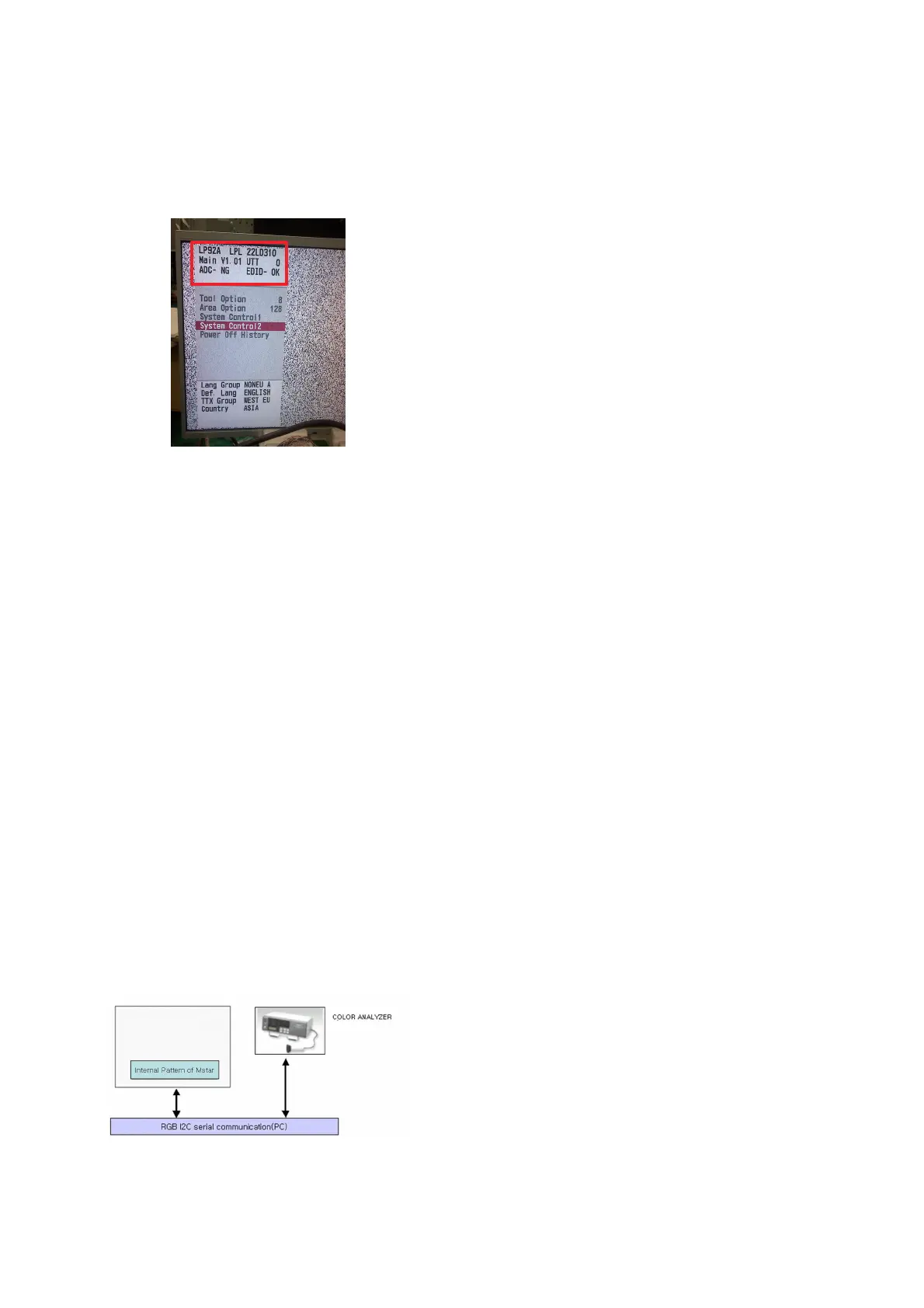
5.2.1. Connecting diagram of equipment for measuring
(For Automatic Adjustment)
* LP92A Support I2C Interface For ADC/DDC Adjustment.
(1) Enter the adjustment mode of DDC
- 22Set command delay time : 50ms
- Enter the DDC adjustment mode at the same time heat-
run mode when pushing the power on by power only key
- Maintain the DDC adjustment mode with same condition
of Heat-run => Maintain after AC off/on in status of Heat-
run pattern display)
(2) Release the DDC adjustment mode
- Release the adjust mode after AC off/on or std-by off/on
in status of finishing the Hear-run mode
- Release the Adjust mode when receiving the aging off
command(F3 00 00) from adjustment equipment.
- Need to transmit the aging off command to TV set after
finishing the adjustment.
- Check DDC adjust mode release by exit key and release
DDC adjust mode)
(3) Enter the adjust mode of white balance
- Enter the white balance adjustment mode with aging
command (F3, 00, 00)
(4) Release the adjust mode of white balance
- Release the white balance adjustment mode with aging
command(F3, 00, FF)
* Luminance min value is 150cd in the Cool/Medium/Warm
mode(For LCD)
5.3. Adjustment of White Balance
(for Manual adjustment)
(1) Color analyzer(CA100+, CA210) should be used in the
calibrated ch by CS-1000
(2) Operate the zero-calibration of the CA100+ or CA-210,
then stick sensor to the module when adjusting.
(3) For manual adjustment, it is also possible by the following
sequence.
1) Select white pattern of heat-run by pressing “POWER
ON” key on remote control for adjustment then operate
heat run longer than 15 minutes. (If not executed this
step, the condition for W/B may be different.)
2) Push “Exit” key.
3) Change to the AV mode by remote control.
4) Input external pattern (85 % white pattern)
5) Push the ADJ key -> Enter “0000” (Password)
6) Stick the sensor to the center of the screen and select
each items (Red/Green/Blue Gain and Offset) using
D/E(CH +/-) key on R/C..
7) Adjust R/ G/ B Gain using
F/G(VOL +/-) key on R/C.
8) Adjust three modes all (Cool/ Medium/ Warm) : Fix the
one of R/G/B gain and change the others
9) When adjustment is completed, Enter “COPY ALL”.
10) Exit adjustment mode using EXIT key on R/C.


 To Next Page
 Loading...