17
ENGENGLISH
ASSEMBLING AND PREPARING
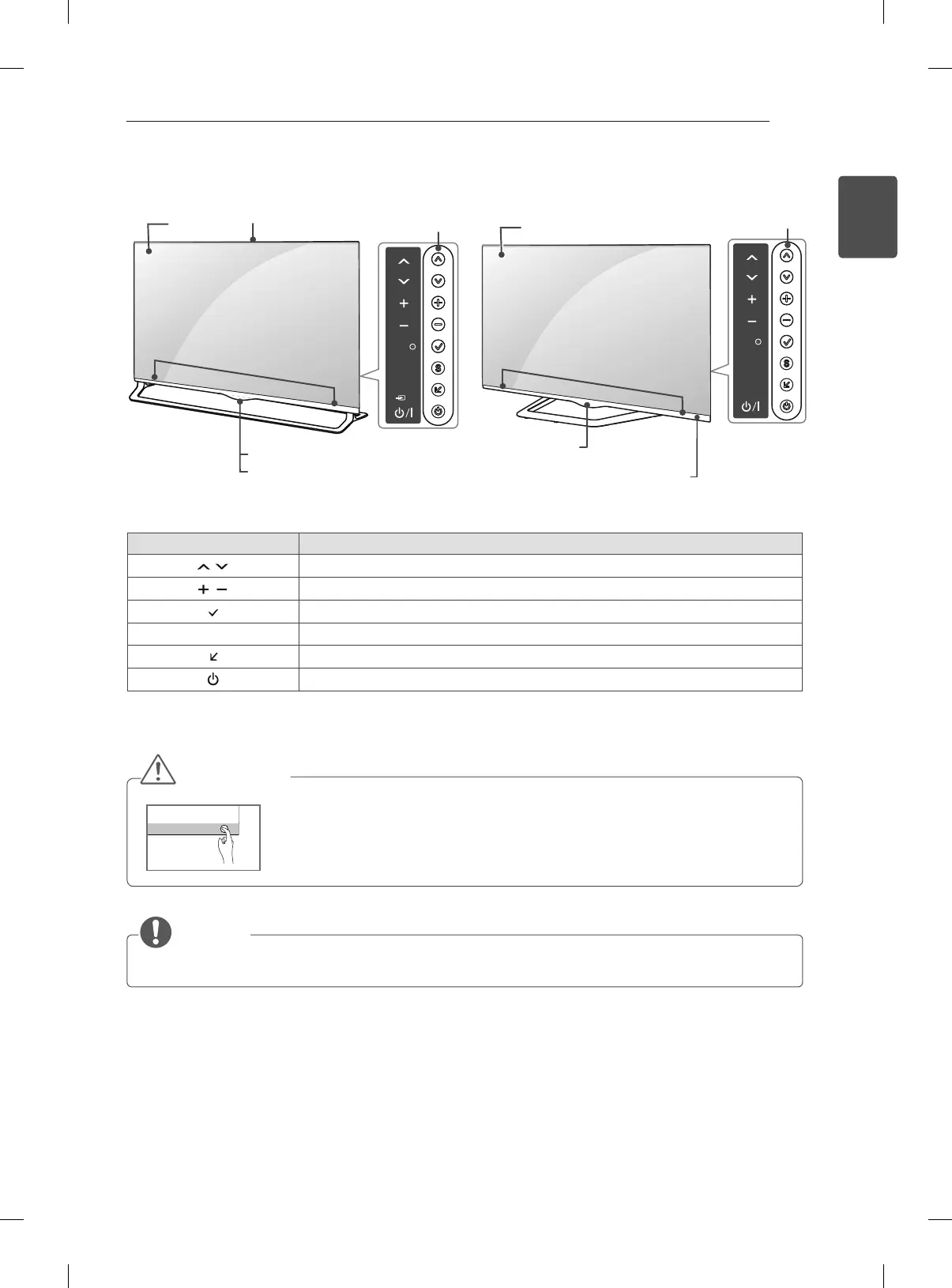
Button Description
Scrolls through the saved programmes.
Adjusts the volume level.
Selects the highlighted menu option or confirms an input.
S
Accesses the main menu, or saves your input and exits the menus.
Changes the input source.
Turns the power on or off.
1 Intelligent sensor - Adjusts the image quality and brightness based on the surrounding environment.
NOTE
y
You can set the
LG Logo Light
to on or off by selecting OPTION in the main menus. (Depending on model)
OK
SETTINGS
INPUT
Video call camera
Screen
Buttons
Speakers
Remote control sensor
Power Indicator
E type : LA97**
CAUTION
y
To avoid possible SPEAKER damage or degradation in performance please
keep contact of TV /Speaker out of reach of children. (Only LA965*)
F type : LA98**, LM96**
SETTINGS
INPUT
OK
Screen
Buttons
Speakers
LG Logo light
Remote control and
Intelligent
sensors
1



 To Next Page