SOUND & LANGUAGE CONTROL
79
SOUND & LANGUAGE CONTROL
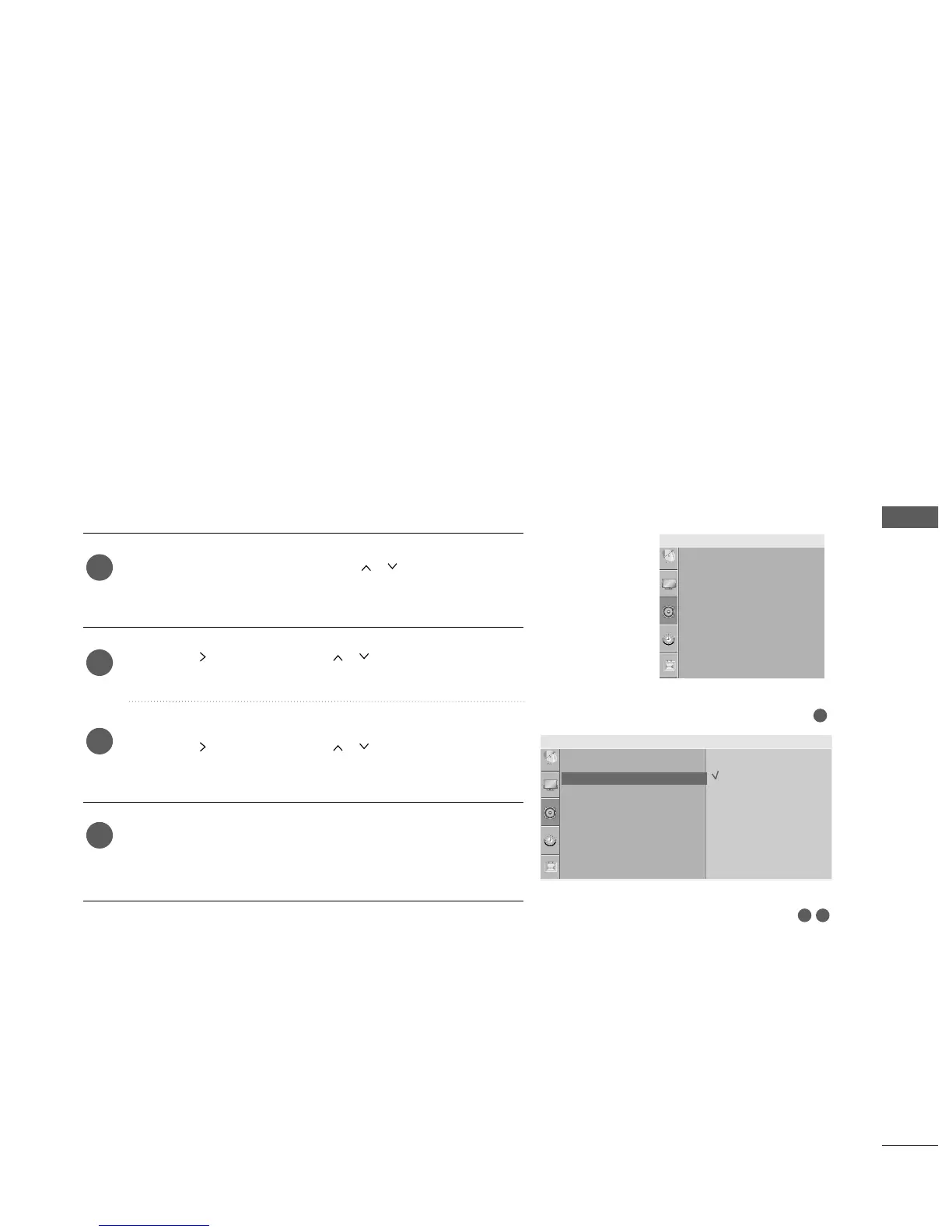
1
AUTO VOLUME LEVELER
Press the
MMEENNUU
button and then
//
button to select
the
AAuuddiioo
menu.
Press the button and then
//
button to select
AAuuttoo VVoolluummee
.
Press the button and then
//
button to select
OOnn
or
OOffff
.
Press the
MMEENNUU
button to return to normal TV viewing.
Press the
RREETTUURRNN
or
MMEENNUU
(
Only 22LG3
***
)
button to
move to the previous menu screen.
Auto Volume automatically remains on the same level of volume
if you change programmes.
1
2
3
4
32
Audio
Sound Mode
Auto Volume
Balance 0
TV Speaker
Audio Out
Auto Volume G
Off
On
Sound Mode
Auto Volume
Balance 0
TV Speaker
Audio Out
Audio



 To Next Page