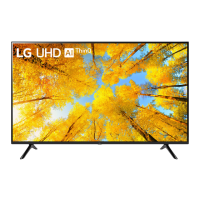
Need help?
Do you have a question about the LG 50UP75006LF and is the answer not in the manual?
Provides advice to prevent damage during transportation and safe handling.
Instructions for placing the TV upright on a table and securing it.
Steps for mounting the TV securely to a wall using brackets and ropes.
Details on attaching an optional wall mount bracket to the TV and wall.
Table detailing VESA standards, screws, and brackets for wall mounting.
Instructions for connecting antenna, cable, and satellite dish to the TV.
Instructions on how to turn the TV on and operate basic functions using the button.
Steps for pairing the Magic Remote Control with the TV for initial use.
Detailed explanation of buttons and functions for the Magic Remote Control.
Explanation of buttons and functions for the standard remote control.
How to connect devices using HDMI cables and supported audio formats.
Information on connecting USB devices and recommended cable specifications.
How to view encrypted digital TV services using a CI module.
Guidelines for connecting various external devices like Blu-ray players and PCs.
Solutions for problems controlling the TV with the remote control.
Troubleshooting steps for no image, no sound, or abnormal display issues.
Reasons why the TV might turn off suddenly and how to fix it.
Explains common sounds like cracking or buzzing and their causes.
Details on digital and analogue TV systems, channel coverage, and programs.
Technical specifications for wireless LAN and Bluetooth modules (LGSBWAC95).
Technical details for the LGSBWAC02 wireless module.
Technical details for the LGSBWAC03 wireless module.
Operating and storage conditions for temperature and humidity.
Information on obtaining open source code and license terms.
Mentions licenses for technologies like HDMI and HEVCAdvance.
This document is an owner's manual for an LG LED TV, providing essential information for its safe operation, setup, and maintenance. It covers various aspects from initial preparation to troubleshooting and specifications.
The LG LED TV is designed to provide a high-quality viewing experience with an LCD screen and LED backlights. It supports various broadcasting specifications, including Digital TV (DVB-T/T2, DVB-C, DVB-S/S2) and Analogue TV (PAL/SECAM B/G/I/D/K, SECAM L), allowing users to access a wide range of channels. The TV can be connected to external devices such as Blu-ray players, HD receivers, DVD players, VCRs, audio systems, USB storage devices, PCs, and gaming devices, expanding its entertainment capabilities. It also supports encrypted (pay) services in digital TV mode via a CI module. The TV features a Magic Remote Control for intuitive navigation and control, including voice recognition (network connection required).
The manual details how to prepare and start the TV, including lifting, moving, mounting on a table, and wall mounting. For wall mounting, it provides guidelines on using VESA standard mounting interfaces and LG's wall mount brackets, emphasizing the importance of proper installation to prevent damage or injury. Connectivity options are extensive, with HDMI ports supporting Ultra HD Deep Colour for clearer pictures and USB ports for connecting various USB devices. The TV also supports wireless connectivity through its built-in Wi-Fi (IEEE 802.11a/b/g/n/ac) and Bluetooth modules.
The Magic Remote Control is a key usage feature, offering multiple ways to interact with the TV. It includes number buttons for direct channel access, volume and programme buttons, and dedicated buttons for accessing the Home menu, input sources, and Quick Settings. The "Wheel (OK)" button allows for menu selection and can activate the Magic Explorer for AI Smart Search. Voice recognition enables hands-free control and content search. The remote also has buttons for streaming services, recording functions, and setting a sleep timer. For users who prefer a more traditional remote experience, the Magic Remote can operate like a general remote control when the pointer is not in use.
The TV's menu system is accessible via the button on the TV itself or through the remote control. Users can adjust settings, change input sources, and scroll through saved programmes. The on-screen display (OSD) may vary slightly depending on the model and selected input source, and new features may be added through future updates.
The manual provides crucial safety and maintenance instructions to ensure the longevity and safe operation of the TV. It warns against electric shock, fire hazards, and product deformation, advising users to keep the TV away from direct sunlight, high humidity, heat sources, flammable objects, and excessively dusty places. Proper ventilation is emphasized, with instructions not to install the TV in confined spaces or block its openings.
Power cord protection is highlighted, urging users to avoid physical or mechanical abuse of the cord and to ensure it is securely connected. In case of damage or malfunction, users are advised to unplug the product immediately and contact customer service. Unauthorized modifications are strictly prohibited.
Battery maintenance for the remote control includes instructions on proper insertion, avoiding mixing old and new batteries, and safe disposal according to local regulations. The manual also covers cleaning procedures, recommending the use of a soft/dry cloth and warning against spraying liquids directly onto the TV or using harsh chemicals.
Troubleshooting tips are provided for common issues such as the remote control not working, no image or sound, sudden TV shutdown, and no signal when connecting to a PC via HDMI. It addresses abnormal display characteristics like "flicker" and tiny dots, explaining that these are normal for advanced panels. Users are also advised to avoid displaying still images for prolonged periods to prevent image sticking. The manual explains common generated sounds like "cracking" noise due to thermal contraction and "electrical circuit humming/panel buzzing" from high-speed switching circuits, clarifying that these do not affect performance or reliability.
 General
| Screen shape | Flat |
|---|---|
| Response time | - ms |
| Display diagonal | 50 \ |
| Display brightness | - cd/m² |
| Display technology | LED |
| Native aspect ratio | - |
| Display diagonal (metric) | 125.8 cm |
| Automatic brightness control | Yes |
| PC in (D-Sub) | No |
| USB 2.0 ports quantity | USB 2.0 ports have a data transmission speed of 480 Mbps, and are backwards compatible with USB 1.1 ports. You can connect all kinds of peripheral devices to them. |
| Ethernet LAN (RJ-45) ports | 1 |
| Common interface Plus (CI+) version | 1.4 |
| USB 3.2 Gen 1 (3.1 Gen 1) Type-A ports quantity | 0 |
| Tuner type | Digital |
| Digital signal format system | DVB-S2, DVB-T2 |
| Video apps | Catch-up TV, Chili, Mediaset Play, RaiPlay |
| Operating system version | 6.0 |
| Operating system installed | Web OS |
| Sound modes | AI Sound |
| Audio decoders | DTS, Dolby Digital |
| RMS rated power | 20 W |
| Quantity per pack | 1 pc(s) |
| Annual energy consumption | 118 kWh |
| Energy efficiency scale | A to G |
| Power consumption (standby) | 0.5 W |
| Power consumption (typical) | 85 W |
| Certification | Tivùon! / Tivùsat, Lativù 4K, HbbTV v 2.0.1, CAMREADY |
| Color name | Dark Iron Gray |
| Product color | Gray |
| Panel mounting interface | 200 x 200 mm |
| Processor cores | 4 |
| Video formats supported | HEVC, VP9 |
| High Dynamic Range (HDR) technology | Filmmaker Mode, High Dynamic Range 10 (HDR10), Hybrid Log-Gamma (HLG) |
| Package depth | 175 mm |
| Package width | 1215 mm |
| Package height | 775 mm |
| Package weight | 15100 g |
| Repairability index | 5.6 |
 Weight and Dimensions
| Depth (with stand) | 231 mm |
|---|---|
| Width (with stand) | 1130 mm |
| Height (with stand) | 722 mm |
| Weight (with stand) | 11500 g |
| Depth (without stand) | 86.3 mm |
| Height (without stand) | 663 mm |
| Weight (without stand) | 11300 g |

 To Next Page