Need help?
Do you have a question about the LG 75UT91006LA and is the answer not in the manual?
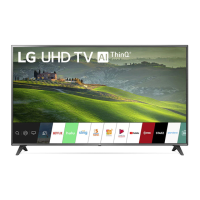
This document serves as the owner's manual for an LG LED TV, providing essential information for its safe operation, setup, and maintenance. The TV utilizes an LCD screen with LED backlights.
The LG LED TV is designed for home entertainment, offering a display for various media content. It can receive terrestrial, cable, and satellite digital TV broadcasts. The TV supports connections to a wide range of external devices, including Blu-ray/DVD players, HD receivers, audio systems, USB storage devices, PCs, and gaming consoles, allowing for a versatile entertainment experience.
The TV features a "Magic Remote Control" (for supported models) which enhances user interaction with its intuitive point-and-click functionality, voice recognition, and NFC tagging capabilities for smart device integration. The remote allows for easy navigation through menus, control of volume and channels, and quick access to various applications and settings.
A key feature is "Always Ready" (depending on the model), which allows the TV to operate and connect to Bluetooth with direct voice recognition even when the power is off, providing quick access to certain functions without fully turning on the display.
Initial Setup and Operation: Before operating, users are advised to read the manual thoroughly and retain it for future reference. The manual can also be downloaded from the LG website or accessed as an embedded "USER GUIDE" within the product itself.
Separate Purchase Items: Certain accessories, such as a Magic Remote Control (if not included), may need to be purchased separately. Users should verify if their TV model supports Bluetooth for Magic Remote compatibility. Cables for antennas and external devices are also typically purchased separately.
Safety Instructions: The manual emphasizes critical safety precautions. Users are warned against electric shock and fire hazards, advising not to open the TV cover or expose the product to rain or moisture. It stresses the importance of proper ventilation, keeping the TV away from heat sources, direct sunlight, high humidity, and flammable objects. The power cord should be protected from physical abuse, and the TV should not be operated with a damaged cord or plug. In case of smoke, unusual odors, or product damage, the TV should be immediately unplugged and serviced by qualified personnel.
Lifting and Moving the TV: When moving the TV, it is recommended to use the original box and packing materials. The power cord and all cables should be disconnected. For larger TVs, at least two people are required. The screen should face away from the user to prevent damage, and the TV should be kept upright, avoiding jolts or excessive vibration. Care should be taken not to apply excessive pressure to the frame or damage protruding buttons.
Mounting Options: The TV can be placed on a table using its stand or mounted on a wall.
Connecting Antennas and Satellite Dishes: The TV connects to a wall antenna socket with a 75 Ω RF cable. A signal splitter can be used for multiple TVs, and a signal amplifier may be needed for poor image quality. For satellite reception, the TV connects to a satellite dish with a 75 Ω satellite RF cable.
Starting the TV: The TV can be turned on using the button on the TV itself, which also controls power off, menu navigation, and selection. Upon first use, initialization may take a few minutes.
Connecting External Devices: The TV supports various external devices via HDMI and USB ports.
Magic Remote Control Usage: The Magic Remote features buttons for power, guide, saved programs, quick access, volume, mute, home menu, input source, quick settings, and voice recognition. It also includes navigation buttons (up/down/left/right), a wheel (OK) button for selection and magic explorer, and color-coded buttons for special functions and recording. The voice recognition feature requires a network connection.
Registering/Deregistering Magic Remote: To use the Magic Remote, batteries are inserted, and the remote is pointed at the TV, then the Wheel (OK) button is pressed to pair. If registration fails, turning the TV off and on again is recommended. To deregister, the (Back) and (Home) buttons are pressed simultaneously for five seconds. Alternatively, pressing and holding (Home) and (Q. Settings) for more than five seconds can disconnect and re-register the remote. It is advised to keep the Access Point (AP) at least 0.2 m away from the TV to avoid frequency interference.
Connecting Smart Devices using NFC Tagging (for NFC-enabled remotes): NFC technology allows convenient information exchange between a smart device and the TV. Users enable NFC on their smart device, bring it near the N (NFC) logo on the remote control (within 1 cm), and follow instructions to install the LG ThinQ app. Retagging the device allows access to various features through the app.
Always Ready Feature (Depending upon model): This feature allows the TV to operate with direct voice recognition and Bluetooth connectivity even when the power is off. It can be enabled in the [General] settings. Pressing the power button switches the screen to [Always Ready] on or off. Pressing the (Home) or (Back) button will switch to TV viewing from [Always Ready]. Pressing the Wheel (OK) button displays wallpaper when [Always Ready] is off, and pressing the power button switches to TV viewing.
Cleaning: When cleaning the TV, the power cord should be unplugged. A soft, dry cloth should be used to gently wipe the screen. Users are explicitly warned not to spray water or other liquids directly onto the TV. Harsh chemicals such as glass cleaner, air fresheners, insecticides, lubricants, wax (car, industrial), abrasives, thinner, benzene, or alcohol should not be used, as they can damage the product and/or its panel, potentially leading to electric shock or product damage. When cleaning, care should be taken to prevent liquids or foreign objects from entering the gaps between the panel and the guide panel. The cloth should be wrung out to remove excess water or cleaner.
Troubleshooting: The manual provides a troubleshooting guide for common issues:
Open Source Software Notice: The manual includes information about the open source software used in the product. Users can obtain the source code, license terms, and copyright notices from the LG Electronics website (https://opensource.lge.com) or request it on CD-ROM for a charge. This offer is valid for three years after the last shipment of the product.
 General
| Display Type | LED |
|---|---|
| Screen Size | 75 inches |
| Resolution | 3840 x 2160 (4K UHD) |
| Smart TV | Yes |
| Operating System | webOS |
| HDMI | 4 |
| USB | 2 |
| Refresh Rate | 60 Hz |
| Wi-Fi | Yes |
| Bluetooth | Yes |
| Audio Output | 20W |
| HDR Support | Yes (HDR10, HLG) |


 To Next Page