EasyManua.ls Logo

LG 7SQNED80AQA - Page 9

LG 7SQNED80AQA
22 pages
Print Icon
To Next Page IconTo Next Page
To Previous Page IconTo Previous Page
Loading...
&
,
Do
not
apply
foreign
substances
(oils
,
lubricants,
etc.)
to
the
screw
parts
when
assembling
the
product.
(Doing
so
may
damage
the
product.)
• If
you
install
the
TV
on
a
stand,
you
need
to
take
actions
to
prevent
the
product
from
overturning.
Otherwise
,
the
product
may
fall
over
,
which
may
cause
injury
.
•
Do
not
use
any
unapproved
items
to
ensure
the
safety
and
lifespan
of
the
product.
•
Any
damages
or
injuries
by
using
unapproved
items
are
not
covered
by
the
warranty.
•
Make
sure
that
the
screws
are
fastened
tightly
.
(If
they
are
not
fastened
securely
enough
,
the
TV
may
tilt
forward
after
being
installed.)
•
Do
not
fasten
the
screws
with
excessive
force
otherwise
they
may
strip
and
become
loose.
Securing
TV
to
the
Wall
Insert
and
tighten
the
eye-bolts
or
TV
brackets
and
bolts
on
the
back
of
the
TV.
• If
there
are
bolts
inserted
at
the
eye
-
bolts
position
,
remove
the
bolts
first.
2
Mount
the
wall
brackets
with
the
bolts
to
the
wall.
Match
the
location
of
the
wall
bracket
and
the
eye
-
bolts
on
the
rear
of
the
TV.
3
Connect
the
eye-bolts
and
wall
brackets
tightly
with
a
sturdy
rope
or
cable.
Make
sure
to
keep
the
rope
parallel
to
the
flat
surface.
•
Use
a
platform
or
cabinet
that
is
strong
and
large
enough
to
support
the
TV
securely.
•
Brackets,
bolts,
and
ropes
are
optional.
You
can
obtain
additional
accessories
from
your
local
dealer
.
Mounting
to
the
Wall
An
optional
wall
mount
can
be
used
with
your
LG
Television.
Consult
with
your
local
dealer
for
a
wall
mount
that
supports
the
VESA
standard
used
by
your
TV
model.
Carefully
attach
the
wall
mount
bracket
at
the
rear
of
the
TV.
Install
the
wall
mount
bracket
on
a
solid
wall
perpendicular
to
the
floor.
If
you
are
attaching
the
TV
to
other
building
materials,
please
contact
qualified
personnel
to
install
the
wall
mount.
Detailed
instructions
will
be
included
with
the
wall
mount.
We
recommend
that
you
use
an
LG
brand
wall
mount.
The
LG
wall
mount
is
easy
to
adjust
or
to
connect
the
cables.
When
you
do
not
use
LG's
wall
mount
bracket,
use
a
wall
mount
bracket
where
the
device
is
adequately
secured
to
the
wall
with
enough
space
to
allow
connectivity
to
external
devices.
If
you
are
using
a
non-adjustable
mount,
attach
the
mount
to
the
wall.
Attach
the
cables
to
the
TV
first,
then
attach
the
TV
to
the
mount.
&
•
Remove
the
stand
before
installing
the
TV
on
a
wall
mount
by
performing
!he
stand
attachment
in
reverse
.
•
For
more
information
of
screws
and
wall
mount
bracket
,
refer
to
the
Separate
Purchase
.
• If
you
intend
to
mount
the
product
to
a
wall
,
attach
VESA
standard
mounting
interface
(optional
parts
)
to
the
back
of
the
product.
When
you
install
the
set
to
use
the
wall
mounting
bracket
(optional
parts)
,
fix
it
carefully
so
as
not
to
drop.
•
When
mounting
a
TV
on
the
wall,
make
sure
not
to
install
the
TV
by
hanging
the
power
and
signal
cables
on
the
back
of
the
TV
.
•
Do
not
install
this
product
on
a
wall
if
it
could
be
exposed
to
oil
or
oil
mist.
This
may
damage
the
product
and
cause
it
to
fall.
•
When
installing
the
wall
mounting
bracket
, it
is
recommended
to
cover
the
stand
hole
using
tape
,
in
order
to
prevent
the
influx
of
dust
and
insects
,
(Depending
upon
model).
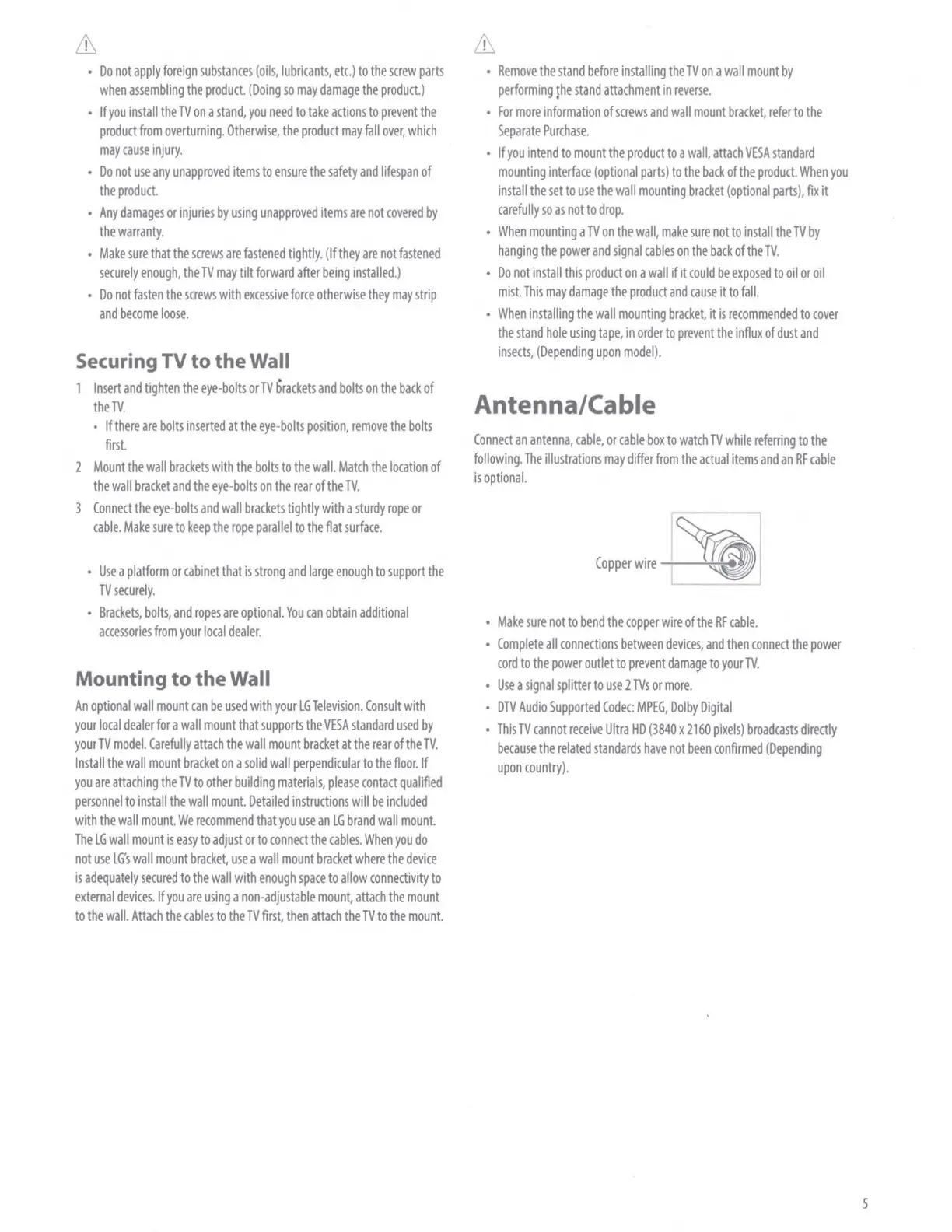
Antenna/Cable
Connect
an
antenna,
cable,
or
cable
box
to
watch
TV
while
referring
to
the
following
.
The
illustrations
may
differ
from
the
actual
items
and
an
RF
cable
is
optional.
Copper
wire
~ "
•
Make
sure
not
to
bend
the
copper
wire
of
the
RF
cable.
•
Complete
all
connections
between
devices,
and
then
connect
the
power
cord
to
the
power
outlet
to
prevent
dama9e
to
your
TV.
•
Use
a
signal
splitter
to
use
2
TVs
or
more.
•
DTV
Audio
Supported
Codec:
MPEG,
Dolby
Digital
•
This
TV
cannot
receive
Ultra
HD
(3840
x
2160
pixels)
broadcasts
directly
because
the
related
standards
have
not
been
confirmed
(Depending
upon
country).
5