Operating26
Operating
3
y
It is not supported to record music stored
on bluetooth device.
y
You can check the recording percentage
rate for the USB record on the display
window during the recording.
(MP3/WMA CD Only)
y
During recording MP3/WMA, there is no
sound.
y
When you stop recording during playback,
the le that has been recorded at that time
will be stored. (Except MP3/WMA les)
y
Do not remove the USB device or turn
o the unit during USB recording. If not,
an incomplete le may be made and not
deleted on PC.
y
If USB recording does not work, the
message like “NO USB”, “ERROR”, “FULL” or
“NO REC” is displayed on the display
window.
y
Multi card reader device or External HDD
can not be used for USB recording.
y
A le is recorded by about 512 Mbyte when
you record for a long term.
y
You may not store more than 999 les.
y
You can not record in AUTO DJ mode.
y
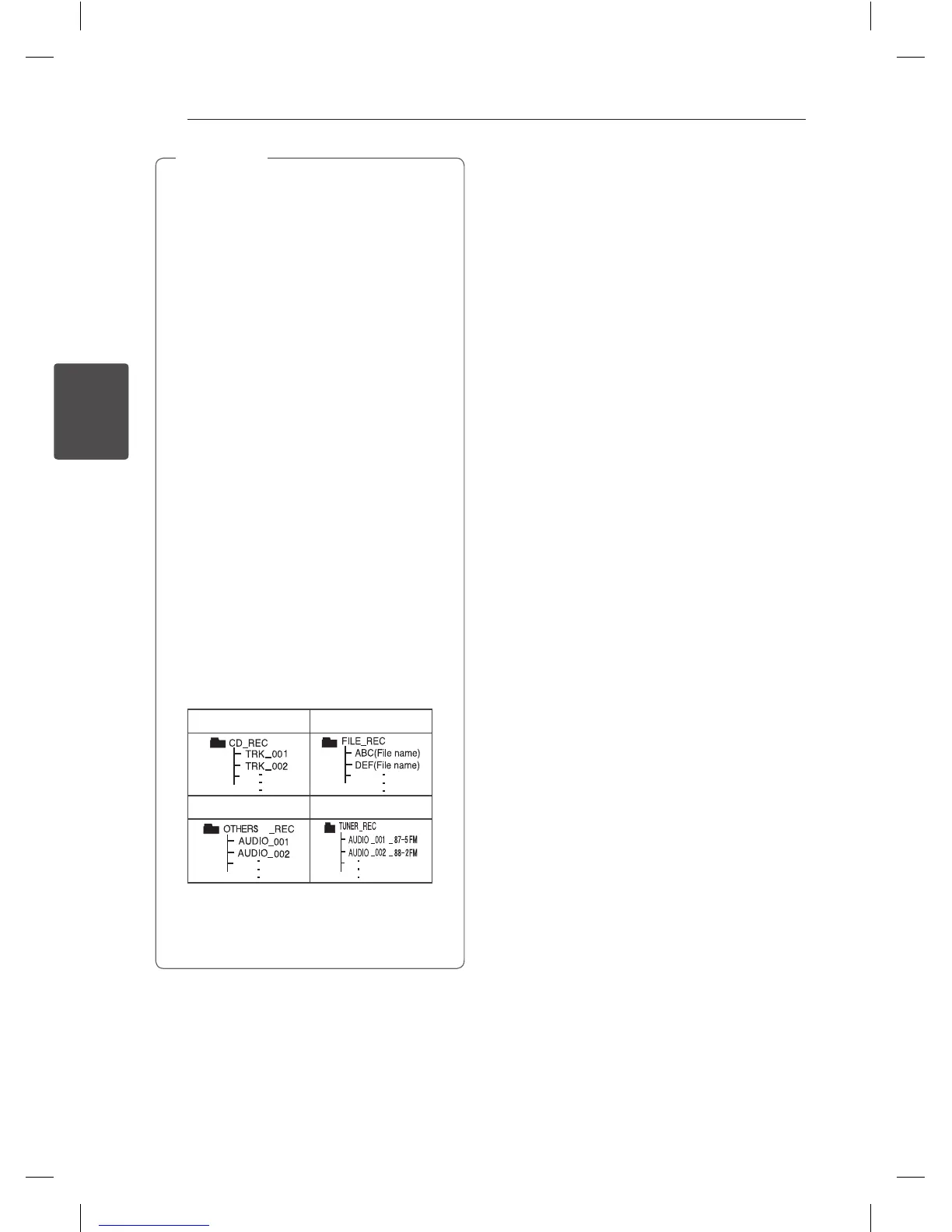
It’ll be stored as follows.
AUDIO CD MP3/WMA
The other source* TUNER
TUNER : The current recording frequency is
shown.
* : AUX and the like.
,
Note
CM4340P-FV.DAUSLLK_ENG_0125.indd 26 2014-03-07 1:37:54



 To Next Page