Operating 15
Operating
2
Connecting AirPlay-enabled
device
Option 1 : Using Air Direct
On Unit
1. Press
1/!
button repeatedly on the unit to
select AirPlay function.
2. Press AIR DIRECT / RESET on the unit. Then
1/!
button blinks with white and amber color
alternately. Then it stops blinking and stays in
amber color with beep sound. (about
1/!
button, refer to page 22)
On AirPlay-enabled device
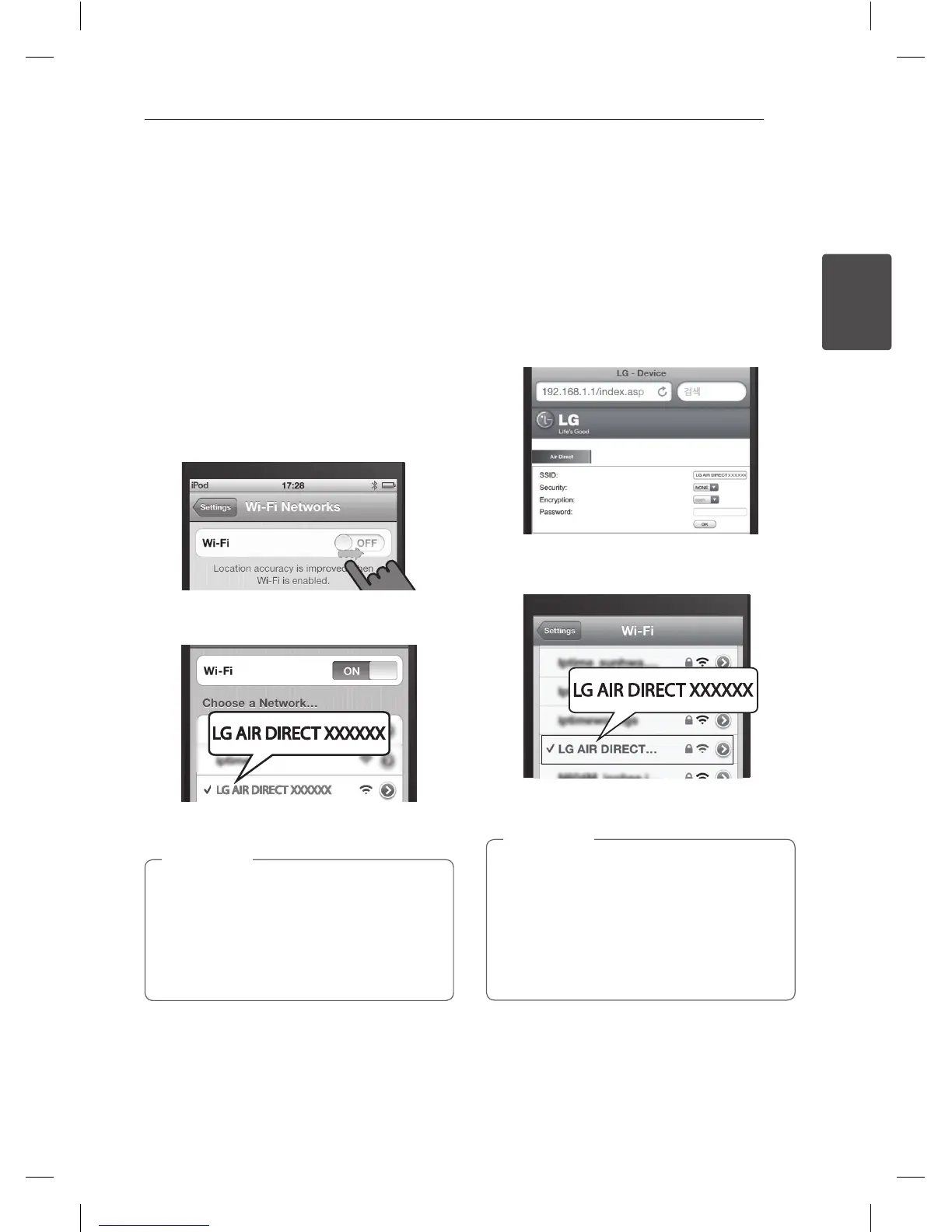
3. Turn on the Wi-Fi function on AirPlay-enabled
device.
4. In the network list, find and select “LG AIR
DIRECT XXXXXX”.
5. Use AirPlay after your iPod touch/iPhone/iPad
or PC/MAC is connected.
y
If “LG AIR DIRECT XXXXXX” is not in the list,
try to scan the available Wi-Fi networks
again.
y
When your iPod touch/iPhone/iPad or
PC/MAC is connected to “LG AIR DIRECT
XXXXXX” , you cannot use internet.
,
Note
Using Air Direct with Security mode
6. Launch Apple Safari browser or Microsoft
Internet Explorer browser on your iPod touch/
iPhone/iPad or PC/MAC.
7. Type in “192.168.1.1” at the browser address bar
and confirm.
8. Set security mode and insert password.
- hexadecimal (0-9, A-F) 10 or 26 digits.
- 5 or 13 ASCII characters.
9. Tap or click “OK”
10. In the network list, find and select “LG AIR
DIRECT XXXXXX” again.
11. If you want to get back to non-security mode,
select security type as None.
y
If you want to deactivate Air Direct function,
press
AIR DIRECT / RESET
.
y
If you want to initialize Wi-Fi network’s Security
Mode, press and hold AIR DIRECT / RESET.
y
When you disconnect Air Direct, this unit will
automatically attempt to reconnect webpage
it has last accessed.
,
Note
NP6630-A0.BGBRLLK_MFL67789408.indd 15 2013-05-27 12:25:52



 To Next Page
 Loading...