3-4
Copyright © 2020 LG Electronics Inc. All rights reserved.
Only for training and service purposes.
ONE POINT REPAIR GUIDE
2. NO BOOTING WHEN POWER ON THE SET
The set doesn’t work when press the power button on the top board or the remote control.
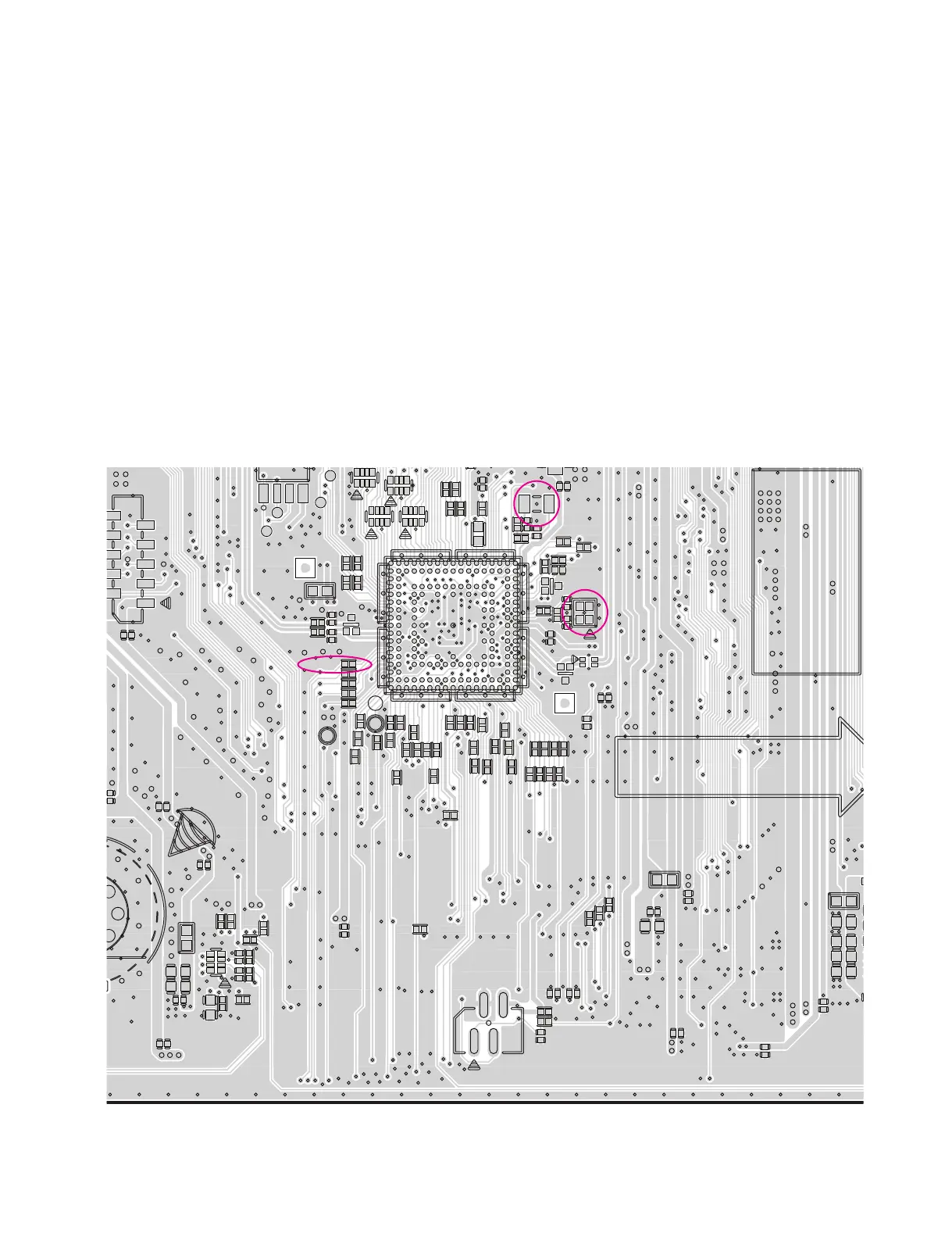
2-1. IC501
2-1-1. Solution
Replace MAIN board.
2-1-2. How to troubleshoot (Countermeasure)
1) Check the 5.1 VA (CN201) and 3.3 VA(IC202) in standby mode.
If there is no 5.1 VA, check the SMPS and if doesn’t appear 3.3 VA, check the IC202.
2) Check +12 V, DVCC_5V and DVCC_3.3V when power on the set.
If the set doesn’t work regardless of what the KEY3 changes high to low while pressing the power button.
X500 and X501 work normally but, if you can not power on the set, replace the IC501 with a new one
on the main board.
2-1-3. Service hint (Any picture / Remark)
SOLDERIN
MES
35791
2468
11 13 17
10 12 14 16
15
A
B
C
D
E
F
G
H
J
K
L
M
N
P
R
T
U
DFT_TX
R5B1
R5B4
R5B5
R5B6
R5B7
R5B8
R5B9
R242
RA102
R243
R244
R245
C217
RA501
RA503
R5D7
C230
C232
C233
C237
C5B2
C5B4
C5B5
C246
ZD501
C5E2
C5E3
ZD505
L101
ZD506
C5E6
C274
C277
IC204
SF_CS
FL500
C5B11 C5B14
R101
R102
R103
C5B18
R104
R109
C5B23
C5B24
C5B25
R111
R112
R116
R503
R505
CN101
R508
C5B34
R122
R5B10
R5B11
R127
R128
R5B15
R129
R5B17
R5D10
R5B21
CN501
R5B22
R5B24
R5B26
R5B28
R5B29
C101
C102
SF_M
C103
C104
C105C106
C107
R5B30
C108
R5B32
R5B33
R147
R5B34
R5B36
R5B37
R5B38
C5B
R5B42
R5B43
R5B44
R5B45
R5B47
R5B48
SF_MOSI
C2A6
X500
X501
R5B51
R5B52
R5B53
R5
R5B56
R5B102
R5B104
C130
C2B5
C131
R5B106
SF_SCK
R5B107
R5B60
R5B61
R5B63
R5B64
R5B65
C2C1
R5B69
R5B70
R5B72
R5B73
R5B74R5B75
C539
ZD205
R5B94
RX
R5B95
R5B98
R5
R596
C177
L206
IC501
I
L5B3
L5B8
2019.12.13
EAX69094501 VER1.4
RD
146 (220X125)
< MAIN board top view >
X500
(32.768 MHz)
X501
(24 MHz)
KEY3
(R5B64)
IC501



 To Next Page