Getting Started 7
Getting Started
1
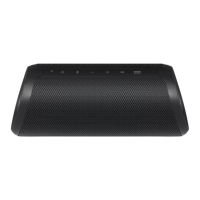
Front
f g h i j k l m
a
b c d e
a
Battery LED
b
Power LED
c
Bluetooth LED
d
STANDARD Plus LED
e
SOUND BOOST LED
f
1
Turns On / Off: Press it.
* If the power turned on, you can check the
battery status by pressing the
1
button for
2 seconds.
g
j
- Adds a Bluetooth device for multi phone
pairing. (Press and hold
j
for 2 seconds)
- Changes to Bluetooth mode in AUX mode.
(Press
j
)
* When you connect the 3.5 mm stereo cable,
the function is changed to AUX mode.
- Press and hold
j
for 7 seconds for Bluetooth
Initialization.
h
P
: Turn down the volume.
i
O
: Turn up the volume.
j
N
- Plays, pauses or skips playback on the
Bluetooth mode. (Page 12)
- Mutes the sound on the AUX mode.
k
Changes mood light. (Page 13)
l
STANDARD
- Changes sound effect. (Page 14)
m
SOUND BOOST
- Changes sound effect. (Page 14)



 To Next Page
 Loading...