33
8
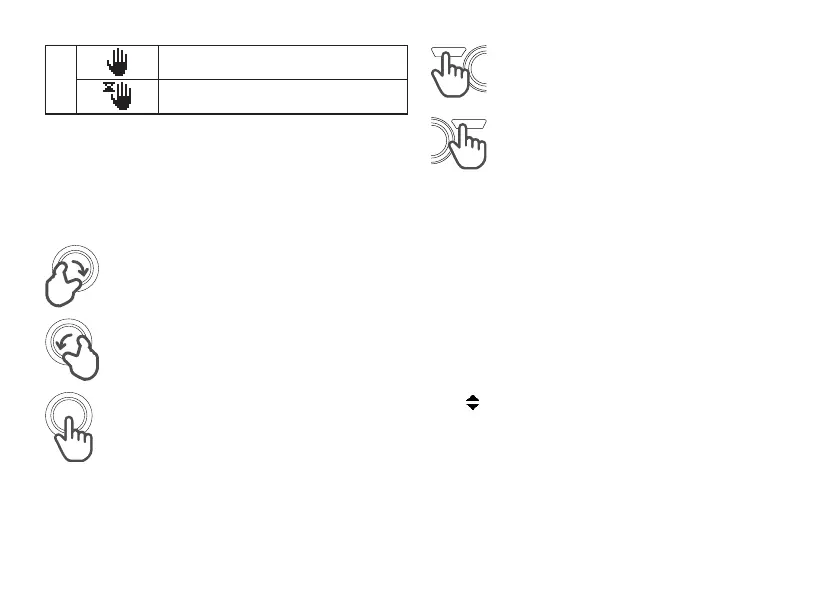
Progr.: MANUAL
Progr.: TEMPORARY MANUAL
3.3 KNOB AND CONTEXTUAL BUTTONS
3.4 SURFING MENU
Anticlockwise rotation:
• Value decrease
• Previous Menu
Clockwise rotation:
• Value Increase
• Following Menu
Pushing:
• Moving from Room Home to Hot
Water Home
• Conrmation and enter
• Value conrmation and passage to
following variable
• Access to Temporary Manual
through Room Set page
Pushing L button:
• Entering Menu
• Esc (Home)
• Cancel
Pushing R button:
• Entering Mode
• Back (previous step)
• Conrm
From Home, Room or Hot Water, pressing L button it is
possible to enter to Menu.
Turn knob to scroll vertically the list of items and press
knob to enter the selected submenu.
Submenus are different, some of them show only
information and others allow to change values. Moreover,
submenu can be organized in more levels, if on the right
of the item there is […] symbol it means that pressing the
knob another page or submenu will appear (picture 7)
• symbol precedes changeable values. To
proceed with change, press the knob (value is
highlighted) and turn it. Press again the knob
to conrm the change and come back to the list
(picture 7).
In general, knob allows moving between pages or
variables and changing values.
Buttons take on different meanings depending on pages
(these meanings are always showed on display).



 To Next Page