EasyManua.ls Logo

Lightning Audio LA-7000 - Page 6

Default Icon
25 pages
Print Icon
To Next Page IconTo Next Page
To Previous Page IconTo Previous Page
Loading...
INSTALLATION
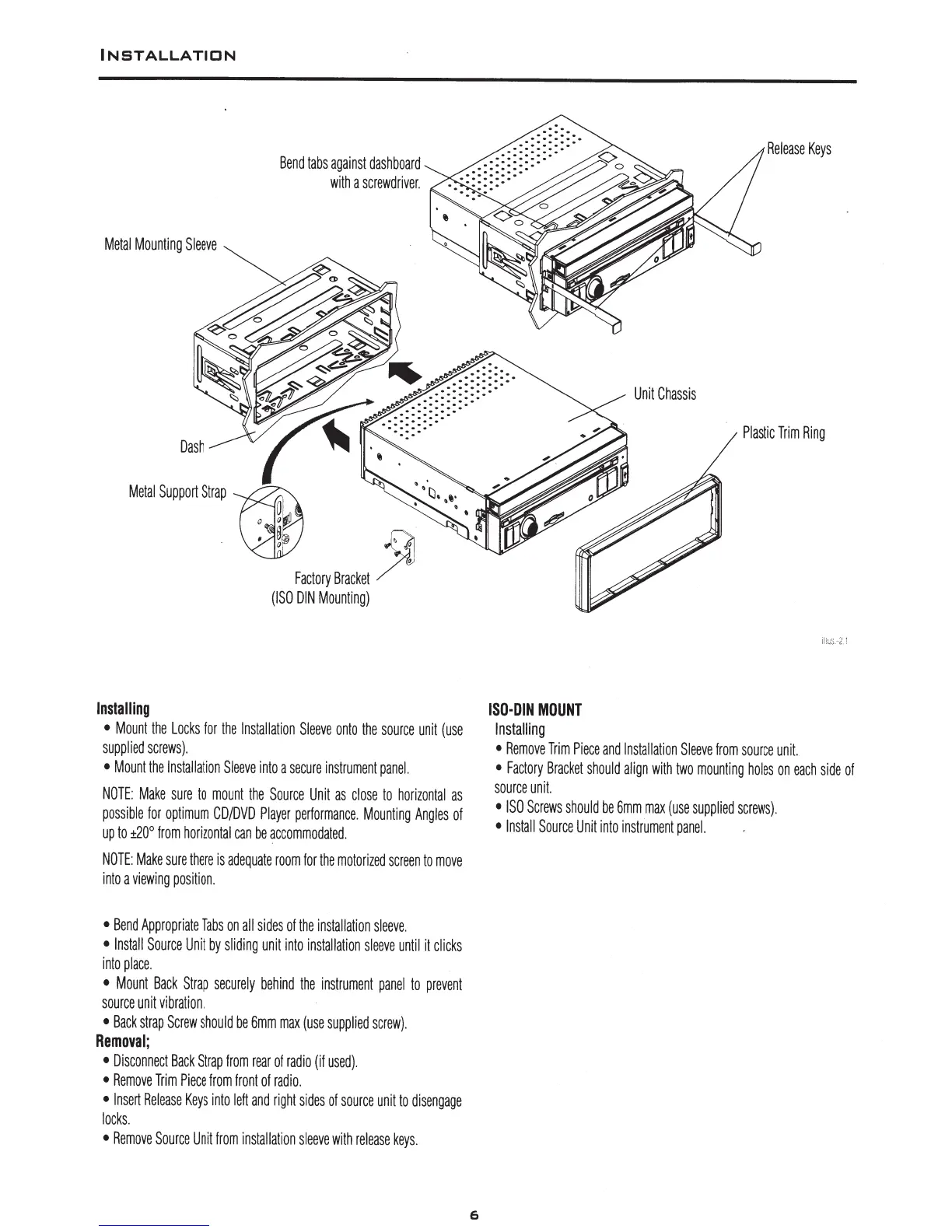
Metal
Mounting
Sleeve
Dash
Bend
tabs
against
dashboard
with
a
screwdriver.
Metal
Support
Strap
()
~
,·t:J.
,.
0 '
' '
:
8
~
. '
Factory
Bracket
/'
(ISO
DIN
Mounting)
Installing
Mount
the
Locks
for
the
Installation
Sleeve
onto
the
source
unit
(use
supplied
screws).
Mount
the
Installation
Sleeve
into
a
secure
instrument
panel.
NOTE:
Make
sure
to
mount
the
Source
Unit
as
close
to
horizontal
as
possible
for
optimum
CD/DVD
Player
performance.
Mounting
Angles
of
up
to
±20°
from
horizontal
can
be
accommodated.
NOTE:
Make
sure
there
is
adequate
room
for
the
motorized
screen
to
move
into
a
viewing
position.
Bend
Appropriate
Tabs
on
all
sides
of
the
installation
sleeve.
Install
Source
Unit
by
sliding
unit
into
installation
sleeve
until
it
clicks
into
place.
Mount
Back
Strap
securely
behind
the
instrument
panel
to
prevent
source
unit
vibration.
Back
strap
Screw
should
be
6mm
max
(use
supplied
screw).
Removal;
Disconnect
Back
Strap
from
rear
of
radio
(if
used)
.
Remove
Trim
Piece
from
front
of
radio.
Insert
Release
Keys
into
left
and
right
sides
of
source
unit
to
disengage
locks.
Remove
Source
Unit
from
installation
sleeve
with
release
keys.
6
.
. . .
.
.
.
.
. .
.
. . . .
.
. . . .
ISO-DIN
MOUNT
Installing
Unit
Chassis
Release
Keys
Plastic
Trim
Ring
il!us
2.1
Remove
Trim
Piece
and
Installation
Sleeve
from
source
unit.
Factory
Bracket
should
align
with
two
mounting
holes
on
each
side
of
source
unit.
ISO
Screws
should
be
6mm
max
(use
supplied
screws).
Install
Source
Unit
into
instrument
panel.