Need help?
Do you have a question about the Linocell Qi 10000 and is the answer not in the manual?
Charge the powerbank before first use. Connect to a USB charger. LEDs show charging progress. Full charge takes about 6 hours.
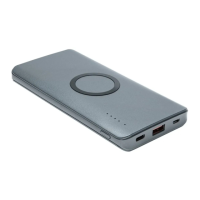
Connect a cable to a USB port for charging devices. USB-C supports PD, both USB-A and USB-C support Quick Charge 3.0.
Place Qi-compatible device on the charging area. Qi indicator flashes orange when active, turns orange in standby.
Do not expose to high temperatures, water, or puncture. Do not charge while charging a device. Unplug when not in use.
Details battery type, capacity, input/output ports, total output, charging time, and physical dimensions/weight.
 General
| Capacity | 10000mAh |
|---|---|
| Output | 5V/2.1A |
| Dimensions | 147 x 71 x 14.5 mm |
| Weight | 225 g |
| Charging Technology | Qi Wireless Charging |
| LED Indicators | 4 LED power indicators |
| Input | 5V/2A |
| Wireless Charging | 5W |
| Wired Charging Ports | 1 x USB-A |

 To Next Page