8
lci1.com 574-537-8900 Rev: 08.20.20CCD-0003866
Flow Max
™
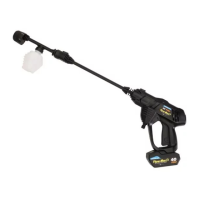
40V Portable Power Cleaner
Installation and Owner’s Manual
(For Aftermarket Applications)
Maintenance and Storage
Remove battery pack prior to cleaning, storing or servicing
power cleaner.
DO NOT TOUCH THE ELECTRICAL PLUG WITH
WET HANDS. WET HANDS CONTACTING ACTIVE
ELECTRICAL COMPONENTS CAN CAUSE PERSONAL
INJURY FROM AN ELECTRICAL SHOCK OR BURN.
Inspect, remove and clean water filters regularly.
Store parts in mesh bag.
Recharging Battery Pack
A
B
6. In a safe direction, disengage the trigger lock and
squeeze the trigger to cycle the power cleaner to purge
any remaining water and additive from the nozzle and
handle assembly.
7. Engage the trigger lock.
8. Remove battery pack from handle assembly by pressing
the two latching buttons inward, then slide the battery out
from the base of the handle assembly.
NOTE: The 2.0 Ah Li-ion battery pack has a two-button,
pinching latch release mechanisma button on either side
of the battery.
9. If the nozzle extension was used:
A. Press and hold the extension’s lock button.
B. Pull the nozzle away from the extension.
C. Press and hold the handle assembly’s lock button.
D. Pull the nozzle extension away from the
handle assembly
10. If the nozzle extension was NOT used:
A. Press and hold the handle assembly’s lock button.
B. Pull the nozzle away from the handle assembly.
11. Position nozzles and extension to allow residual uid
to drain.
12. Allow all parts to dry before storing the power cleaner.
Troubleshooting
Remove battery pack from handle assembly prior to
servicing the power cleaner.
Reinstall battery pack into handle assembly only after
troubleshooting issue has been resolved and normal power
cleaner operation is ready to resume.
Refer to the following troubleshooting table for specific
issues. If necessary, contact Lippert Components with
addition questions or concerns.
1. Plug battery charger (Fig.14A) into a 110V AC outlet.
2. Plug barrel end of charger (Fig.14B) into battery.
Fig.14
DO NOT:
• USE WATER OR CHEMICAL SOLVENTS TO
CLEAN THE POWER CLEANER. ONLY USE A DRY
CLOTH TO WIPE THE PRODUCT CLEAN.
• STORE POWER CLEANER NEAR FIRE OR HIGH
TEMPERATURE SOURCES.
• EXPOSE BATTERY PACK TO WATER, HEAT, FIRE
OR DIRECT SUNLIGHT.
• USE POWER CLEANER IF PRODUCT SHOWS
SIGNS OF DAMAGE OR OPERATIONAL FAILURE.


 To Next Page
 Loading...