Rev: 11.13.2017 Page 17
Ground Control TT Leveling OCTP Owner's
Auto Level
1. Prior to auto leveling, ensure the trailer is unhitched from the tow vehicle and the tow vehicle is parked a safe
distance away from the trailer.
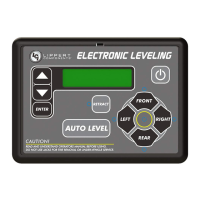
2. Press the “ON/OFF” button (Fig. 14I) on the Linc remote if the Linc is not on.
3. Enter a PIN.
4. Choose the "LEVELER" option.
5. Press “AUTO LEVEL” (Fig. 14H).
NOTE: Once the automatic leveling cycle has been started, it is important that there is no movement in the trailer until the
trailer has completed the leveling process. Failure to remain still during the leveling cycle could have an effect on
the performance of the leveling system.
6. When the Auto Level Sequence begins:
A. The system checks that the rear jacks are retracted.
B. The Power Tongue Jack may adjust depending on the orientation of the trailer.
C. Front jacks will extend until movement of the trailer is sensed.
D. The Power Tongue Jack will then retract.
E. The front jacks will extend/retract near level.
F. Rear jacks will extend and ground.
G. Trailer will level front-to-back and then side-to-side.
H. The Auto level Sequence will ground all jacks to ensure all foot pads are on the ground and the Auto Leveling
sequence is complete.
NOTE: If the AUTO LEVEL sequence does not perform as described above, locate the OneControl Touch Panel or use
the OneControl App to place the system in Manual Mode. Test that the jacks operate correctly by pushing their
corresponding buttons on the OneControl Touch Panel or App; e.g., "FRONT" button operates only the front
jacks, etc. (See "Operation - OneControl Touch Panel" or "Operation - OneControl App" in this manual).
NOTE: There is no Hitch Recognition sequence programmed for the Linc remote.
NOTE: Ensure the foot pad of the Power Tongue Jack is pinned securely in place with the clevis pin and hairpin
cotter pin.
1. Disconnect any wires, chains, or sway control that may be equipped between the tow vehicle and the trailer.
Unlatch the trailer coupler.
2. Turn the Linc remote on (Fig. 14I) and enter a PIN code to turn system on.
3. Press the "LEVELER" button.
4. Press "EXTEND" (Fig. 14E) and "FRONT" arrow (Fig. 14B) to extend the Power Tongue Jack and lift the front of
trailer to take the weight of the trailer off of the hitch.
5. Disconnect the trailer wire connection at the tow vehicle, if not previously completed.
6. Pull tow vehicle away and park at a safe distance.
NOTE: To utilize the Power Tongue Jack for the unhitching process see "Operation - Power Tongue Jack."
What Is Happening? Why?
Off Touch panel is locked.
Solid Green Touch panel is active.
Blinking Green Jacks are moving.
Solid Red Low battery.
Blinking Red
Error - Refer to OneControl Touch Panel screen or the Leveling App for the
specific error, then consult the Troubleshooting section of this manual to clear
the error.
Red/Green LED Indicator on Auto Leveling Control Touch Panel
Troubleshooting



 To Next Page
 Loading...