57
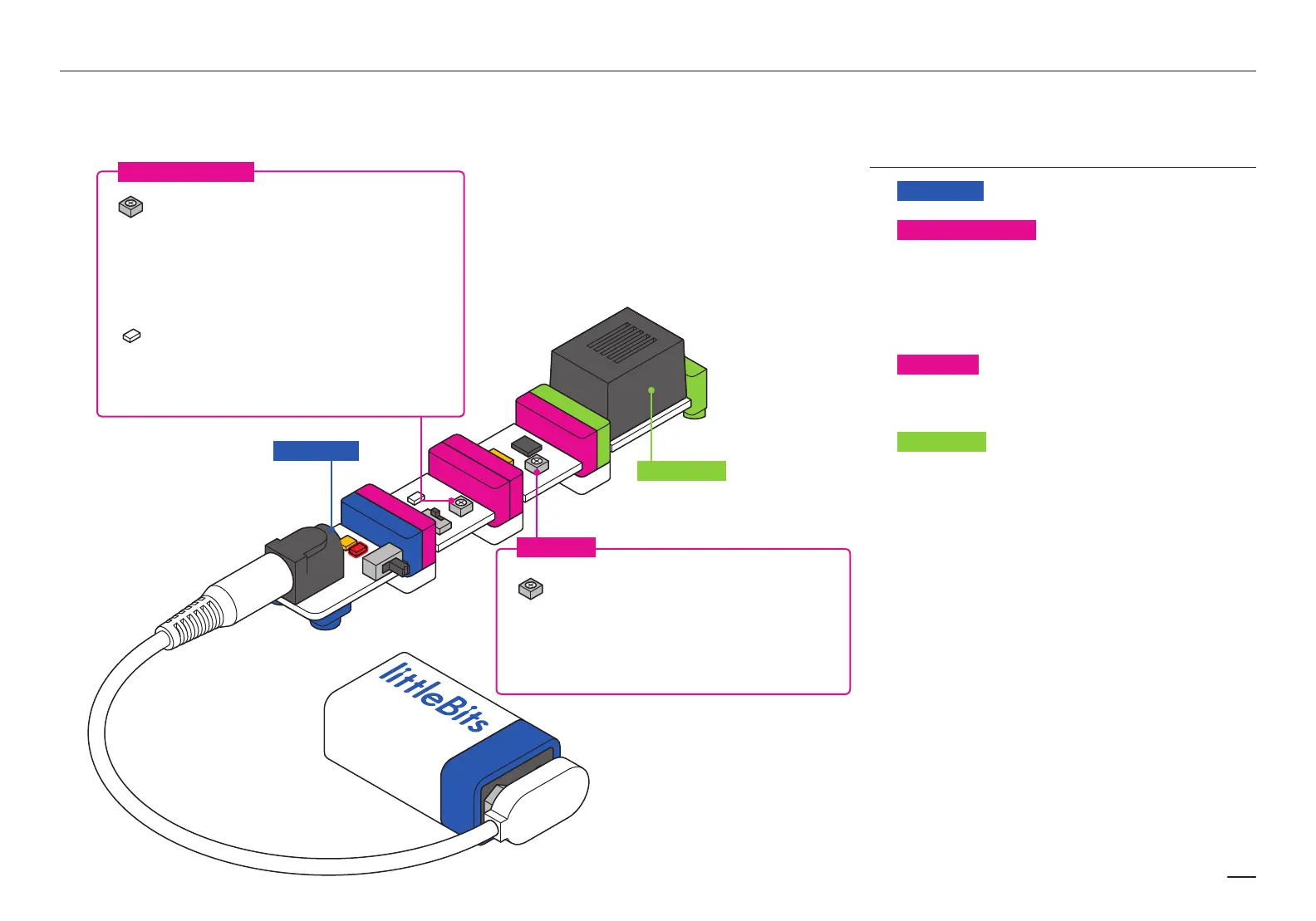
The p1 POWER sends a signal through the circuit.
The i13 LIGHT SENSOR is in light mode. When the alarm
is inside your bag, no light hits the sensor, so it doesn’t
allow a signal to pass through. When you open the bag,
light shines in on the sensor, letting the signal through to the
pulse. The more light that shines on the sensor, the more
signal it lets through and the louder your buzzer will sound.
The i16 PULSE Bit is continuously switching on and o .
When it gets a signal from the light sensor, it only lets it
through in short bursts.
The o6 BUZZER sounds when it gets the signal from the
pulse, but is quiet when the pulse flips o . This changing
between on and o produces the alarm noise to scare o
the snooper.
The speed adjustment knob will let you adjust
how fast (and frantic) your alarm sounds.
If your pulse Bit is set too fast your buzzer
may not have time to vibrate and may not
make any noise.
Some bags might not be totally dark inside.
If your alarm sounds even in the bag, try
turning the sensitivity dial down (counter-
clockwise) a little. If your alarm doesn’t
sound at all, make sure the sensitivity dial
is turned all the way up.
This is the light sensor component. It only
senses light that reaches it, so the direction
that the circuit faces will a ect how much
light is sensed.
i16 PULSE
i13 LIGHT SENSOR
p1 POWER
o6 BUZZER
HOW IT WORKS
a1 - battery & cable
p1 - power
i13 - light sensor
i16 - pulse
o6 - buzzer
a6 - hook & loop shoes
a1 - battery & cable
p1 - power
i13 - light sensor
i16 - pulse
o6 - buzzer
a6 - hook & loop shoes
a1 - battery & cable
p1 - power
i13 - light sensor
i16 - pulse
o6 - buzzer
a6 - hook & loop shoes
Can anyone open your
backpack without setting
o the alarm?


 To Next Page
 Loading...