NOTE:
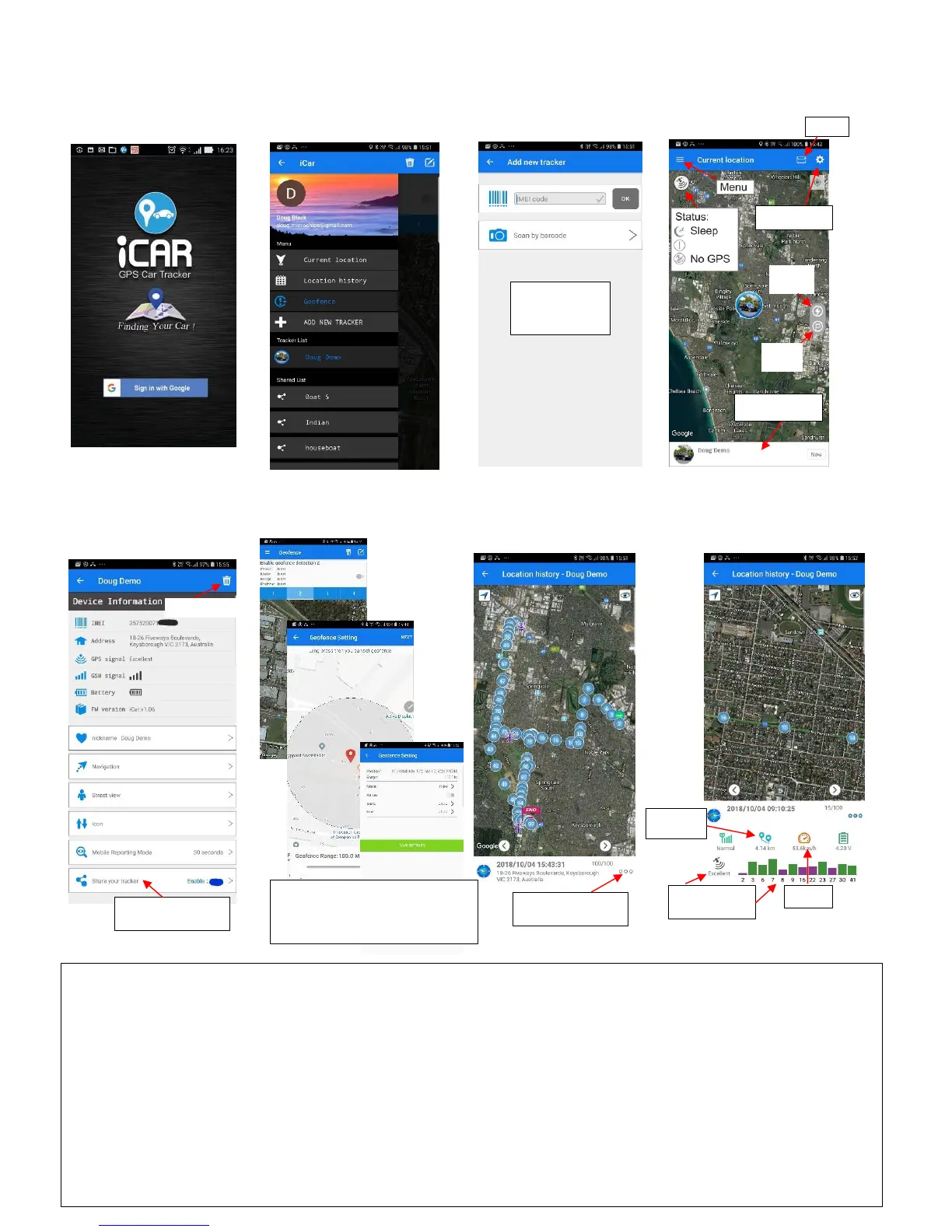
• After entering the IMEI code it will ask you for a security code... type in 12345678 to complete adding the tracker.
• To share the tracker, Enable & enter a 4 digit security code. The sharer then goes to "Add Tracker" on their app,
types in your tracker's IMEI code and then enters that same 4 digit security code. The sharer can only see Current
Location and cannot change any settings.
• To vary the Map Display Mode go to “APP Settings” on Current Location screen - "Hybrid” is preferred.
• To change the type of Notification and to enable Continuous Alarm go to “APP Settings”.
About GPS accuracy:
Global Positioning System is used as a navigation tool. It is normal to have random accuracy fluctuations due to a
number of factors. When the tracker is under shelter or in hilly terrain areas, the accuracy may vary from 2 metres
to 50+ metres.
Pick which Geofence to Edit or Delete. Tap the
edit button in top right of screen to add a
Geofence. Long press and centre geofence and
set distance by dragging slide. Tap NEXT and
select settings and then tap SAVE SETTINGS.



 To Previous Page
 Loading...