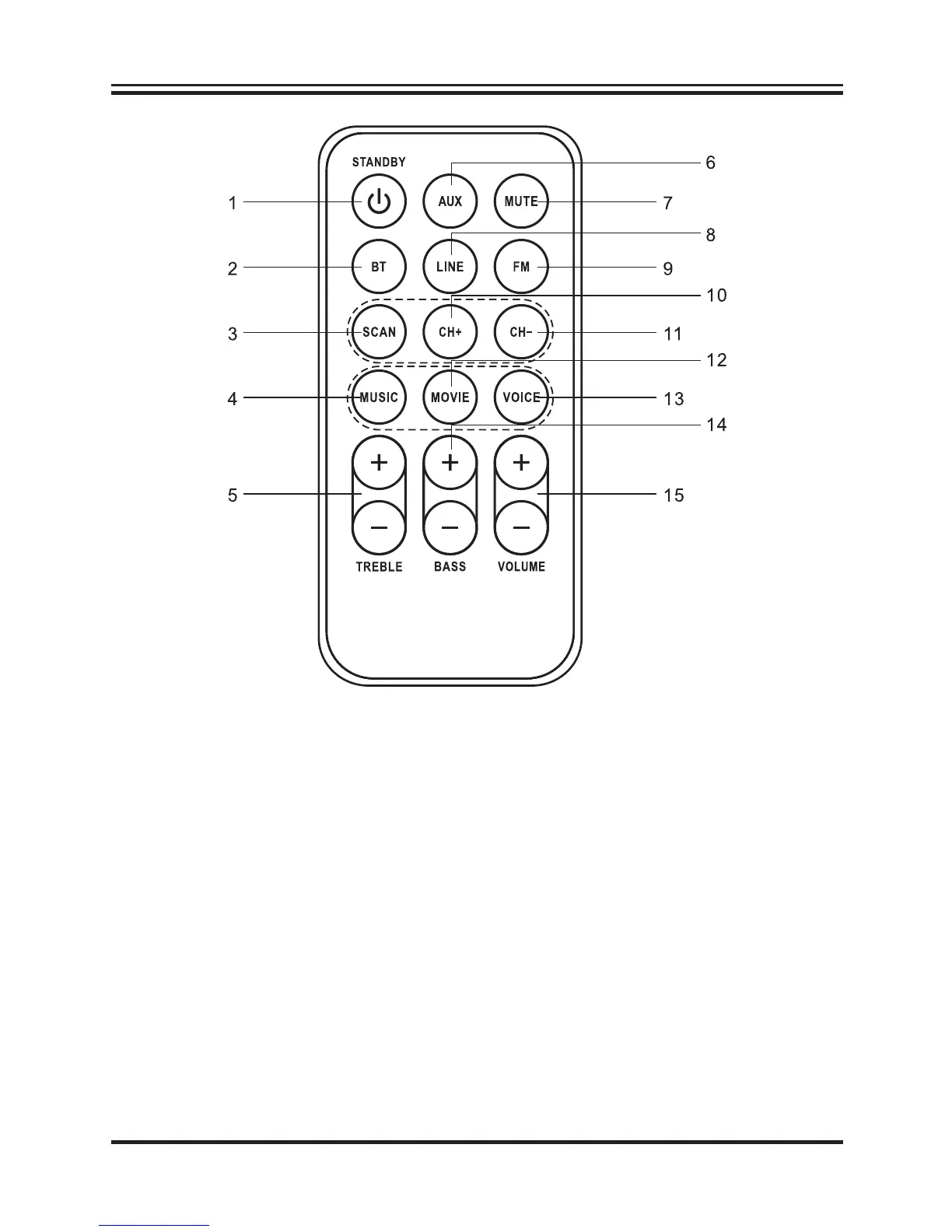
1. STANDBY button: Press to turn the unit on or off.
2. BLUETOOTH button: Press to switch to Bluetooth mode.
3. SCAN button: Press to scan for available radio stations in FM Radio mode,
then store in the memory list automatically. Total 30 stations can be stored.
4. MUSIC button: Press to switch to the EQ optimized for music.
5. TREBLE buttons: Press to adjust the treble up or down.
6. AUX button: Press to switch to AUX mode.
7. MUTE button: Press to mute the sound, press again to resume.
8. LINE button: Press to switch to LINE In mode.
9. FM button: Press to switch to FM Radio mode.
10. CH + button: Press to skip to next stored channel.
11. CH - button: Press to skip to previous stored channel.
12. MOVIE button: Press to switch to the EQ optimized for movie sound.
13. VOICE button: Press to switch to the EQ optimized for dialogue.
14. BASS buttons: Press to adjust the bass up or down.
15. VOLUME buttons: Press to adjust the volume.
4



 To Next Page