This document describes the Lockly Smart Safe, a secure storage device designed for various applications, from personal use to property management. The safe incorporates advanced security features and smart functionalities, allowing for flexible access and monitoring.
Function Description
The Lockly Smart Safe is a secure storage solution that offers multiple ways to access its contents, including patented hack-proof PIN Genie keypad, advanced 3D fingerprint recognition, access codes, smartphone app control, and physical keys. It is designed to provide robust security and convenient management for valuables. The safe can be monitored remotely through a smartphone app, providing live monitoring and secure access permissions from anywhere in the world. It also supports offline access codes (OAC), allowing users to issue time-limited access codes without internet connectivity. The device includes a backup key and a Type-C USB socket for power backup.
Important Technical Specifications
- Access Codes: Supports up to 37 free access PIN codes or up to 100 access codes through Lockly/OS (premium subscription). Access codes are 6 to 8 digits long.
- Fingerprint Recognition: Advanced 3D biometric fingerprint recognition allows up to 99 registered fingerprints.
- Connectivity: Bluetooth and Wi-Fi enabled for smartphone app control. Requires a Secure Link Wi-Fi Hub for optimal connectivity, ideally within 30 feet (9 meters) of the safe. The Secure Link requires a strong 2.4 GHz wireless signal.
- Power: Operates on 4 AA alkaline batteries. Features a low battery warning and a Type-C USB port for continuous power supply or backup power in case of battery failure.
- Construction: Made of drop-tested fortified steel alloy with corrosion-resistant coating, magnet resistant, and laser-cut 3D keyway. Includes anti-theft cable and screws.
- Air Transfer Compatibility: Quickly transfers fingerprint and trusted user profiles from Lockly smart locks to the Smart Safe.
- Dimensions (Cable): Security cable length is 1100mm.
Usage Features
Access Methods
- Patented Hack-Proof PIN Genie Keypad: Digits are randomly displayed on the keypad, ensuring access codes are undetectable to intruders even after repeated use. Numbers are randomly distributed across 4 buttons, with 3 numbers in each button. Users press any button showing their number.
- Advanced 3D Fingerprint Recognition: Biometric fingerprint recognition allows quick and secure access. The fingerprint sensor is located on the exterior of the safe.
- Multiple Access Codes & Monitoring: Store up to 37 access codes for family, friends, and guests, or up to 100 with Lockly/OS. Administrators can set up and assign access codes.
- Live Monitoring: Through the smartphone app, users can monitor Smart Safe access from anywhere in the world and control access permissions.
- Offline Access Code™ (OAC): Allows owners to issue access codes with a set allowed access duration, even without internet connectivity.
- Smartphone App (Lockly App): Unlock the safe, manage access codes, and monitor activity via iOS or Android devices. The app can be downloaded from the App Store or Google Play.
- QR Code Unlock: Generate unique QR codes via the Lockly app for smart safe access.
- Physical Key: The safe comes with a physical backup key. This key cannot be duplicated like regular keys and has a string of codes for manufacturer duplication if lost.
Setup and Configuration
- Optional Installation: The safe can be placed in a drawer or cabinet, or securely mounted to a wall or bottom plate using provided screws and security cable.
- Secure Link Wi-Fi Hub Setup: The hub should be placed no further than 30 feet (9 meters) from the safe for optimal connectivity. Both Bluetooth and Wi-Fi must be enabled on the iOS or Android device during setup.
- Connecting to the App: Users must register their Lockly Smart Safe with the app using an activation card included in the box. The app guides users through setting up the administrator access code and connecting to Wi-Fi.
- Adding Access Codes: Access codes can be added through the app, allowing the creation of "Trusted User," "Guests," or "Admin" profiles.
- Adding Fingerprints: Users can register up to 99 fingerprints. The manual provides guidance on proper fingerprint scanning techniques for optimal recognition.
- Entering Programming Mode: The programming button is located on the rear left interior of the safe.
- Pairing to a New Mobile Device: If performing a factory reset or pairing to a new device, the safe can be reconnected via Bluetooth pairing mode.
Security Features
- Safe Mode: Activated after three consecutive wrong access code attempts, disabling the keypad for 10 minutes. Can be disabled by entering the correct access code, using the Lockly app, physical key, or a registered fingerprint.
- Duress Finger Alert: Assign a specific finger that, when used, will automatically send duress notifications via email and text message to pre-selected contacts.
- Twin-Credential Opening Capability: Requires two administrators to verify by their fingerprints or passwords within a 60-second time frame to open the safe.
- Tamper-proof / Premium Build: Fortified steel alloy construction, corrosion-resistant coating, and magnet resistance.
Convenience Features
- Pneumatics Easy-Lift Mechanism: Unlocks quietly and includes LED lights that illuminate the interior when opened.
- Rebooting the Smart Safe: A reboot button is available on the exterior of the safe, left of the fingerprint reader, for troubleshooting.
- Shine Mode: Adjusts keypad brightness for optimum battery life or user convenience. Long press the first button from the left for 3 seconds to activate.
Maintenance Features
- Changing the Battery: The safe uses 4 AA alkaline batteries. The battery compartment cover is removed to replace them. Batteries should be oriented correctly.
- Cleaning: The touchscreen should be cleaned with a warm water prior to cleaning. Use a soft microfiber cloth to avoid scratches. Avoid abrasive cleaners, high alkaline cleaners, cleaning detergent directly on the screen, scrapers, squeegees, or razors. Do not allow water to flow into the product.
- Factory Reset: The safe can be restored to factory settings via the programming mode. This deletes all previously stored data.
- Troubleshooting: The manual provides tips for fingerprint scanning, low battery warnings, and general troubleshooting. Additional support is available via Lockly's website or customer service.

 Need help?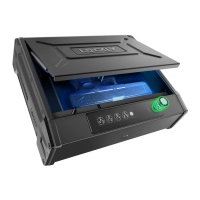

 To Next Page
 General