Need help?
Do you have a question about the Logitech G400 and is the answer not in the manual?
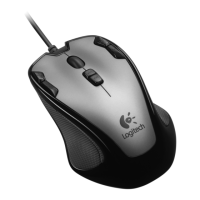
Connect the Logitech G400 mouse to your computer's USB port for basic operation.
Adjust mouse sensitivity levels (DPI) during gameplay for different actions like sniping or quick movements.
Details the functions of DPI increase/decrease, generic button, default DPI, forward, and back buttons.
Provides practical advice for optimizing in-game sensitivity adjustments and customization.
Lists the detailed gaming-grade specifications for the Logitech G400 mouse.
Offers solutions for common issues encountered during mouse setup and connection.
A comprehensive list of Logitech customer support phone numbers by country for assistance.
Connect the Logitech G400 mouse to your computer's USB port for basic operation.
Adjust mouse sensitivity levels (DPI) during gameplay for different actions like sniping or quick movements.
Details the functions of DPI increase/decrease, generic button, default DPI, forward, and back buttons.
Provides practical advice for optimizing in-game sensitivity adjustments and customization.
Lists the detailed gaming-grade specifications for the Logitech G400 mouse.
Offers solutions for common issues encountered during mouse setup and connection.
A comprehensive list of Logitech customer support phone numbers by country for assistance.

 To Next Page
 General