Need help?
Do you have a question about the Logitech H340 and is the answer not in the manual?
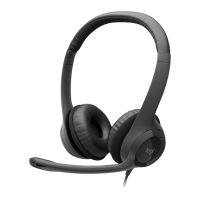
The Logitech USB Headset H340 is a versatile and user-friendly audio device designed for clear communication and comfortable wear. This headset is primarily intended for use with computers, connecting via a standard USB-A connector. Its plug-and-play functionality ensures a straightforward setup process, allowing users to quickly integrate it into their digital environment without the need for complex driver installations.
The core function of the Logitech USB Headset H340 is to provide high-quality audio input and output for various computer-based activities. This includes voice calls, video conferences, online learning, gaming, and listening to multimedia content. The headset features a noise-canceling microphone, which is a significant advantage for users in busy or noisy environments. This technology works by filtering out ambient background sounds, ensuring that the user's voice is transmitted clearly and distinctly to the listener. This makes it ideal for professional settings where clear communication is paramount, such as remote work or customer service roles, as well as for personal use where minimizing distractions is desired. The stereo headphones deliver clear audio output, allowing users to hear conversations, music, or game sounds with good fidelity. The USB connection ensures a stable digital audio signal, often superior to analog connections in terms of clarity and resistance to interference.
The Logitech USB Headset H340 is designed with user comfort and convenience in mind, incorporating several features that enhance its usability:
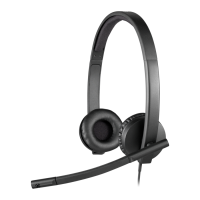
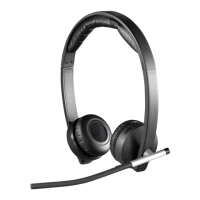
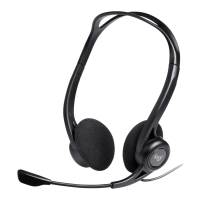
Adjustable Headband: The headband is fully adjustable, allowing users to slide it up or down to achieve a snug and comfortable fit. This adjustability is crucial for accommodating different head sizes and ensuring that the headset can be worn for extended periods without discomfort. A proper fit also helps in positioning the ear cushions correctly over the ears for optimal sound delivery and passive noise isolation.
Swivel-Mounted Foam Ear Cushions: The ear cushions are made of foam and are swivel-mounted. This design allows the ear cups to pivot slightly, conforming to the shape of the user's ears and head. Foam cushions are generally lightweight and breathable, contributing to comfort during long usage sessions. The swivel mechanism further enhances comfort by reducing pressure points and ensuring an even distribution of weight.
Adjustable Microphone Boom: The microphone is attached to an adjustable boom, which can be moved up, down, in, or out. This flexibility allows users to position the microphone precisely at mouth level. Optimal microphone placement is critical for effective voice capture, ensuring that the user's voice is picked up clearly while minimizing breath sounds or other close-range noises. The boom's adjustability ensures that users can find the sweet spot for their individual vocal projection and speaking style.
Tuck-Away Microphone Boom: A practical feature of the microphone boom is its ability to be tucked out of the way when not in use. This is particularly useful when the user is primarily listening to audio and does not need the microphone, or when transporting the headset. Tucking the boom away prevents it from being an obstruction and can also help protect it from accidental damage.
USB-A Connectivity: The headset connects to a computer via a standard USB-A connector. This universal connectivity ensures compatibility with a wide range of desktop and laptop computers, making it a versatile accessory. The plug-and-play nature of USB devices means that the headset is typically recognized by the operating system immediately upon connection, without the need for additional software or drivers, simplifying the user experience.
Lightweight Design: While not explicitly detailed in the provided snippets, Logitech headsets, especially those designed for general computer use, often prioritize a lightweight construction. This design choice contributes significantly to long-term comfort, reducing strain on the head and ears during extended use.
While the manual does not extensively detail specific maintenance procedures, general care for the Logitech USB Headset H340 would involve practices common to most electronic accessories:
Cleaning: The foam ear cushions and plastic surfaces can typically be wiped clean with a soft, damp cloth. It's important to avoid harsh chemicals or abrasive materials that could damage the headset's finish or materials. Regular cleaning helps maintain hygiene and prolong the life of the ear cushions, especially with frequent use.
Cable Management: The USB cable should be handled with care to prevent kinks, twists, or excessive pulling, which can damage the internal wires or the connector. Storing the headset neatly, perhaps by coiling the cable loosely, can help prevent tangles and extend the cable's lifespan.
Storage: When not in use, storing the headset in a safe place where it won't be crushed or exposed to extreme temperatures or moisture is advisable. Tucking the microphone boom away before storage can also help protect it.
Software Updates: Although the headset is plug-and-play, ensuring that the computer's operating system and USB drivers are up to date can sometimes help maintain optimal performance and compatibility. Logitech's support website (www.logitech.com/support/H340) serves as a resource for any potential firmware updates or troubleshooting information, though specific firmware updates for a basic headset like the H340 are less common than for more complex peripherals.
In summary, the Logitech USB Headset H340 is a practical and comfortable audio solution for computer users, emphasizing clear communication through its noise-canceling microphone and ease of use with its adjustable design and USB-A connectivity. Its features are geared towards providing a reliable and comfortable experience for a variety of digital tasks.
 General
| Cable length | 1.8 m |
|---|---|
| Headset type | Binaural |
| Product type | Headset |
| Product color | Black |
| Wearing style | Head-band |
| Recommended usage | Office/Call center |
| USB connector | USB Type-A |
| USB connectivity | Yes |
| Connectivity technology | Wired |
| Impedance | 20 Ω |
| Ear coupling | Supraaural |
| Headphone frequency | 20 - 20000 Hz |
| Headphone sensitivity | 115 dB |
| Microphone type | Boom |
| Microphone frequency | 100 - 16000 Hz |
| Microphone sensitivity | -42 dB |
| Quantity | 1 |
| Master (outer) case width | 141 mm |
| Master (outer) case height | 215 mm |
| Master (outer) case length | 448 mm |
| Master (outer) case weight | 1310 g |
| Harmonized System (HS) code | 85183000 |
| Package depth | 200 mm |
| Package width | 54 mm |
| Package height | 220 mm |
| Package weight | 246 g |
 Weight and Dimensions
| Depth | 60 mm |
|---|---|
| Width | 175 mm |
| Height | 160 mm |
| Weight | 100 g |


 To Next Page