EasyManua.ls Logo

Logitech N305 - User Manual

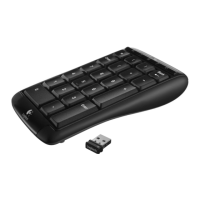
Logitech N305
2 pages
To Next Page IconTo Next Page
Loading...
s  s  sò s ÔÛÜó øï÷
sô ô ô ss   ò
s   sô s s
ô ss ÑÒñÑÚÚ øî÷ô s ò
 s    ò ~}
 øï÷ sô  }ô  ô |ò
{  s ô  s sô
ssñs øî÷ô s ò
s  z ysy y  s  yò {s
s yzzsy ôs   wô
  ÑÒñÑÚÚ øî÷ô | yò
©©©ò´±¹·¬»½¸ò½±³ñ¼±©²´±¿¼-
ò
ssò q 
s s s
 Í»¬Ð±·²¬r ó
©©©ò´±¹·¬»½¸ò½±³ñ¼±©²´±¿¼-
ò
osæ {  
}spô s s Í»¬Ð±·²¬r
©©©ò´±¹·¬»½¸ò½±³ñ¼±©²´±¿¼-
ò
nmæ |y þþ
ô p  Í»¬Ð±·²¬r ó
yy
©©©ò´±¹·¬»½¸ò½±³ñ¼±©²´±¿¼-
ò
ïò
îò
íò
ìò
ëò
êò
ïò
os ˲·º§·²¹ ËÍÞó ò
îò
os ËÍÞó  ˲·º§·²¹s
ss ó
©©©ò´±¹·¬»½¸ò½±³ñ«¾»¨¬»²¼»®ô  ô 
ËÍÞó ˲·º§·²¹ s
sò
íò
gs sò
ìò
os ò
ëò
o ò { 
 ˲·º§·²¹ ó ©©©ò´±¹·¬»½¸ò½±³ñ«²·º§·²¹ò
s  ò
êò
o ò
ïò
gs ˲·º§·²¹ ËÍÞ }ò
îò
o ˲·º§·²¹ ËÍÞô  ós
s ô s 
©©©ò´±¹·¬»½¸ò½±³ñËÍÞ»¨¬»²¼»® ËÍÞ psô
| ss ós 
s ò
íò
gs s ò
ìò
oò
ëò
f }æ es  ˲·º§·²¹ 
©©©ò´±¹·¬»½¸ò½±³ñ«²·º§·²¹ò s ò
êò
d}ò
ïò
oysy ˲·º§·²¹  ypËÍÞó m
îò
oysy ˲·º§·²¹  ËÍÞó ô |
s zsy ô  yyó
©©©ò´±¹·¬»½¸ò½±³ñËÍÞ»¨¬»²¼»®ô | ËÍÞó ô
sy sz sy ò
íò
fyy sy ò
ìò
oy sys
ëò
o yysæ  
 s ˲·º§·²¹ yóy ©©©ò´±¹·¬»½¸ò½±³ñ«²·º§·²¹ò
 yò
êò
o mò
Question and Answer IconNeed help?

Do you have a question about the Logitech N305 and is the answer not in the manual?

Logitech N305 Specifications

General IconGeneral
Mouse includedNo
Depth142 mm
Width90 mm
Height28 mm
Compatible operating systemsWindows XP, Windows Vista, Windows 7
Frequency band2.4 GHz
Keyboard layoutNumeric
Device interfaceRF Wireless
Connectivity technologyWireless
Product colorBlack
Battery typeAAA
Number of batteries supported2

Summary

Number Pad Hotkey Customization

Hotkey Functions Explained

Details the default functions of hotkeys 1, 2, and 3, including launching applications and switching windows.

Logitech Unifying Receiver

Adding Compatible Devices

Instructions on adding more compatible wireless devices using the Logitech Unifying receiver and software.

Related product manuals