Button Operation (T3 & T3-V)
Voice Operation (T3-V Only)
Single Targets
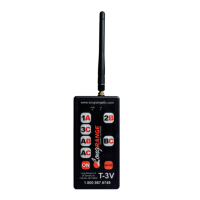
Press one of the 3 single trap buttons to re the corresponding trap. The Green Tx LED will illuminate
to indicate that a signal is being transmitted and the corresponding trap will re.
True Pairs
To re 2 traps simultaneously, press one of the True Pair combination buttons. The corresponding
pair will re simultaneously.
True Pairs
To re a true pair, press one of the True Pair combination buttons. The Green Tx LED will illuminate
indicating the device is armed. Call “Pull” in a normal tone of voice. The corresponding pair will re
simultaneously and the Green Tx LED will go out until another button is pressed.
Be sure to have the supplied microphone plugged into the Microphone Jack on the top of the
T3-V and clipped to the lapel of vest or shirt, about 6-9 inches from your mouth. The T3-V transmitter
can be clipped to a belt or put in a pocket of a shooting vest.
Single Targets
Once the microphone is plugged into the Microphone Jack, the T3-V automatically enters voice
activation mode. To re a single target, press one of the 3 trap buttons. This arms the device but does
not re the trap. The Green Tx Light will illuminate indicating the device is armed and waiting for the
voice command. When ready, call “Pull” in a normal tone of voice to re the designated trap. The trap
will re and the Green Tx Light will go out until another button is pressed.
Report Mode (T3-V Only)
Report Mode is a feature of the T3-V and used in conjunction with voice operation. Report Mode
allows shooter to call for the rst target with the sound of their voice and the second target will re on
the report of the gun.
To set up Report Mode, press the rst trap that you would like to re (1-3). The Green Tx LED will
illuminate to indicate that the device is armed. Before calling for the target, press another trap button
to select the trap you would like to re on the report. When you are ready, call “Pull” in a normal tone
of voice to re the rst designated trap. The second selected trap will arm automatically and wait for
the report of the gun. On the sound of the gun, the second trap will re.
2
Lock On Mode
Lock On Mode allows singles, true pairs, report pairs or all 3 traps to be locked out. This feature
automatically reloads the selected presentation allowing the shooter to call for targets hands free.
To lock in a single trap or true pair (T3-V only), press and hold a single trap or true pair button for 4
seconds until the Green Tx Light starts to ash. The selected trap(s) is now locked in. When ready,
call “Pull” in a normal tone of voice to re the designated trap(s). The trap(s) will re and the Green
Tx Light will go out. After 4 seconds, the Green Tx Light will begin to ash again and the T3-V will
be ready to re the same trap(s).
To cancel Lock On Mode, press the On Button.


 To Next Page
 Loading...