RESIZING/CHANGING THE BRACELET
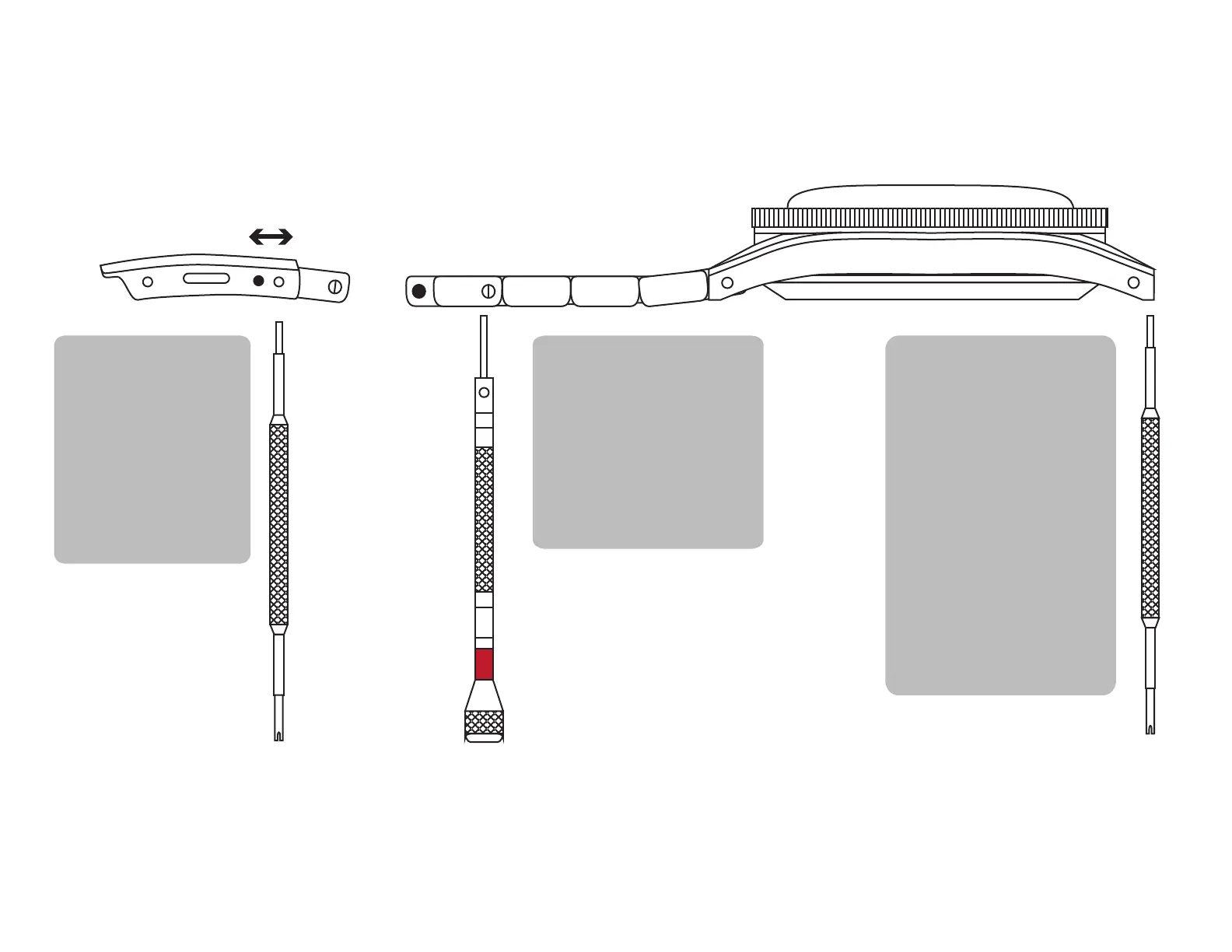
MICROADJUSTMENT
Use the round end of
the strap changing tool
(not included) to push
in the clasp springbar,
then move the spring-
bar into the desired slot.
Make sure it is in the
same slot on both sides
of the clasp.
SIZING WITH LINKS
Use the screwdriver to
remove and replace links as
needed.
For a secure fit, we highly
recommend applying
low-strength threadlocker,
such as Loctite 222/222MS
(not included).
CHANGING STRAPS
Use the strap changing tool
(not included) to remove
and replace the springbar.
One side at a time, insert the
round end into the lug holes
and gently pull the bracelet
so that both ends are out.
Place the springbar back
into the holes for use with
another strap.
PLEASE USE CAUTION
WHEN REMOVING THE
SPRINGBAR AS IT COULD
FLY OUT



 To Next Page